A Samba Active Directory domain, administered from the terminal
A terminal UI (TUI) for samba-tool on Linux: samba-tool for a machine that is a Samba Active Directory domain controller.
v0.2.2betausersMIT
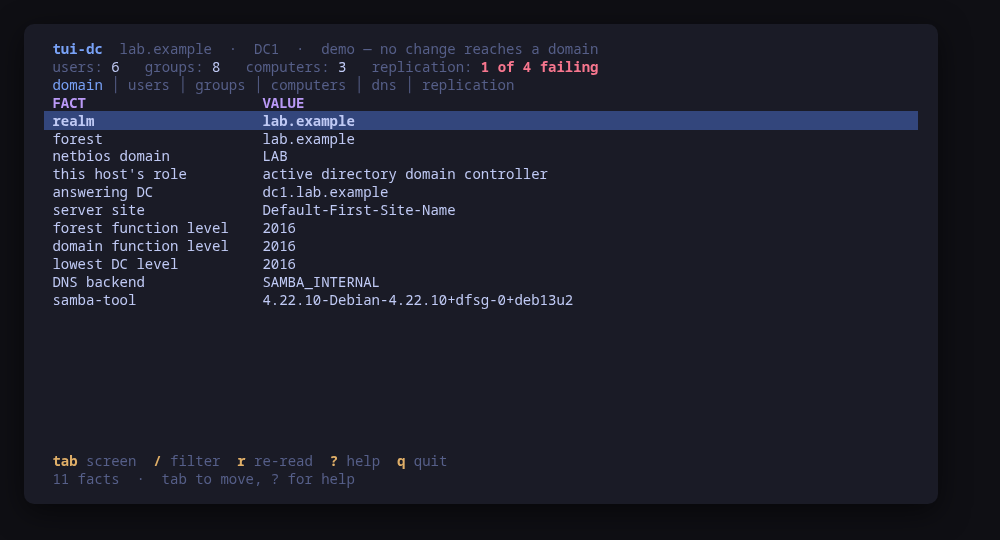
The domain screen: what the controller answered, what this host is, and the functional levels
A terminal UI over samba-tool for a machine that is a Samba Active Directory domain controller. It opens read-only: the domain's name and functional levels, the role this host plays in it, the password policy, the accounts, the groups, the machine accounts, the domain's own DNS zone, and the state of replication per naming context.
Every change is one samba-tool command, shown in full and confirmed before it runs — and no password is ever an argument. samba-tool warns about that itself, because a command line is visible in ps to every user on the machine, so creating an account and resetting a password ask samba-tool for a random password and show what it printed — and provisioning omits --adminpass so samba-tool generates the Administrator password itself and prints it exactly once.
On a machine that has samba-tool and no domain, a wizard provisions one: realm, NetBIOS name, DNS backend, optional forwarder, the realm typed back as a second confirmation, then the usual previewed command. It does not join or demote a domain: both touch a trust relationship with another controller, and are worth reading in a shell where they can be checked twice.
Keys
Key
Action
tab / 1…6
Move between domain, users, groups, computers, DNS and replication
enter
Open the selected row, reading its detail if it has not been read
n
Create an account, a group or a DNS record
d
Delete the selected account, group or record
e / s
Enable or suspend the account; on the domain screen, edit the password-policy setting
P
On the domain screen of a host with no domain: provision one (wizard, double-confirmed)
p
Reset the selected account's password to a random one
x
Set when the selected account expires
a / m
Add or remove a member of the selected group
/
Filter the current screen
r / ctrl+r
Re-read the domain
?
Help
q
Quit
Press ? inside the tool for the full help screen, which is generated from the same action table as the key map.
Compatibility
This tool is a face on the program below, so its version matters. Tested is not a claim: a version lands there only after the tool's own suite passed against it on a real machine in the lab, and the run is kept as evidence in the repository. At startup the tool probes the backend once and says what it found in its header — a version nobody has run against is shown as (untested) in the warning colour, one older than the minimum as (below minimum) in the error colour. Neither stops it: the backend still refuses what it cannot do, in its own words.
samba
samba-tool ≥ 4.13
Binary
samba-tool
Minimum
4.13
Probed with
samba-tool --version
Tested
4.19.54.24.64.24.7
Needs a version this new
computer-subcommandsince 4.8
What changes on older versions
samba <4.8
samba-tool computer does not exist, so the computers screen is empty
samba <4.13
untested: the output of domain info, dns query and drs showrepl has changed shape across releases, and the parsers are checked against live controllers running 4.19.5, 4.24.6 and 4.24.7; nothing older, and nothing between 4.13 and 4.19, has been exercised
Maintain samba? You are welcome to help shape this tool. About → maintainers
Guides
Written after the work, from a machine the commands were actually run on. Every guide that mentions tui-dc is listed here.
tui-dc administers a Samba Active Directory domain from a terminal on the controller; Samba Conductor runs the same kind of domain from a browser, with single sign-on and Google Workspace sync. This page says which one fits which job.
Install
Once per machine, then every tool in the family is one pacman away.
Add the repository
$ curl -fsSL https://pkgs.tui.tools/install.sh | sh
Or run the same thing yourself, one command at a time
A family whose whole promise is preview before you run is not going to insist you pipe a script into a shell. These are the commands that script runs.
Not released yet. The channel turns available once the first release lands in pkgs.tui.tools.
!
Not published yet. The command is what it will be once the package repository at pkgs.tui.tools is live. Until then, use the static binary or build from source.
$ git clone https://github.com/tui-tools/tui-dc
  cd tui-dc && make demo
`make demo` runs against a sample domain, so it needs no Samba at all.
What it can do to your machine
✓
Preview, then confirm
Every change is shown as an exact command line and confirmed before it runs. The dialog and the runner receive the same value, so the preview cannot drift from what executes.
•
Escalates for actions
Everything. samba-tool opens the directory database directly and that database is readable only by root, so even the read path escalates. A machine where escalation is refused says so at startup rather than showing an empty domain.
✓
No daemon, no state of its own
Nothing keeps running after you quit, and nothing is installed to run later. The system is the source of truth; the tool re-reads it after every change.
✕
Opens network connections
samba-tool talks to a controller, and this tool points it at this host. domain info is a CLDAP query, dns query a DNS RPC call and drs showrepl a DRS one, so there is loopback traffic on every read. Nothing leaves the machine and nothing is fetched from the internet.
✓
Static binary
Released statically linked, with no runtime dependencies to install.
✓
Signed release, with provenance
checksums.txt carries a keyless cosign signature from this repository's release workflow, every archive has a CycloneDX SBOM, and every archive, package and the checksum file carry SLSA build provenance. The security page shows the three commands that check it.
Reporting
Report a security issue privately, through GitHub's private vulnerability reporting on the repository's Security tab. The family-wide policy, and what counts as in scope, is on the security page.
## tui-dc v0.2.2

tui-dc 0.2.2

Release notes (0.2.2): tui-dc moves from tui-kit v0.3.1 to v0.4.4. The kit now shell-quotes every command preview itself, so tui-dc's own quoting is retired and the provision dialog shows the same pasteable line as before (`'--option=dns forwarder=10.0.0.1'`). Every command runs without a controlling terminal, so anything that would prompt fails fast instead of waiting behind the TUI, and status-line errors are cleaned of escape codes. The compatibility evidence records the Samba version exactly as `samba-tool --version` printed it; the tested versions are unchanged.

Built by this repository's CI on the tag itself. Each archive ships a
CycloneDX SBOM, `checksums.txt` carries a keyless cosign signature, and
every file has SLSA build provenance — see the README's "Verify a
download" for the two commands that check them.

The commits in this release:

## Changelog
* 4fbb02e18bcca096febc62b4acd955518f8d30ad Authenticate the RPC commands, and tell drs which server to ask (#14)
* bf9c1b069a91af12d0ee08c0d549d8e1ab98bccf Bump anchore/sbom-action/download-syft in the github-actions group (#8)
* 6fb837f899400524bb9fe426a4ba8ff30047d2be Bump the github-actions group with 4 updates (#25)
* 3aec55eaddd86bbbff7aecfdff6100bda3f0d67f Make provision reach samba, and keep the password it prints (#15)
* 6c941390a72f32e1b54cfb72daf8e25c8ba48e06 Preflight before the wizard, and a controller that can serve after it (#16)
* 32ea2670876caa4df56c0570e4b44d96823c859e Provision on the other two distributions the lab covers (#22)
* f373a12d334817b37bf153b60d58396d1d65c0f0 README: link the tool's page on tui.tools (#7)
* 8135195293121528c64bf2bde8faa741f71cbd7b README: point the install snippet at the current release (#6)
* 0dc10c237309c63b1642d36083bc69af205b7246 Read the role a distro's smb.conf only implies, and refuse a version out of a traceback (#21)
* da6f7d52a18995e9fd8eb3e9f349fac0e528a755 Take the compatibility block from the lab matrix, not from prose (#24)
* 81f565853c4c4d8a5f3f475baefd8f1292eecc22 Take tui-kit v0.4.4: kit preview quoting, raw compat evidence (#26)
## tui-dc v0.2.1

tui-kit v0.3.0: the dialogs wrap and scroll instead of clipping the
command preview, and the picker filters as you type.

Built by this repository's CI on the tag itself. Each archive ships a
CycloneDX SBOM, `checksums.txt` carries a keyless cosign signature, and
every file has SLSA build provenance — see the README's "Verify a
download" for the two commands that check them.

The commits in this release:

## Changelog
* bb59e12027bd5aff170577dfbf6a6081302c4420 Bump tui-kit to v0.3.0 (#5)
* 65658796d8867823d2b86275c38fd16dd1f89100 tool.json: released (#4)
## tui-dc v0.2.0

Manage, not view: create and edit from the TUI (wave 1), lab-validated on the router image.

Built by this repository's CI on the tag itself. Each archive ships a
CycloneDX SBOM, `checksums.txt` carries a keyless cosign signature, and
every file has SLSA build provenance — see the README's "Verify a
download" for the two commands that check them.

The commits in this release:

## Changelog
* 55abe6ba3af082b21eb07fa42fbf82ce71419d86 Domain provision wizard and password policy — the DC learns to create (#3)
## tui-dc v0.1.0

First validated release: the router-1.0 lab ran this tool against real VMs (tui-lab router topology).

Built by this repository's CI on the tag itself. Each archive ships a
CycloneDX SBOM, `checksums.txt` carries a keyless cosign signature, and
every file has SLSA build provenance — see the README's "Verify a
download" for the two commands that check them.

The commits in this release:

## Changelog
* 051ba70e4bde4b77a8923ea01acb5a359d1cba52 Bump anchore/sbom-action/download-syft in the github-actions group (#1)
* 08be222949085e71786a65c17b2b35a2ab8df511 Initial commit
* c7864297f37facc16f1693c4247ff389764b8769 Replace the template with a Samba AD domain controller tool (#2)