btrfs snapshots, managed by snapper, from the terminal
A terminal UI (TUI) for snapper on Linux: the btrfs snapshots snapper manages.
v0.2.2betasnapshotsMIT
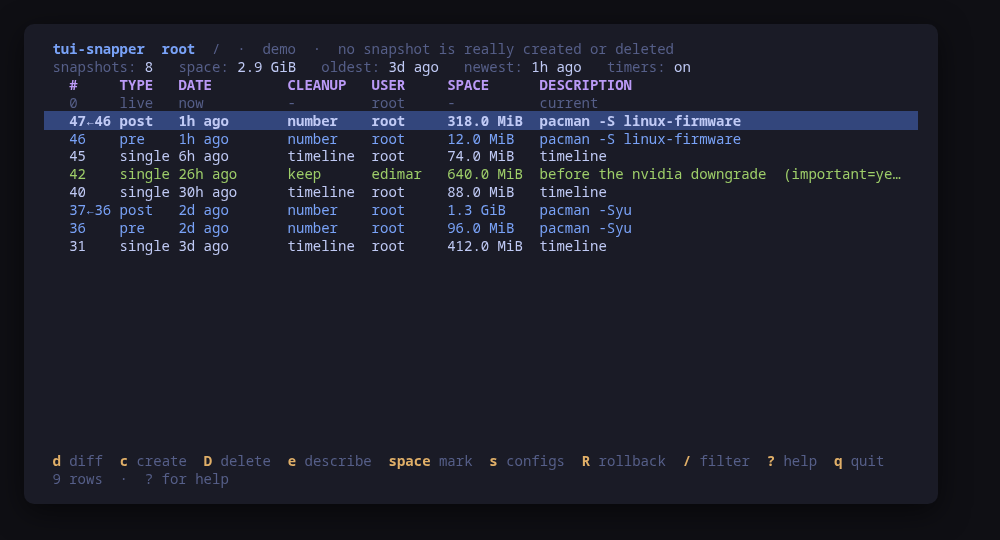
The snapshot history: pre/post pairs, timeline snapshots and the pinned ones, newest first
A terminal UI for the btrfs snapshots snapper manages. It lists every config and its history — pre/post pairs from package upgrades next to the hourly timeline snapshots — compares any two of them, and shows what changed file by file, with a read-only diff for anything you want to look at closely.
It creates, deletes, relabels and cleans up snapshots too, and puts individual files back with undochange without touching the rest of the filesystem. The configs themselves are authored from the same screen: create one for a subvolume, edit its retention limits, delete it. Every one of those is shown as the exact snapper command line and confirmed before it runs; starting the tool only reads.
Rollback is the one thing that genuinely differs between machines, so it is detected rather than assumed: where snapper rollback is the mechanism it is offered with a full warning, and on an Omarchy or limine-snapper-sync layout the boot menu entries are read from /boot/limine.conf and shown read-only, because that is where the rollback really happens.
--demo runs the whole UI against a sample history, so you can try it without a btrfs filesystem to risk.
Keys
Key
Action
d / enter
Compare two snapshots; a post snapshot pairs with its own pre
space
Mark a snapshot: two marks are a range, many are one delete
c
Create a snapshot: description, type and cleanup algorithm
D
Delete the selected snapshot, or every marked one
e / a
Change a snapshot's description / cleanup algorithm
C
Run a cleanup: number, timeline or empty-pre-post
u
In the diff: put the selected files back with undochange
R
Rollback, or how this machine actually rolls back
s
The config screen: switch config, and author one
n / a / D
On the config screen: create a config, edit its limits, delete it
T
snapper's systemd timers, read-only
/
Filter the list
? / q
Help / quit
Press ? inside the tool for the full help screen, which is generated from the same action table as the key map.
Compatibility
This tool is a face on the program below, so its version matters. Tested is not a claim: a version lands there only after the tool's own suite passed against it on a real machine in the lab, and the run is kept as evidence in the repository. At startup the tool probes the backend once and says what it found in its header — a version nobody has run against is shown as (untested) in the warning colour, one older than the minimum as (below minimum) in the error colour. Neither stops it: the backend still refuses what it cannot do, in its own words.
snapper
snapper ≥ 0.8.6
Binary
snapper
Minimum
0.8.6
Probed with
snapper --version
Tested
0.10.60.13.00.13.1
Needs a version this new
undochange-root-pathssince 0.10.6
What changes on older versions
snapper <0.8.6
snapper has no --jsonout, and both the config list and the snapshot list are read as JSON, so nothing can be listed at all
snapper <0.10.6
snapper undochange cannot recreate a path that sits directly under the subvolume root, so putting back a deleted top-level file or directory fails with "failed to create"
snapper <0.10.7
snapper diff is broken for LVM-based configs, so the file view comes back empty there even when the compare screen lists the change
Maintain snapper? You are welcome to help shape this tool. About → maintainers
Install
Once per machine, then every tool in the family is one pacman away.
Add the repository
$ curl -fsSL https://pkgs.tui.tools/install.sh | sh
Or run the same thing yourself, one command at a time
A family whose whole promise is preview before you run is not going to insist you pipe a script into a shell. These are the commands that script runs.
Upgrades then arrive with the rest of your system updates.
!
Not published yet. The command is what it will be once the package repository at pkgs.tui.tools is live. Until then, use the static binary or build from source.
Needs the tui-tools repository, a one-time setup you do once per machine.
openSUSE · tui-snappercoming soon
$ sudo zypper install tui-snapper
The rpm repository is shared with dnf; zypper support is not tested yet.
Static, no runtime dependencies beyond the snapper binary it drives.
From source · tui-snapper
$ git clone https://github.com/tui-tools/tui-snapper
  cd tui-snapper && make demo
make demo needs no btrfs filesystem and no root.
What it can do to your machine
✓
Preview, then confirm
Every change is shown as an exact command line and confirmed before it runs. The dialog and the runner receive the same value, so the preview cannot drift from what executes.
•
Escalates for actions
Reads too, not only writes: snapper opens its subvolumes directly, so even listing snapshots needs root. Run with sudo, or leave sudo = "sudo -n" configured. Everything that changes something — snapshots, and the configs themselves — is confirmed first. --demo escalates nothing.
✓
No daemon, no state of its own
Nothing keeps running after you quit, and nothing is installed to run later. The system is the source of truth; the tool re-reads it after every change.
✓
No network access
The tool opens no network connection of its own. No telemetry, no update check, no phone home.
✓
Static binary
Released statically linked, with no runtime dependencies to install.
✓
Signed release, with provenance
checksums.txt carries a keyless cosign signature from this repository's release workflow, every archive has a CycloneDX SBOM, and every archive, package and the checksum file carry SLSA build provenance. The security page shows the three commands that check it.
Reporting
Report a security issue privately, through GitHub's private vulnerability reporting on the repository's Security tab. The family-wide policy, and what counts as in scope, is on the security page.
## tui-snapper v0.2.2

tui-snapper 0.2.2: tui-kit v0.4.4

tui-snapper 0.2.2 moves to tui-kit v0.4.4: every snapper command now runs in its own session without a controlling terminal, so a step that would prompt fails at once instead of hanging behind the UI, and a failed step reports its meaningful line, cleaned of escape codes. Command previews are POSIX shell-quoted (a description with spaces now reads as `'known good'`), the README screenshots are re-rendered with continuous box borders, and the README banner now carries the kit's stability markers.

Built by this repository's CI on the tag itself. Each archive ships a
CycloneDX SBOM, `checksums.txt` carries a keyless cosign signature, and
every file has SLSA build provenance — see the README's "Verify a
download" for the two commands that check them.

The commits in this release:

## Changelog
* dc0d72c04175d11e31562344cb478ccbe914ef41 0.2.2: tui-kit v0.4.4 (#20)
* f1cd383ce32f3781711033433a133faa7ac7dc9d Bump anchore/sbom-action/download-syft (#4)
* 457aa63ad59c51d17a191405b622a96df3731243 Bump anchore/sbom-action/download-syft in the github-actions group (#17)
* e3888fc6ad05c941e0d1526991298d27081c96be Bump the github-actions group with 4 updates (#19)
* 52567b6325ae832ae6699a78ef85a990875a67ce README: link the tool's page on tui.tools (#16)
* 2097ee5ae636a72332eabe8f1360b8e6d9a35a0a README: point the install snippet at the current release (#15)
## tui-snapper v0.2.1

tui-kit v0.3.0: the dialogs wrap and scroll instead of clipping the
command preview, and the picker filters as you type.

Built by this repository's CI on the tag itself. Each archive ships a
CycloneDX SBOM, `checksums.txt` carries a keyless cosign signature, and
every file has SLSA build provenance — see the README's "Verify a
download" for the two commands that check them.

The commits in this release:

## Changelog
* e26af48e8d44a946c469a7d0911656271d2a00f3 Bump tui-kit to v0.3.0 (#14)
## tui-snapper v0.2.0

Manage, not view (wave 3): create what does not exist, edit what does; lab-validated.

Built by this repository's CI on the tag itself. Each archive ships a
CycloneDX SBOM, `checksums.txt` carries a keyless cosign signature, and
every file has SLSA build provenance — see the README's "Verify a
download" for the two commands that check them.

The commits in this release:

## Changelog
* 4b9b8ca1afd31b483a57d896c7cff066aa373636 A code of conduct that fits on one screen (#10)
* 144b0689a16c21992bab3973ba3fe14e43f85198 Add --report, and a bug form that asks for it (#11)
* a8a64dd4af30be9920ed9aa0740b3e814dffed27 Carry the OpenSSF Best Practices badge (#8)
* a763de9d41536aee68bfa40bf2b1a9f3b76fd8d8 Create and edit snapper configs from the TUI (#13)
* d30eee7f4c3ca9914e5720919cbff8a248d175ec Fetch the tag annotation before releasing (#6)
* ae98bed5f0a7f45fdbaa32d7522de38f78e73e0c Pin what CI runs, fuzz the parsers, and say the releases are signed (#3)
* ccd4439329adedd03555fbc9b5242882d80b43d4 Print the whole tag message, not only its body (#7)
* 56a13653a7dba6ee34a4a796250583497522b57b Say beta once (#5)
* 28a843f9063e5b3638e8498737e38ea367c2c5fb Take tui-kit v0.2.8: hashed pip install, provenance bundle on the release (#9)
* db5df7775c6052a0dc41159aeee395333c74fea2 The leak check searches every line but the two uname never names (#12)
## Changelog
* b388bf182d2c500cf43897d96b13b071b84067f7 Drop cross-repo dispatch; the package repo and the site poll releases
* 8f996ca8a0dc2685bf6f0ac9c841394937661a1f Gate the release on a security job, and sign what it publishes (#2)
* 1019222544a6e38dc00cfa894319607c67f20cb6 Stop telling readers the packages are unpublished
## Changelog
* 0e8d3a873253c297e174a7c76f0f733af37f0a1a Bump the github-actions group with 5 updates (#1)
* cce03797b03ded206265b06a3b333aa5a3849e40 Hold this tool to the family's lint bar
* 60c6d09fa8666890df4be66f0dede0efe1f29e0b Join the lab, and fix what the real Omarchy machine showed
* 36fb218dcde5cc0ac7853043c80fef778b927638 Packages are available from pkgs.tui.tools
* 5669e30bd8fc9e259cb1b4b41ac37212eb768887 Point the install line at v0.1.0
* f8296f32ddeebd30eb1c4949809b05ebed4319d2 Re-pin the kit at v0.1.3 and put the help screen back under the width test
* 5a84f3c11d87b62feb8b9531039634907031214d Re-pin the kit at v0.2.3
* 80794b77cace82177b986d9a14c338049603fba7 Ship the tool as a .deb, an .rpm and a pacman package
* ad670b41277a46c1d82f6441d04e0f6c9266abb0 Tell the user which snapper they are running
* 9f66d07254381b1ddc35ae7bd463206d46eda2c2 Use a neutral home directory in the path-with-spaces fixture
## Changelog
* 3927add228d0434cde0cdb80c0188900841ef102 Add --no-dbus, for a machine with no running snapperd
* 492a639daa4ee7656f42c78e22802408d761e8c2 Initial commit
* 1ca855042732942359cb2af5e5c7d87699d35a95 Replace the template with tui-snapper