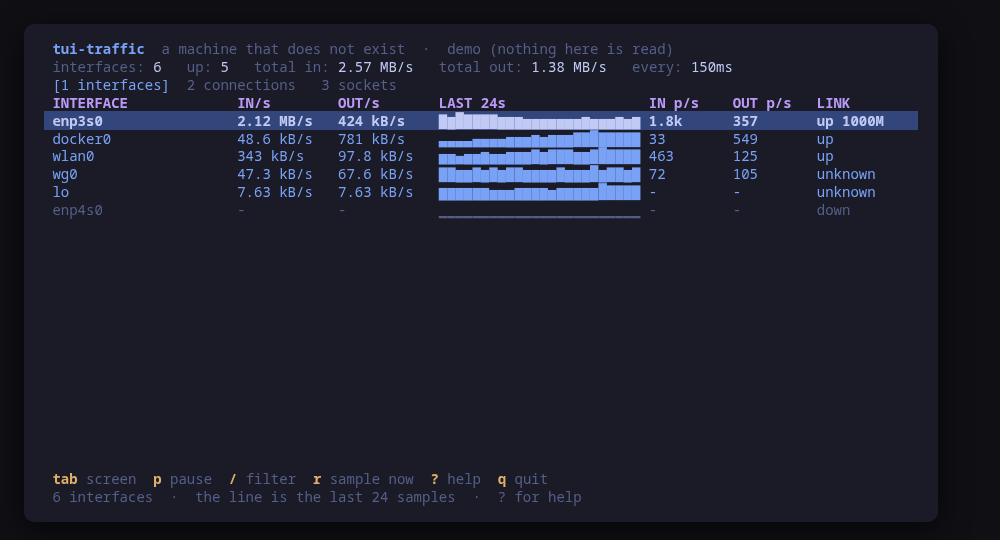
What the network is doing right now, interface by interface
A terminal UI (TUI) for conntrack on Linux: realtime network metrics for one Linux machine, in the terminal.
v0.1.2betanetworkMIT
Interfaces: RX and TX rates with a sparkline over the last minute
Realtime network metrics for one Linux machine, in the terminal. Three screens, refreshed every second, and every number on them comes from a file the kernel already exports.
Interfaces is throughput per interface: RX and TX in bytes per second and packets per second, a sparkline over the last minute, the link state, and the errors and drops the counters have accumulated. It is /proc/net/dev read twice a second apart, which is what a rate actually is.
Connections summarises the conntrack table: how many connections there are, what states they are in, split by protocol, and the busiest talkers by bytes when the kernel is counting them. Byte accounting (net.netfilter.nf_conntrack_acct) is off by default on most kernels, and when it is off this screen says so rather than inventing figures. On a machine with no conntrack at all it counts sockets instead and names the source it used.
Sockets is what is listening and what is established, from /proc/net/tcp, tcp6, udp and udp6.
It changes nothing: no action key, no confirm dialog, and no privilege beyond the sudo -n that reading the conntrack table needs.
Keys
Key
Action
1 / 2 / 3
Interfaces, connections, sockets
tab
Next screen
p
Pause and resume the one-second refresh
/
Filter the rows
r
Sample now, without waiting for the tick
?
Help
q
Quit
Press ? inside the tool for the full help screen, which is generated from the same action table as the key map.
Compatibility
This tool is a face on the program below, so its version matters. Tested is not a claim: a version lands there only after the tool's own suite passed against it on a real machine in the lab, and the run is kept as evidence in the repository. At startup the tool probes the backend once and says what it found in its header — a version nobody has run against is shown as (untested) in the warning colour, one older than the minimum as (below minimum) in the error colour. Neither stops it: the backend still refuses what it cannot do, in its own words.
conntrack
conntrack ≥ 1.4.0
Binary
conntrack
Minimum
1.4.0
Probed with
conntrack --version
Tested
No recorded run yet. The tool still runs and reports the version it found as untested.
What changes on older versions
conntrack <1.4.0
conntrack -L -o extended prints a layout this parser does not read, so the connections screen falls back to /proc/net/nf_conntrack or to counting sockets, and says which it used
Maintain conntrack? You are welcome to help shape this tool. About → maintainers
Install
Once per machine, then every tool in the family is one pacman away.
Add the repository
$ curl -fsSL https://pkgs.tui.tools/install.sh | sh
Or run the same thing yourself, one command at a time
A family whose whole promise is preview before you run is not going to insist you pipe a script into a shell. These are the commands that script runs.
Nothing is published yet: tui-traffic is unreleased, and this channel turns available with its first release.
!
Not published yet. The command is what it will be once the package repository at pkgs.tui.tools is live. Until then, use the static binary or build from source.
There is no release yet. Build from source in the meantime.
From source · tui-traffic
$ git clone https://github.com/tui-tools/tui-traffic
  cd tui-traffic && make build
  sudo install -m0755 bin/tui-traffic /usr/local/bin/tui-traffic
Needs Go 1.27 or newer. This is the only way to run it today.
What it can do to your machine
✓
Preview, then confirm
Every change is shown as an exact command line and confirmed before it runs. The dialog and the runner receive the same value, so the preview cannot drift from what executes.
•
Escalates for actions
Only the conntrack table needs it. Everything else — /proc/net/dev, /proc/net/tcp and its siblings, /sys/class/net — is world-readable. Escalation is sudo -n, which never prompts: a machine where it does not work shows the socket-count fallback with the reason instead of asking for a password.
✓
No daemon, no state of its own
Nothing keeps running after you quit, and nothing is installed to run later. The system is the source of truth; the tool re-reads it after every change.
✓
No network access
The tool opens no network connection of its own. No telemetry, no update check, no phone home.
✓
Static binary
Released statically linked, with no runtime dependencies to install.
✓
Signed release, with provenance
checksums.txt carries a keyless cosign signature from this repository's release workflow, every archive has a CycloneDX SBOM, and every archive, package and the checksum file carry SLSA build provenance. The security page shows the three commands that check it.
Reporting
Report a security issue privately, through GitHub's private vulnerability reporting on the repository's Security tab. The family-wide policy, and what counts as in scope, is on the security page.
## tui-traffic v0.1.2

tui-traffic 0.1.2: tui-kit v0.4.4

tui-traffic 0.1.2 moves to tui-kit v0.4.4: every probe now runs in its own session without a controlling terminal, so nothing can wait on a prompt hidden behind the UI, and a failed read reports its meaningful line, cleaned of escape codes. The README screenshots are re-rendered with continuous box borders and the install snippet points at this release.

Built by this repository's CI on the tag itself. Each archive ships a
CycloneDX SBOM, `checksums.txt` carries a keyless cosign signature, and
every file has SLSA build provenance — see the README's "Verify a
download" for the two commands that check them.

The commits in this release:

## Changelog
* a9306353d56b2da79ec96180a84e42c1fc57b685 0.1.2: tui-kit v0.4.4 (#12)
* c0f4c789e01b2aef220b712ee4f31a1804730dac Bump anchore/sbom-action/download-syft in the github-actions group (#10)
* 1636cdaaa9e891ec8b14471ad4d596b65f635efc Bump the github-actions group with 4 updates (#11)
* 7485b287365534c0d2848b240ff3ce671f665956 README: link the tool's page on tui.tools (#9)
* afcdbfc91a4583d745d68e1d170a68285a1d37e9 README: point the install snippet at the current release (#8)
## tui-traffic v0.1.1

tui-kit v0.3.0: the dialogs wrap and scroll instead of clipping the
command preview, and the picker filters as you type.

Built by this repository's CI on the tag itself. Each archive ships a
CycloneDX SBOM, `checksums.txt` carries a keyless cosign signature, and
every file has SLSA build provenance — see the README's "Verify a
download" for the two commands that check them.

The commits in this release:

## Changelog
* 5627c8bf458028450d4a178c583367e4a00e22fc Bump tui-kit to v0.3.0 (#7)
* 32c4e58a6fed7d0ac64b017cd44097ea588b23bb tool.json: released (#6)
## tui-traffic v0.1.0

First validated release: the router-1.0 lab ran this tool against real VMs (tui-lab router topology).

Built by this repository's CI on the tag itself. Each archive ships a
CycloneDX SBOM, `checksums.txt` carries a keyless cosign signature, and
every file has SLSA build provenance — see the README's "Verify a
download" for the two commands that check them.

The commits in this release:

## Changelog
* 180d7fc89f524ecd88849da53abf404b5807f918 Add internal/traffic: the read-only core and its three parsers (#3)
* f8765574a4d43976b231524249aa2e54df0d5181 Add the smoke test and re-render the screenshots from the real binary (#5)
* 8013ec0bab39f7aa2e227424a7c0179a24e8464d Bump anchore/sbom-action/download-syft (#2)
* 2623d9568d26a94865f8289d8a5b96754d439e69 Initial commit
* cad48b0983f748c2d75a69e0c9e099247d3a6276 Rename the template scaffold to tui-traffic (#1)
* f78602a30599bd4022e738570fba73b8163eea20 Replace the template's sample with the three screens, --check and --report (#4)