

tui-tools

tui-containers

Every container on one screen, docker and podman together

v0.1.1containersMIT
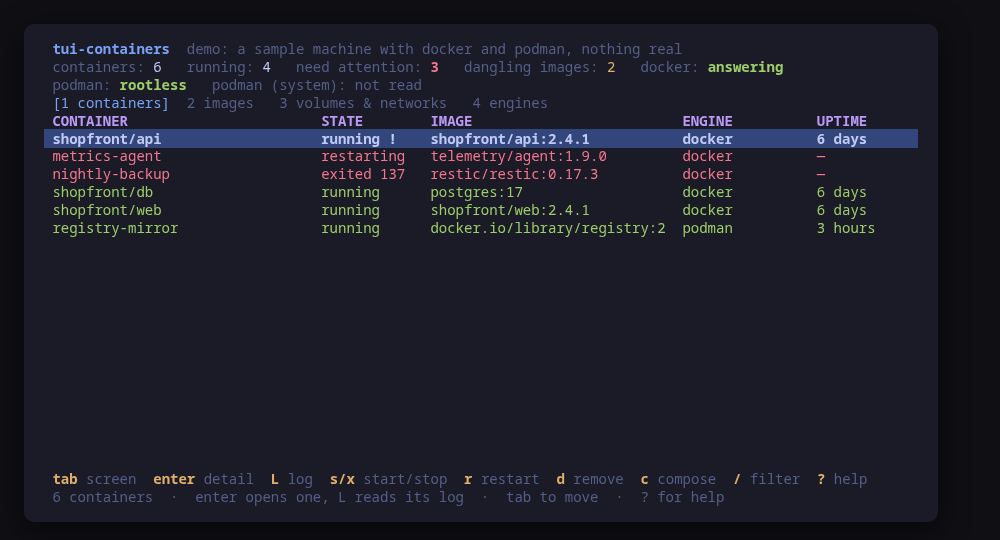
Every container on one list, docker and podman together, with what is wrong at the top

A terminal UI for the containers on a machine. Docker and Podman are two engines with two stores, two sets of commands and — for Podman — two scopes that do not see each other; tui-containers puts them on one list, worst first: the ones exited non-zero, the ones stuck restarting, the ones their own health check disagrees with.

A container is more than its row. Open one and it says what it is using right now from a single stats --no-stream sample, what it is mounted on, which networks it is on, what its health check has actually been printing, and its environment — with any value whose name contains PASS, SECRET, TOKEN or KEY replaced, and the name still on screen.

Logs are a pane, read with logs --tail and re-read on a timer: nothing is left following.

Changes are previewed as the exact command line. Start, stop, restart, kill, pause, remove, update --restart, an image pull, compose up -d/down/pull for a project — with the project name and directory read from the labels Compose itself wrote. Every prune is a sentence you pick before it is a flag. There is no exec.

Run tui-containers --demo to drive a sample machine with both engines, and nothing touched.

Keys

KeyAction
tab / 1-4Move between containers, images, volumes and networks, and the engines
enterOpen the selected container: what it is using, its mounts, its health check
LRead the selected container's log in a pane
s / xStart or stop the selected container
r / KRestart it, or kill it with SIGKILL and no grace period
p / uPause or unpause it
dRemove what is selected: a container, an image, a volume or a network
oChange the selected container's restart policy in place
UPull the selected container's image (the container is not recreated)
ccompose up, down or pull for the selected container's project
XPrune, with each variant spelled out before you choose one
AWhat Podman's auto-update would do, as a dry run
/Filter the rows of the current screen
?Help
qQuit

Press ? inside the tool for the full help screen, which is generated from the same action table as the key map.

Compatibility

This tool is a face on the program below, so its version matters.Tested is not a claim: a version lands there only after the tool's own suite passed against it on a real machine in the lab, and the run is kept as evidence in the repository. At startup the tool probes the backend once and says what it found in its header — a version nobody has run against is shown as(untested) in the warning colour, one older than the minimum as (below minimum) in the error colour. Neither stops it: the backend still refuses what it cannot do, in its own words.

docker

docker ≥ 20.10
Binary
docker
Minimum
20.10
Probed with
docker --version
Tested
No recorded run yet. The tool still runs and reports the version it found as untested.

Needs a version this new

  • format-jsonsince 23.0

What changes on older versions

  • docker <23.0

    --format json as a shorthand does not exist, so every list is read with --format '{{json .}}' instead. Nothing is lost: it is the same output, and it is what the shorthand expands to

  • docker >=20.10

    docker --version answers without a daemon, which is why it is the version probe: a machine with the CLI installed and dockerd stopped reports its version and then reports the daemon as not answering, with the reason

  • docker >=20.10

    the label list docker ps prints is every label joined with commas and nothing is escaped, so a label value containing a comma can be mis-split. The Compose labels this tool reads never contain one

  • docker >=20.10

    reading needs whatever the docker socket needs: an account in the docker group or a rootless daemon reaches it directly, and otherwise the tool retries the probe once through sudo -n and says in the header that it did

podman

podman ≥ 4.0
Binary
podman
Minimum
4.0
Probed with
podman --version
Tested
5.8.1

Needs a version this new

  • quadletsince 4.4
  • composesince 4.7
  • update-restartsince 5.0

What changes on older versions

  • podman <4.4

    Quadlet did not exist, so the ~/.config/containers/systemd and /etc/containers/systemd directories are not read and no unit files are listed on the engines screen

  • podman <4.7

    podman compose does not exist, so a Compose project is listed and grouped but cannot be driven from here. Before 4.7 a project was run by calling podman-compose directly, which takes different arguments

  • podman <5.0

    podman update --restart does not exist — podman update arrived in 4.3 carrying only the resource limits — so the restart policy key refuses with that reason instead of running a command Podman would reject

  • podman >=4.0

    rootless and root are two separate sets of containers, not two views of one. Both are listed when both answer; root's are read through sudo -n, and where that needs a password the screen says the system scope was not read

  • podman >=4.0

    an infra container — the pause process holding a pod's namespaces open — is dropped from the list. It runs nothing anyone wrote, and showing one per pod would be an unexplained extra row

Install

Once per machine, then every tool in the family is one pacman away.

Add the repository
$ curl -fsSL https://pkgs.tui.tools/install.sh | sh
Or run the same thing yourself, one command at a time

A family whose whole promise is preview before you run is not going to insist you pipe a script into a shell. These are the commands that script runs.

The one-time setup, by hand
$ curl -fsSL -o /tmp/tui-tools.asc https://pkgs.tui.tools/pubkey.asc
  sudo pacman-key --add /tmp/tui-tools.asc
  sudo pacman-key --lsign-key \
    "$(gpg --show-keys --with-colons /tmp/tui-tools.asc | awk -F: '/^fpr:/{print $10; exit}')"
  printf '[tui-tools]\nServer = https://pkgs.tui.tools/arch/$arch\n' \
    | sudo tee -a /etc/pacman.conf
  sudo pacman -Sy
Arch Linux · tui-containers
$ sudo pacman -S tui-containers

Upgrades then arrive with the rest of your system updates.

What it can do to your machine

  • Preview, then confirm

    Every change is shown as an exact command line and confirmed before it runs. The dialog and the runner receive the same value, so the preview cannot drift from what executes.

  • Escalates for actions

    Rootless Podman and a Docker socket this account can reach need nothing at all. Escalation through sudo -n, which never prompts, is used for exactly two things: root's Podman containers, and a Docker daemon this account cannot reach otherwise — and the header says when it is being used.

  • No daemon, no state of its own

    Nothing keeps running after you quit, and nothing is installed to run later. The system is the source of truth; the tool re-reads it after every change.

  • No network access

    The tool opens no network connection of its own. No telemetry, no update check, no phone home.

  • Static binary

    Released statically linked, with no runtime dependencies to install.

  • Releases are not signed yet

    Releases carry SHA-256 checksums but no signature. Verify the checksum, and read this as the open item it is.

Reporting

Report a security issue privately, through GitHub's private vulnerability reporting on the repository's Security tab. The family-wide policy, and what counts as in scope, is on the security page.

Downloads

v0.1.1 · 2026-08-30
FileSizeSHA-256
checksums.txt824 B
tui-containers-0.1.1-1-aarch64.pkg.tar.zst1.7 MB2a179f74ef7a559d41d8794bf8f990a66214fbcbc88bc63e9e6052be6f9436ae
tui-containers-0.1.1-1-x86_64.pkg.tar.zst1.9 MB81c0f3d43619de5d9482f0d7a7ef7d403af403ebf42d44e2ec5f0ab94f0eb95f
tui-containers-0.1.1-1.aarch64.rpm1.8 MB0487deccacf14cc98040252080f8661c2db2f5b057491e737460e4cc9ca80dee
tui-containers-0.1.1-1.x86_64.rpm1.9 MB590a5464248d019d8610329a7018cf66b00ee2e682724dce682b308d7ec1b001
tui-containers_0.1.1_amd64.deb1.9 MB2093fab45b22286028996fdeb4c12e10e6f8cfafcba2229e2812e7b0611226ed
tui-containers_0.1.1_arm64.deb1.7 MB2d3fb26e78e6277bfa7f0eefba1916cf915a20e1644047f118bf30442d91c324
tui-containers_0.1.1_linux_amd64.tar.gz1.9 MB34c41db0e65485d620f3e33bef55b8599b431a12270517f58dbebfcdf3923dcc
tui-containers_0.1.1_linux_arm64.tar.gz1.8 MBf2e25d562ecbf791dbe111e50510540a5ed08e48b83695f82c00dec37dd204c0

Every release ships a checksums.txt. Download it next to the archive and run sha256sum -c checksums.txt --ignore-missing. See verifying a download.

Releases

v0.1.1

2026-08-30
## Changelog
* a515f597b6f5332b2136ecb0ced886ee10d7304b Let a machine with no container engine be a model, not an error
* da24df4fcef0e7e2df30b60594752acf19dc65f0 Packages are available from pkgs.tui.tools
* bf176ea837348204adc3d503b20c385fc6c4c6fa Re-pin the kit at v0.2.3
* cc8b781becd0561fdaa8ad177a07ebff17359376 Ship the tool as a .deb, an .rpm and a pacman package

v0.1.0

2026-08-30
## Changelog
* f70ab7e513330c5a6169967e7318cff065368e87 Initial commit
* 205c289bac39c66f8582c5b9e52f4bc8d117a5a0 Let the host version probe be slow rather than fail
* 274fbbdd8b5d4d30bf3751346765663043d03ade tui-containers v0.1: docker and podman on one screen