tui-tools

tui-cert

Every certificate on the machine, and what will stop working when

A terminal UI (TUI) for certbot, acme.sh and openssl on Linux: the TLS certificates on this machine.

v1.0.1Stable since 1.0.0certificatesMIT
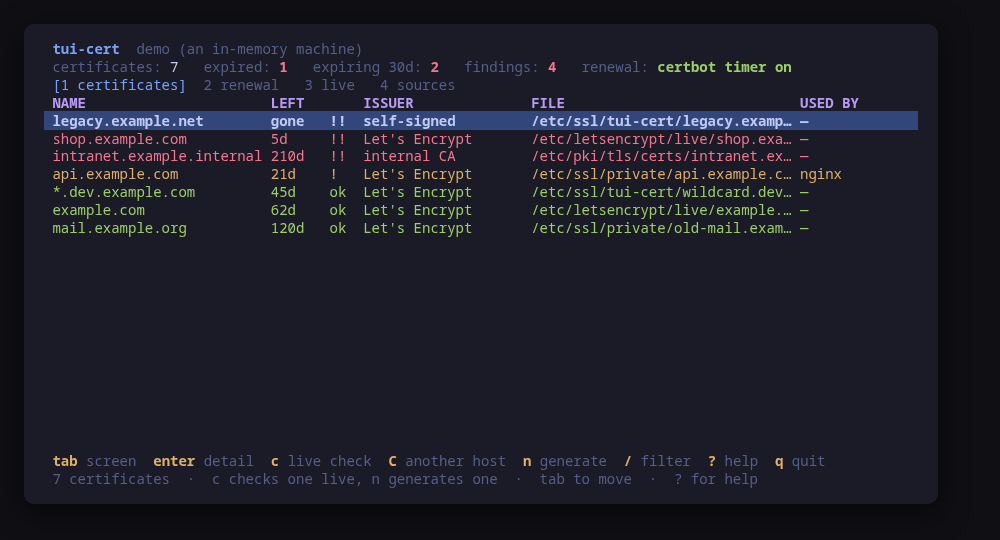
The inventory, worst first: what expires when, who issued it, and which server serves it

A terminal UI for the TLS certificates on this machine. It finds them — the Let's Encrypt tree, /etc/ssl, /etc/pki, the paths an nginx, Apache or Caddy configuration names — and puts them on one screen, worst first: expired, expiring, the ones whose private key is not their key, the ones whose key every account can read.

Reading is done in Go. crypto/x509 parses the chain, verifies it against the system trust store and compares the key, so the whole inventory works on a machine with nothing else installed. openssl, certbot and acme.sh are optional, and only used to act.

More screens: what certbot or acme.sh manages and whether its timer really runs, a live TLS handshake on demand, and local CAs — create one, issue server certificates for DNS names or IP addresses, trust it on this host.

Every change is previewed as the exact command line. I obtains a certificate by webroot or standalone, and requests nothing until the agreement says yes. i installs a pair to the paths a server's configuration names, never typed.

Run tui-cert --demo for a sample machine with nine certificates and a local CA.

Keys

KeyAction
tab / 1-5Move between certificates, renewal, live checks, sources and local CAs
enterOpen the selected row in full
cConnect to the selected certificate's own name and read what is served
CThe same, against a host you type
nGenerate a self-signed certificate, previewed before it is written
sGenerate a certificate signing request the same way
IObtain a new certificate from an authority: webroot or standalone
iInstall the selected pair where a server config already names it
dRehearse every renewal against the staging authority, writing nothing
FForce the selected certificate to renew now, rate limit and all
NCreate a local certificate authority, previewed before it is written
eIssue a server certificate from the selected CA: DNS names, IP addresses, owner
xExport the selected CA: its PEM, fingerprint and copy command; w writes a file
XImport a CA certificate from another host, pasted as PEM or read from a file
t / TTrust the selected CA on this machine, or stop trusting it
/Filter the rows of the current screen
RRe-read this machine
?Help
qQuit

Press ? inside the tool for the full help screen, which is generated from the same action table as the key map.

Compatibility

This tool is a face on the program below, so its version matters. Tested is not a claim: a version lands there only after the tool's own suite passed against it on a real machine in the lab, and the run is kept as evidence in the repository. At startup the tool probes the backend once and says what it found in its header — a version nobody has run against is shown as (untested) in the warning colour, one older than the minimum as (below minimum) in the error colour. Neither stops it: the backend still refuses what it cannot do, in its own words.

certbot

certbot ≥ 1.0
Binary
certbot
Minimum
1.0
Probed with
certbot --version
Tested
No recorded run yet. The tool still runs and reports the version it found as untested.

What changes on older versions

  • certbot >=1.0

    certbot is optional: without it the inventory, the chain validation, the key match and the live check all still work, and only the renewal screen's two keys say there is nothing here to renew with

  • certbot <2.0

    a certificate renewed by this certbot keeps the RSA key type it was issued with; from 2.0 the default became ECDSA, so a renewal there can change the key type of a certificate a client was pinned to

acme-sh

acme.sh ≥ 3.0.0
Binary
acme.sh
Minimum
3.0.0
Probed with
acme.sh --version
Tested
No recorded run yet. The tool still runs and reports the version it found as untested.

What changes on older versions

  • acme-sh >=3.0.0

    acme.sh renews from a crontab entry rather than a systemd timer, and tui-cert reads nobody's crontab: the renewal screen says so instead of claiming nothing is scheduled

openssl

openssl ≥ 1.1.1
Binary
openssl
Minimum
1.1.1
Probed with
openssl version
Tested
3.0.133.5.53.6.4

Needs a version this new

  • addextsince 1.1.1
  • req-casince 3.0.0

What changes on older versions

  • openssl <1.1.1

    openssl req has no -addext, so a subject alternative name cannot be set on the command line; tui-cert will not write an openssl configuration file, so the generate keys say why they are unavailable rather than producing a certificate no client accepts

  • openssl <3.0.0

    openssl req cannot sign with a CA (-CA arrived in 3.0), and tui-cert signs only through it rather than write an extensions file: the local CA keys say why they are unavailable, and everything else works

  • openssl >=1.1.1

    openssl is only ever used to generate a key pair or sign one with a local CA; nothing is read with it, so a machine without it loses those keys and keeps every screen

Maintain certbot, acme.sh or openssl? You are welcome to help shape this tool. About → maintainers

Guides

Written after the work, from a machine the commands were actually run on. Every guide that mentions tui-cert is listed here.

  • A company tailnet with Keycloak single sign-on

    A local CA from tui-cert, Keycloak served over https with a certificate from it, and a Headscale control plane set up with tui-tailscale that admits only the members of one Keycloak group. Run end to end in the family lab and told through the screens it produced, including the login that was refused.

  • A local CA with tui-cert

    Certificates for an IP address or a name no public DNS carries, from a small certificate authority of your own. Create it, issue with DNS and IP names, copy it to another machine, trust it or stop trusting it, and read what each finding means.

  • A private tailnet with your own CA

    A Headscale control plane with no public DNS name and no Let's Encrypt. tui-cert runs a local certificate authority, tui-tailscale serves its certificate and trusts it on each client, and machines join with pre-auth keys.

Install

Once per machine, then every tool in the family is one pacman away.

Add the repository
$ curl -fsSL https://pkgs.tui.tools/install.sh | sh
Or run the same thing yourself, one command at a time

A family whose whole promise is preview before you run is not going to insist you pipe a script into a shell. These are the commands that script runs.

The one-time setup, by hand
$ curl -fsSL -o /tmp/tui-tools.asc https://pkgs.tui.tools/pubkey.asc
  sudo pacman-key --add /tmp/tui-tools.asc
  sudo pacman-key --lsign-key \
    "$(gpg --show-keys --with-colons /tmp/tui-tools.asc | awk -F: '/^fpr:/{print $10; exit}')"
  printf '[tui-tools]\nServer = https://pkgs.tui.tools/arch/$arch\n' \
    | sudo tee -a /etc/pacman.conf
  sudo pacman -Sy
Arch Linux · tui-cert
$ sudo pacman -S tui-cert

Upgrades then arrive with the rest of your system updates.

What it can do to your machine

  • Preview, then confirm

    Every change is shown as an exact command line and confirmed before it runs. The dialog and the runner receive the same value, so the preview cannot drift from what executes.

  • Escalates for actions

    Three reads escalate through sudo -n, which never prompts: ls, stat and cat, for the certificate directories an ordinary user cannot open. A private key is never read through sudo. Every change escalates: renewing, generating, a local CA, the trust store.

  • No daemon, no state of its own

    Nothing keeps running after you quit, and nothing is installed to run later. The system is the source of truth; the tool re-reads it after every change.

  • Opens network connections

    One TLS handshake to a host:port you type, and only when you press c. Nothing is sent over it and the socket is closed as soon as the certificate is read. Starting the tool, and --check, open no connection at all.

  • Static binary

    Released statically linked, with no runtime dependencies to install.

  • Signed release, with provenance

    checksums.txt carries a keyless cosign signature from this repository's release workflow, every archive has a CycloneDX SBOM, and every archive, package and the checksum file carry SLSA build provenance. The security page shows the three commands that check it.

Reporting

Report a security issue privately, through GitHub's private vulnerability reporting on the repository's Security tab. The family-wide policy, and what counts as in scope, is on the security page.

Downloads

v1.0.1 · 2026-09-25
FileSizeSHA-256
checksums.txt1006 B—
checksums.txt.sigstore.json10 KB—
provenance.intoto.jsonl12 KB—
tui-cert-1.0.1-1-aarch64.pkg.tar.zst2.8 MB972ef89e1692e871c6a219f7bb4c8c95c4082983e0b8035c2b4c548acfec58ea
tui-cert-1.0.1-1-x86_64.pkg.tar.zst3.2 MBaac3c048a8b4d4e4f3739c1bf7f503d39f8fa055084886e1c1f74ef80abcbabe
tui-cert-1.0.1-1.aarch64.rpm2.8 MB6afdd96ebff5cd0b1938badd143a2df285fdf77c479e6f1561316fc33efbcf52
tui-cert-1.0.1-1.x86_64.rpm3.1 MB6ef0fc58daf9da65a345db6b02f35593c6c82ec67ae35ed546f1013af824eebf
tui-cert_1.0.1_amd64.deb3.1 MB263f9f1eb86670854774d5279b3a3fc64504a2e1aeb807ec9bc1dca8d7b0e5ac
tui-cert_1.0.1_arm64.deb2.8 MB70f2bf5b129c58655806e3f8b7902a82fc8a37eb10f75c48f7e73138825ab97a
tui-cert_1.0.1_linux_amd64.tar.gz3.1 MB127c91ef0f9f2de6714f412466dc4ceff5f97ec47201e41080495847edcc992b
tui-cert_1.0.1_linux_amd64.tar.gz.cyclonedx.json23 KBdb26e0a01eff4649d56e4472a58f261a12a7899c6757674dbc160f7edffec6c3
tui-cert_1.0.1_linux_arm64.tar.gz2.8 MB71b0225a0e7306a83356426401d4f0f069a36e3386159aa8073a9aa01694c0a2
tui-cert_1.0.1_linux_arm64.tar.gz.cyclonedx.json23 KB48e08555027fe3d5a18a9d2ac2b9ca808ec69144bb5ec409b5f1aae37eaace7c

Every release ships a checksums.txt. Download it next to the archive and run sha256sum -c checksums.txt --ignore-missing. See verifying a download.

Releases

v1.0.1

2026-09-25
## tui-cert v1.0.1

tui-cert 1.0.1

Release notes (1.0.1): a maintenance release on tui-kit v0.4.4. The export file picker opens with the suggested `<ca>.crt` in the home directory already in its path field, now through the kit's `InitialPath` option instead of a simulated paste; enter alone still accepts it. Every command runs without a controlling terminal, so anything that would prompt fails fast instead of waiting behind the TUI, and status-line errors are cleaned of escape codes. No key, flag or `--check` change: the stable contract is untouched.

Built by this repository's CI on the tag itself. Each archive ships a
CycloneDX SBOM, `checksums.txt` carries a keyless cosign signature, and
every file has SLSA build provenance — see the README's "Verify a
download" for the two commands that check them.

The commits in this release:

## Changelog
* 346054836c71c680e4db157c2197a039c99b6cc0 Take tui-kit v0.4.4: the export picker opens with InitialPath (#27)

v1.0.0

2026-09-25
## tui-cert v1.0.0

tui-cert 1.0.0: stable

tui-cert 1.0.0 is the second stable tool of the tui-tools family. Stable means a frozen contract under semver: the keys, the flags and the `--check` JSON only grow in minor releases, and anything removed or changed waits for a major release announced one minor ahead. It has run a local CA for real services, a self-hosted Headscale and a Keycloak single sign-on, installs from apt, dnf, pacman and a static binary, and ships signed checksums, SBOMs and build provenance. This release also carries what those runs asked for (#24): `x` prints the CA certificate as PEM, ready to copy, and `w` there writes it to a file you pick; `X` imports a CA on another host from a paste or a file, tolerant of lost line breaks and panel borders, refusing a private key, and installs it certificate-only; `t`/`T` report `done` (with the trust store's count when it prints one) and show the output only on failure, on every distribution; the issue form's Owner takes a numeric `uid:gid` for a service in a container, previewed as such and looked up nowhere; and in every form a prefilled value is selected on focus so typing replaces it, and `ctrl+u` clears a field. Built with tui-kit v0.4.3.

Built by this repository's CI on the tag itself. Each archive ships a
CycloneDX SBOM, `checksums.txt` carries a keyless cosign signature, and
every file has SLSA build provenance — see the README's "Verify a
download" for the two commands that check them.

The commits in this release:

## Changelog
* 96a5ae39f47c1683047a2223fb7a248c41ac258d Local CA in practice: export/import, trust status, numeric owners, ctrl+u (#24) (#25)
* 7ef72687adf7831e7eca964cb1a2d7ad1f35f8dd Promote tui-cert to stable: 1.0.0 (#26)

v0.3.1

2026-09-25
## tui-cert v0.3.1

tui-cert 0.3.1: CA dialogs say what each field takes

The local CA dialogs now show each field's format while it is empty: the extra names take DNS names or IPs separated by commas or spaces, the validity is in days, an empty owner means root and an empty directory shows the path it stands for. The review lists the names the certificate will carry, common name first and duplicates dropped. An owner that does not exist on the machine, such as the account of a service whose package is not installed yet, is refused in the dialog instead of failing at `chown`, and every form refusal is now shown inside the dialog rather than only in the status line behind it.

Built by this repository's CI on the tag itself. Each archive ships a
CycloneDX SBOM, `checksums.txt` carries a keyless cosign signature, and
every file has SLSA build provenance — see the README's "Verify a
download" for the two commands that check them.

The commits in this release:

## Changelog
* ddbfa6c500bbc47dbe3229d184567186ec6dc1dc CA dialogs: show each field's format, list the SANs, check the owner (#22) (#23)

v0.3.0

2026-09-25
## tui-cert v0.3.0

tui-cert 0.3.0: a local CA from the terminal.

- New screen 5, CAs: N creates a CA (ECDSA P-256 or RSA 3072, CA:TRUE pathlen:0), e issues a server certificate from it with DNS and IP SANs and the owner of the service that reads it (fullchain.pem and privkey.pem under /etc/tui-cert/issued/<name>/), x exports it (path, SHA-256 fingerprint, copy command), t and T trust and untrust it on this host (Debian and Ubuntu, Fedora and RHEL, Arch).
- The inventory names the local CA that issued each certificate and flags an issuer this system does not trust; new findings for a CA key readable by others, an expiring CA and a leaf that outlives its CA.
- --check lists local CAs with fingerprint, expiry and whether this host trusts them.
- Issuing needs OpenSSL 3.0 or newer.
- tui-kit v0.4.0.

Built by this repository's CI on the tag itself. Each archive ships a
CycloneDX SBOM, `checksums.txt` carries a keyless cosign signature, and
every file has SLSA build provenance — see the README's "Verify a
download" for the two commands that check them.

The commits in this release:

## Changelog
* e7a7541d8e0ae81841acafdb6aaea312a9d32bce Bump anchore/sbom-action/download-syft (#3)
* 9d8c41467dd1042fce0f4b441827b8903ecabf27 Bump anchore/sbom-action/download-syft in the github-actions group (#16)
* 960cee8114e8a5a534b31265ba1cca005215cffb Bump the github-actions group with 4 updates (#18)
* 148e0592ad6082cc8b0412bb8627a9c5e8c5b804 Local CA: create, issue, export, trust (#19) (#20)
* e4eeaeef274939459d8948a33fc7d05781c05164 README: link the tool's page on tui.tools (#15)
* 62395adfb4d20c62a6f8491de0061cc6688f17ed README: point the install snippet at the current release (#14)
* f28625ac9839e772de25a60ba91e8988ec8c1141 Release 0.3.0: local CA; tui-kit v0.4.0 (#21)

v0.2.1

2026-09-02
## tui-cert v0.2.1

tui-kit v0.3.0: the dialogs wrap and scroll instead of clipping the
command preview, and the picker filters as you type.

Built by this repository's CI on the tag itself. Each archive ships a
CycloneDX SBOM, `checksums.txt` carries a keyless cosign signature, and
every file has SLSA build provenance — see the README's "Verify a
download" for the two commands that check them.

The commits in this release:

## Changelog
* 2a361460bd978d08170d020818833b1b62ead930 Bump tui-kit to v0.3.0 (#13)

v0.2.0

2026-09-01
## tui-cert v0.2.0

Manage, not view (wave 3): create what does not exist, edit what does; lab-validated.

Built by this repository's CI on the tag itself. Each archive ships a
CycloneDX SBOM, `checksums.txt` carries a keyless cosign signature, and
every file has SLSA build provenance — see the README's "Verify a
download" for the two commands that check them.

The commits in this release:

## Changelog
* b02d639ab4e700329458f33264f85c785fcea48e A code of conduct that fits on one screen (#9)
* 6205a70238c6c508ffc14bd8fdd2e7d2bc8ba47e Add --report, and a bug form that asks for it (#10)
* e14e6b9a3eacd8ca8b9688d2bc4ec1d704850b1c Carry the OpenSSF Best Practices badge (#7)
* 18a4a88040b3f710599f2787aea41358c19d1802 Fetch the tag annotation before releasing (#5)
* c37340448cd66c6812cdbddff78245030ca39301 Keep the leak check off the two lines that never carry a node name (#11)
* 0b269a31029fc0ed5eaa6eac17155dd38bd1e895 Obtain an ACME certificate and install it where the server looks (#12)
* b1cf7dd1bf263923b26e587a429ca37296886d04 Pin what CI runs, fuzz the parsers, and say the releases are signed (#2)
* 0e5de367eb4e27456d5188772f376286bb02d7f7 Print the whole tag message, not only its body (#6)
* e48bbdf3982c2ec795d9cd5f5b2f26c776d43c4d Say beta once (#4)
* 471f3207a2fbd005afb56a3293b73c954f418507 Take tui-kit v0.2.8: hashed pip install, provenance bundle on the release (#8)

v0.1.2

2026-08-30
## Changelog
* 1274169d21b72edba472177d56dd52c090aa2250 Drop cross-repo dispatch; the package repo and the site poll releases
* e3794b57b2c791df5077f11ddbf9614f9bf7a775 Gate the release on a security job, and sign what it publishes (#1)
* c3015a01f05504420390f7f894af4a27eeaf43d6 Stop telling readers the packages are unpublished

v0.1.1

2026-08-30
## Changelog
* cd78c648f4ba2c5e7772216814b46faa3789d860 Assert the absent-ACME-client path, which is the one every guest runs
* c9837fea12567e0d7f7af1c94210ec4cc7b1db84 Packages are available from pkgs.tui.tools
* 07538e2325669738c68c398a7298604a987ca4c7 Re-pin the kit at v0.2.3
* 1a4b12373fac9fc53d350e72ef52d9e63b11153a Ship the tool as a .deb, an .rpm and a pacman package

v0.1.0

2026-08-30
## Changelog
* 0c8683dd16882518991decd3b3176d60889e3651 Initial commit
* aa4a3a5f5891d98a4f1f33466a53b5fc89f971ff Turn the template into tui-cert