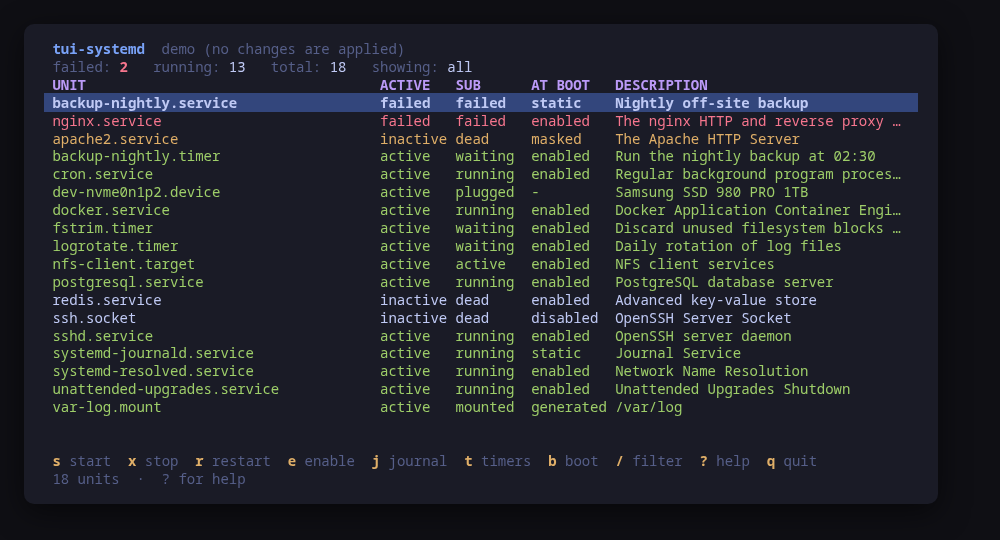
The unit list, with failed units sorted to the top
A terminal UI for systemd. It opens on what failed — failed units sort first, always — and puts the journal that explains why one key away. Timers show what is scheduled and when it last fired; the boot view shows what made the last boot slow.
It also writes. c shows the unit file as systemd assembles it. E opens a guided editor over a closed set of properties — Restart, RestartSec, MemoryMax, CPUQuota, Environment, Nice, and OnCalendar on a timer — and renders the whole drop-in at /etc/systemd/system/<unit>.d/90-tui-systemd.conf. n creates a service, or a timer and the service it starts, from a vetted template. Every write is staged in a temporary directory, read by systemd-analyze verify before you are asked anything, shown as a unified diff, and only then installed with install -m 644 and a daemon-reload.
Every read works as an ordinary user, so the tool opens instantly and without a password; only a change escalates, and only behind a confirm dialog showing the exact command lines.
Run tui-systemd --demo for a sample machine with a couple of interesting failures. Nothing touches your system.
Keys
Key
Action
j / enter
Journal for the selected unit
c
Show the unit file and its drop-ins (systemctl cat)
E
Override properties of the selected unit in a drop-in
n
Create a service, or a timer and the service it starts
f
In the journal: follow, re-reading every 2s
s / x
Start / stop the selected unit
r / l
Restart / reload the selected unit
e / D
Enable / disable the selected unit
m / M
Mask / unmask the selected unit
d
Reload the systemd manager (daemon-reload)
tab
Cycle the state filter: all, failed, active, inactive
/
Filter by name, description or state
t
Timers
b
Boot times, slowest first
?
Help
q
Quit
Press ? inside the tool for the full help screen, which is generated from the same action table as the key map.
Compatibility
This tool is a face on the program below, so its version matters. Tested is not a claim: a version lands there only after the tool's own suite passed against it on a real machine in the lab, and the run is kept as evidence in the repository. At startup the tool probes the backend once and says what it found in its header — a version nobody has run against is shown as (untested) in the warning colour, one older than the minimum as (below minimum) in the error colour. Neither stops it: the backend still refuses what it cannot do, in its own words.
systemd
systemctl ≥ 230
Binary
systemctl
Minimum
230
Probed with
systemctl --version
Tested
255259261
Needs a version this new
timerssince 250
boot-blamesince 230
verify-no-mansince 235
What changes on older versions
systemd <250
list-timers has no JSON output, so the timers view is not offered: the text table cannot be parsed without mangling its timestamps
systemd <245
list-units --plain is absent on some builds, so the unit list falls back to the decorated output
systemd <235
systemd-analyze verify has no --man=no, so the unit file check also opens every man page a unit's Documentation= names, and on a machine without man pages that lookup fails and the edit is refused
Maintain systemd? You are welcome to help shape this tool. About → maintainers
Guides
Written after the work, from a machine the commands were actually run on. Every guide that mentions tui-systemd is listed here.
A service failed and you want to know why, fix it, make it restart on its own, start it at boot and give it a nightly timer. One walk through tui-systemd on a real machine, with every preview dialog as the tool showed it.
Install
Once per machine, then every tool in the family is one pacman away.
Add the repository
$ curl -fsSL https://pkgs.tui.tools/install.sh | sh
Or run the same thing yourself, one command at a time
A family whose whole promise is preview before you run is not going to insist you pipe a script into a shell. These are the commands that script runs.
Upgrades then arrive with the rest of your system updates.
!
Not published yet. The command is what it will be once the package repository at pkgs.tui.tools is live. Until then, use the static binary or build from source.
Arch Linux (AUR) · tui-systemd-bincoming soon
$ paru -S tui-systemd-bin
The -bin package installs the released static binary.
Once per machine, then every tool in the family is one apt away.
Add the repository
$ curl -fsSL https://pkgs.tui.tools/install.sh | sh
Or run the same thing yourself, one command at a time
A family whose whole promise is preview before you run is not going to insist you pipe a script into a shell. These are the commands that script runs.
Upgrades then arrive with the rest of your system updates.
!
Not published yet. The command is what it will be once the package repository at pkgs.tui.tools is live. Until then, use the static binary or build from source.
Needs the tui-tools repository, a one-time setup you do once per machine.
openSUSE · tui-systemdcoming soon
$ sudo zypper install tui-systemd
The rpm repository is shared with dnf; zypper support is not tested yet.
One static binary. Verify it against checksums.txt from the same release.
From source · tui-systemd
$ git clone https://github.com/tui-tools/tui-systemd
  cd tui-systemd && make build
  sudo install -m0755 bin/tui-systemd /usr/local/bin/tui-systemd
Needs Go 1.26 or newer.
What it can do to your machine
✓
Preview, then confirm
Every change is shown as an exact command line and confirmed before it runs. The dialog and the runner receive the same value, so the preview cannot drift from what executes.
•
Escalates for actions
Only changes escalate: the systemctl actions, daemon-reload, and the install that copies a staged unit file into /etc/systemd/system. Reads never do, systemctl cat and systemd-analyze verify included. Escalation goes through sudo -n, which never prompts.
✓
No daemon, no state of its own
Nothing keeps running after you quit, and nothing is installed to run later. The system is the source of truth; the tool re-reads it after every change.
✓
No network access
The tool opens no network connection of its own. No telemetry, no update check, no phone home.
✓
Static binary
Released statically linked, with no runtime dependencies to install.
✓
Signed release, with provenance
checksums.txt carries a keyless cosign signature from this repository's release workflow, every archive has a CycloneDX SBOM, and every archive, package and the checksum file carry SLSA build provenance. The security page shows the three commands that check it.
Reporting
Report a security issue privately, through GitHub's private vulnerability reporting on the repository's Security tab. The family-wide policy, and what counts as in scope, is on the security page.
## tui-systemd v1.0.0

tui-systemd 1.0.0: stable

tui-systemd 1.0.0 is stable. Stable means a frozen contract under semver: the keys, the flags and the `--check` JSON only grow in minor releases, and anything removed or changed waits for a major release announced one minor ahead. It has driven a real machine end to end, from a failed service to its journal, a checked drop-in, a restart, boot enablement and a timer; installs from apt, dnf, pacman and a static binary; and ships signed checksums, SBOMs and build provenance. This release also carries what that work found: the unit file check runs `systemd-analyze verify --man=no` on systemd 235 and later, so a machine without man pages (Omarchy Server) can edit units whose Documentation= names one; a refused plan is shown under the form instead of silently; and the selection follows the unit across a re-read. Built with Go 1.27.1 and tui-kit v0.4.4.

Built by this repository's CI on the tag itself. Each archive ships a
CycloneDX SBOM, `checksums.txt` carries a keyless cosign signature, and
every file has SLSA build provenance — see the README's "Verify a
download" for the two commands that check them.

The commits in this release:

## Changelog
* f17680f1d92c1df1de41ea6fcc8658d1d30caab3 Bump the github-actions group with 4 updates (#20)
* c837e750c5feba0b092baf5bd529481b1ffd44f1 Lab fixes before 1.0.0: verify --man=no, refusals shown under the form, selection follows the unit; Go 1.27.1 (#21)
* 7b18a40a48bd92a5dee9acbfc3a70ada42110ab2 Promote tui-systemd to stable: 1.0.0 (#22)
## tui-systemd v0.2.2

tui-systemd 0.2.2: tui-kit v0.4.4

tui-systemd 0.2.2 moves to tui-kit v0.4.4: every systemctl and journalctl call now runs in its own session without a controlling terminal, so a step that would prompt fails at once instead of hanging behind the UI, and a failed step reports its meaningful line, cleaned of escape codes. Command previews are POSIX shell-quoted, the README screenshots are re-rendered with continuous box borders, and the README banner now carries the kit's stability markers.

Built by this repository's CI on the tag itself. Each archive ships a
CycloneDX SBOM, `checksums.txt` carries a keyless cosign signature, and
every file has SLSA build provenance — see the README's "Verify a
download" for the two commands that check them.

The commits in this release:

## Changelog
* 2b136527f3f476c5c3964f35990d2ce5f500faf0 0.2.2: tui-kit v0.4.4 (#19)
* 80933bd75bbe4689522f37116c042701a81ea852 Bump anchore/sbom-action/download-syft (#4)
* 18279a35b2021493f476efed749f10f7330f3455 Bump anchore/sbom-action/download-syft in the github-actions group (#17)
* f6dc801413962e73603c39c1942205966b3d7e9e Bump the github-actions group with 4 updates (#18)
* cfebc2dbe2087ea3a391c2f7a54bf8baaa9de28b README: link the tool's page on tui.tools (#16)
* f8a0d2667dbf6a39c3f3566973bbb7a081de8e6d README: point the install snippet at the current release (#15)
## tui-systemd v0.2.1

tui-kit v0.3.0: the dialogs wrap and scroll instead of clipping the
command preview, and the picker filters as you type.

Built by this repository's CI on the tag itself. Each archive ships a
CycloneDX SBOM, `checksums.txt` carries a keyless cosign signature, and
every file has SLSA build provenance — see the README's "Verify a
download" for the two commands that check them.

The commits in this release:

## Changelog
* 0f6d2b7e6b02f3189911ca1bdd4267eb786353b6 Bump tui-kit to v0.3.0 (#14)
## tui-systemd v0.2.0

Manage, not view (wave 2): apply what it diagnoses, author what it manages; lab-validated.

Built by this repository's CI on the tag itself. Each archive ships a
CycloneDX SBOM, `checksums.txt` carries a keyless cosign signature, and
every file has SLSA build provenance — see the README's "Verify a
download" for the two commands that check them.

The commits in this release:

## Changelog
* ec80bf049d3fa8121f29edbc31e5b6b8cb301f33 A code of conduct that fits on one screen (#10)
* c8a412ef859b1dd570be6a8429348a781a1828da Add --report, and a bug form that asks for it (#11)
* 8feed38eeb3bfb8be882d5716f6e3c65bbedd8cf Carry the OpenSSF Best Practices badge (#8)
* b4c2bded06c465257e03a0f059d9a880f8f4fe9e Fetch the tag annotation before releasing (#6)
* 24a90921ae16f212e40e8d5882f20dbe8f6c6051 Pin what CI runs, fuzz the parsers, and say the releases are signed (#3)
* 0aed82f239f4405206554258f31f0d46bc83c87b Print the whole tag message, not only its body (#7)
* ff3365abfa687dfdd4825301c24623906898efc6 Say beta once (#5)
* f749da5aa6226a19680910307cb3419efdcc7f75 Smoke: do not search the distro and kernel lines for the host name (#12)
* a0bdc531c0d7d3b202a26a04f1d54887fc3ecce4 Take tui-kit v0.2.8: hashed pip install, provenance bundle on the release (#9)
* 73cf9d1d27cbde705d1ba5d9bbdd6e5238b74a25 Unit authoring: view, drop-in editor, new service/timer from template (#13)
## Changelog
* 9cf65df04a660b26836bccfab796feae1e15484a Drop cross-repo dispatch; the package repo and the site poll releases
* 636276f48a5ff74ab0c00c0484dd9efd584424d1 Gate the release on a security job, and sign what it publishes (#2)
* 4221931ef408cbfedc7a834460137b6cb34574bf Stop telling readers the packages are unpublished
## Changelog
* 55c26e36517200cf3eb916a0d859a6ab9b4903c9 Add --check, a non-interactive read path, and a backend smoke test
* 52960eba1d2c6411dd6c5f4a90bf856a7659ef01 Add tool.json and generate the README Install section from it
* 37182a9e794425cd61069a1baa6d6ceb8e7af1a4 Ask systemd what it can do instead of assuming
* c14626c0231c384400b90851f672686181f7dee6 Bump the github-actions group with 5 updates (#1)
* 1e83fa96c2b7ed0e5754df7c78392b5cb68c71aa Hold this tool to the family's lint bar
* ac2444ed78c1bb6f0663e55f3c2e0714eb00f2ed Packages are available from pkgs.tui.tools
* 7e53d37debbd473656a1fd2dbea0be8983c8914c Re-pin the kit at v0.1.3 for the help panel width fix
* 7ad6994385857efd512dbd079c5844ce915e8608 Re-pin the kit at v0.2.3
* 3a933fd3a85dafb9a423996d7bbcaeefa830871e Ship the tool as a .deb, an .rpm and a pacman package