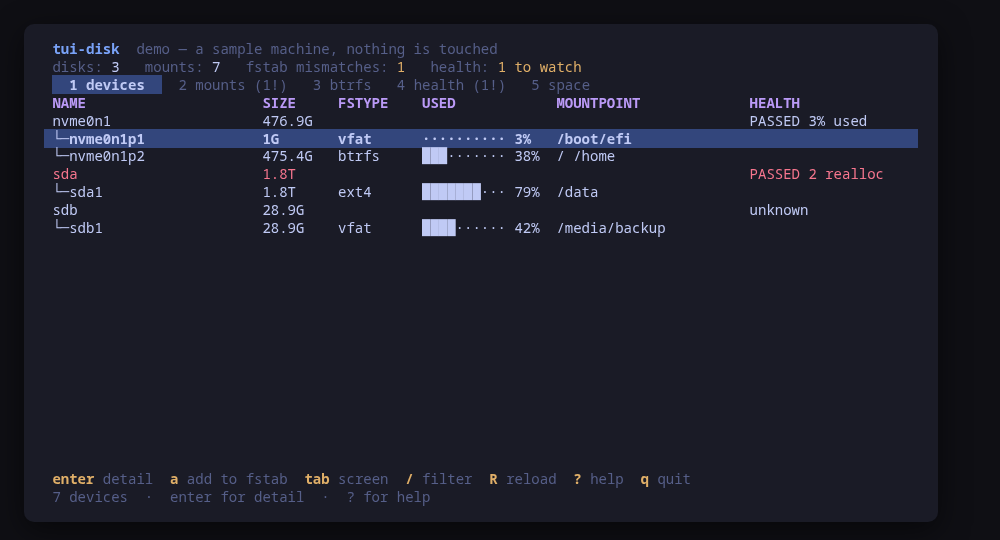
The device tree: size, filesystem, usage and the SMART verdict of every disk
A terminal UI for the machine's storage. Five screens over one read: the block devices with their filesystems and usage bars, the mount table crossed against /etc/fstab, the btrfs filesystems in full, the SMART health of every drive, and what df says about free space.
The mounts screen is the one that earns its keep. It shows what is mounted now next to what fstab says will be mounted next boot, and marks every row where those disagree: a filesystem mounted by hand that will vanish on reboot, an fstab entry that failed to mount and nobody noticed, and options fstab asks for that are not in effect.
Changes are previewed. Mounting and unmounting an entry, starting or cancelling a btrfs scrub or balance, starting a drive self-test, and editing /etc/fstab — which is validated with findmnt --verify against the staged file BEFORE the dialog opens, shown as a unified diff, then installed and applied with systemctl daemon-reload — all carry the exact command line.
Run tui-disk --demo to drive a sample machine: an NVMe root on btrfs, a spinning disk with two reallocated sectors, a USB stick mounted by hand and one fstab mismatch. Nothing touches your system.
Keys
Key
Action
1…5 / tab
Switch between devices, mounts, btrfs, health and space
enter
Open the selected row in full
m / u
Mount or unmount the selected fstab entry
e
Edit the fstab entry for the selected row, with a diff to confirm
a
Add an fstab entry, picking the device by UUID
D
Reload the systemd units generated from fstab
c / C
Start or cancel a btrfs scrub
b / B
Start or cancel a btrfs balance, with a block group filter
s / S
Start a short or extended drive self-test
/
Filter the current screen across every column
R
Re-read the storage
?
Help
q
Quit
Press ? inside the tool for the full help screen, which is generated from the same action table as the key map.
Compatibility
This tool is a face on the program below, so its version matters. Tested is not a claim: a version lands there only after the tool's own suite passed against it on a real machine in the lab, and the run is kept as evidence in the repository. At startup the tool probes the backend once and says what it found in its header — a version nobody has run against is shown as (untested) in the warning colour, one older than the minimum as (below minimum) in the error colour. Neither stops it: the backend still refuses what it cannot do, in its own words.
util-linux
lsblk ≥ 2.34
Binary
lsblk
Minimum
2.34
Probed with
lsblk --version
Tested
2.39.32.41.52.42.2
Needs a version this new
mountpointssince 2.37
What changes on older versions
util-linux <2.37
lsblk has no MOUNTPOINTS column, so the single-valued MOUNTPOINT is asked for instead; a device mounted at several paths reports only the first one. lsblk fails the whole call on a column name it does not know, so this is a gate rather than a fallback
util-linux >=2.34
blkid reads /dev directly and answers an unprivileged caller with an empty body and exit 0, so the fstab editor's device picker escalates with sudo -n and falls back to the UUIDs lsblk already reported when it cannot
btrfs-progs
btrfs ≥ 5.10
Binary
btrfs
Minimum
5.10
Probed with
btrfs --version
Tested
6.6.36.19.17.1
Needs a version this new
json-outputsince 5.15
What changes on older versions
btrfs-progs >=5.10
--format json is supported per command, not globally: device stats and filesystem df emit JSON, while filesystem usage, subvolume list, scrub status and balance status refuse it through 6.19 at least, so those four are read from their text output
btrfs-progs >=5.10
subvolume list, qgroup show, balance status, and on some kernels (Ubuntu 24.04) scrub status and device stats, refuse an unprivileged caller; they are retried with sudo -n, and what still cannot be read is left empty with a note saying so
btrfs-progs <5.15
no --format json at all, so device stats is read from its text output too
smartmontools
smartctl ≥ 7.0
Binary
smartctl
Minimum
7.0
Probed with
smartctl --version
Tested
7.5
Needs a version this new
json-outputsince 7.0
What changes on older versions
smartmontools <7.0
smartctl --json does not exist, and the health of every drive is reported as unknown rather than scraped out of a table meant for human eyes
smartmontools >=7.0
reading SMART needs the raw device, so it escalates with sudo -n; a drive behind a USB bridge that passes no SMART through, and a virtual disk that has no firmware, both come back unknown with the reason smartctl gave
Maintain util-linux, btrfs-progs or smartmontools? You are welcome to help shape this tool. About → maintainers
Guides
Written after the work, from a machine the commands were actually run on. Every guide that mentions tui-disk is listed here.
A line in /etc/fstab that does not parse is a boot that stops in an emergency shell. tui-disk picks the device by UUID, checks the staged file with findmnt before you are asked, shows the one-line diff, and then reads the drive's health and the btrfs state back.
Install
Once per machine, then every tool in the family is one pacman away.
Add the repository
$ curl -fsSL https://pkgs.tui.tools/install.sh | sh
Or run the same thing yourself, one command at a time
A family whose whole promise is preview before you run is not going to insist you pipe a script into a shell. These are the commands that script runs.
Upgrades then arrive with the rest of your system updates.
!
Not published yet. The command is what it will be once the package repository at pkgs.tui.tools is live. Until then, use the static binary or build from source.
Arch Linux (AUR) · tui-disk-bincoming soon
$ paru -S tui-disk-bin
The -bin package installs the released static binary.
Once per machine, then every tool in the family is one apt away.
Add the repository
$ curl -fsSL https://pkgs.tui.tools/install.sh | sh
Or run the same thing yourself, one command at a time
A family whose whole promise is preview before you run is not going to insist you pipe a script into a shell. These are the commands that script runs.
Upgrades then arrive with the rest of your system updates.
!
Not published yet. The command is what it will be once the package repository at pkgs.tui.tools is live. Until then, use the static binary or build from source.
Needs the tui-tools repository, a one-time setup you do once per machine.
openSUSE · tui-diskcoming soon
$ sudo zypper install tui-disk
The rpm repository is shared with dnf; zypper support is not tested yet.
One static binary. Verify it against checksums.txt from the same release.
From source · tui-disk
$ git clone https://github.com/tui-tools/tui-disk
  cd tui-disk && make build
  sudo install -m0755 bin/tui-disk /usr/local/bin/tui-disk
Needs Go 1.27 or newer.
What it can do to your machine
✓
Preview, then confirm
Every change is shown as an exact command line and confirmed before it runs. The dialog and the runner receive the same value, so the preview cannot drift from what executes.
•
Escalates for actions
Most reads are unprivileged. Five are not and escalate with sudo -n, which never prompts: blkid, btrfs subvolume list, qgroup show, balance status and smartctl -a. Every change escalates the same way.
✓
No daemon, no state of its own
Nothing keeps running after you quit, and nothing is installed to run later. The system is the source of truth; the tool re-reads it after every change.
✓
No network access
The tool opens no network connection of its own. No telemetry, no update check, no phone home.
✓
Static binary
Released statically linked, with no runtime dependencies to install.
✓
Signed release, with provenance
checksums.txt carries a keyless cosign signature from this repository's release workflow, every archive has a CycloneDX SBOM, and every archive, package and the checksum file carry SLSA build provenance. The security page shows the three commands that check it.
Reporting
Report a security issue privately, through GitHub's private vulnerability reporting on the repository's Security tab. The family-wide policy, and what counts as in scope, is on the security page.
## tui-disk v1.0.0

tui-disk 1.0.0: stable

tui-disk 1.0.0 is stable. Stable means a frozen contract under semver: the keys, the flags and the `--check` JSON only grow in minor releases, and anything removed or changed waits for a major release announced one minor ahead. It has driven a real machine through its main job, an fstab entry added by UUID and verified before install, mounted, scrubbed and unmounted, and read SMART on real drives; installs from apt, dnf, pacman and a static binary; and ships signed checksums, SBOMs and build provenance. This release also carries what that work found: `btrfs scrub status` and `btrfs device stats` are retried with `sudo -n` when the kernel refuses them to an ordinary user (Ubuntu 24.04), and `--check` gains `btrfsUncounted`, the number of btrfs filesystems whose error counters could not be read, so a `btrfsErrors` of zero means clean only when it is zero too. smartmontools 7.5 joins the tested versions. Built with Go 1.27.1 and tui-kit v0.4.4.

Built by this repository's CI on the tag itself. Each archive ships a
CycloneDX SBOM, `checksums.txt` carries a keyless cosign signature, and
every file has SLSA build provenance — see the README's "Verify a
download" for the two commands that check them.

The commits in this release:

## Changelog
* 2051c50777b8843923190b2ec3e77ab4be338fed Bump the github-actions group with 4 updates (#17)
* 700c411edd2b236cc29c24b7060b5f8b7207c4d0 Promote tui-disk to stable: 1.0.0 (#19)
* 64c68010144124fc334ff89bec2dd49b8dbf1271 btrfs: escalate scrub status and device stats; --check btrfsUncounted; smartmontools 7.5 recorded; Go 1.27.1 (#18)
## tui-disk v0.1.4

tui-disk 0.1.4: tui-kit v0.4.4

tui-disk 0.1.4 moves to tui-kit v0.4.4: every mount, btrfs and smartctl command now runs in its own session without a controlling terminal, so a step that would prompt fails at once instead of hanging behind the UI, and a failed step reports its meaningful line, cleaned of escape codes. Command previews are POSIX shell-quoted, the README screenshots are re-rendered with continuous box borders, and the README banner now carries the kit's stability markers.

Built by this repository's CI on the tag itself. Each archive ships a
CycloneDX SBOM, `checksums.txt` carries a keyless cosign signature, and
every file has SLSA build provenance — see the README's "Verify a
download" for the two commands that check them.

The commits in this release:

## Changelog
* d2f882a9c3cc7ae1b5c209fb122ef7962b17240e 0.1.4: tui-kit v0.4.4 (#16)
* 8f104787eb8951b5db18f8497bd3af43b3d1c2c4 Bump anchore/sbom-action/download-syft (#3)
* 5e8bbfca872abdba1dfa63cd49a8a38c4fc33ead Bump anchore/sbom-action/download-syft in the github-actions group (#14)
* 7d6ac289a0d7fbe9881412357435423f2c634787 Bump the github-actions group with 4 updates (#15)
* 13366d7c3c2fd298e5e486c6fb0406d1f2f1ff27 README: link the tool's page on tui.tools (#13)
* 8e4088c780c1af893ba625975261753c6bc1da63 README: point the install snippet at the current release (#12)
## tui-disk v0.1.3

tui-kit v0.3.0: the dialogs wrap and scroll instead of clipping the
command preview, and the picker filters as you type.

Built by this repository's CI on the tag itself. Each archive ships a
CycloneDX SBOM, `checksums.txt` carries a keyless cosign signature, and
every file has SLSA build provenance — see the README's "Verify a
download" for the two commands that check them.

The commits in this release:

## Changelog
* 758d647719756631e261025cf701af6af85a553d A code of conduct that fits on one screen (#9)
* f8f4d9de86a65647a5055aa592f512808057547a Add --report, and a bug form that asks for it (#10)
* 4f5b42ee88c58de6a98d940fef6dc0cb6b57e639 Bump tui-kit to v0.3.0 (#11)
* 31e9a328028b02741283eaf5ca4833fb4fcc0ce6 Carry the OpenSSF Best Practices badge (#7)
* a509fa7eb5c2101b21cbb157cde8ba46992a01f3 Fetch the tag annotation before releasing (#5)
* 1f560a6457d8ccaf29ed43e88e1775f0157d48d3 Pin what CI runs, fuzz the parsers, and say the releases are signed (#2)
* 81aa808b96da07c91ed3f2a5a278ad26cd5fbc1f Print the whole tag message, not only its body (#6)
* cc1519b60b0bf405d9b94ef05b093355a177bbee Say beta once (#4)
* ac8e8a1d937bc797393fe52f04d18b4d12f96add Take tui-kit v0.2.8: hashed pip install, provenance bundle on the release (#8)
## Changelog
* 975225eb161be0ddb3fd46c6495e640dc6de208f Drop cross-repo dispatch; the package repo and the site poll releases
* f0068de4d16ddad07176bbb2540591023c19bebe Gate the release on a security job, and sign what it publishes (#1)
* 1b3d2a5871317e91d1ee18ac9d399d71e374ec76 Stop telling readers the packages are unpublished
## Changelog
* 6e2c0ac055010364892989959f23ec4ed1ae3980 Cover the btrfs filesystem that is not the root, and record the first real run
* 2922593be9f088a3a1bb62b9e13bbd4c5cf520a6 Packages are available from pkgs.tui.tools
* 3d74312aec38354d784b2ae8021fdb042274e161 Re-pin the kit at v0.2.3
* c7a25638d6e73e1f13cf3b0175ddbe2c3ef7a4ac Ship the tool as a .deb, an .rpm and a pacman package
## Changelog
* 32f35b639edef85b8a39f13f82bc0a70bdf91fae Build tui-disk: disks, mounts, fstab, btrfs and SMART on one screen
* 53b08c5ec4331f3890a7636851c92509bcd33a63 Fit the manifest inside the family schema
* f4eab3e7cc3bbff4422b3b8607d71f464ff1884d Initial commit