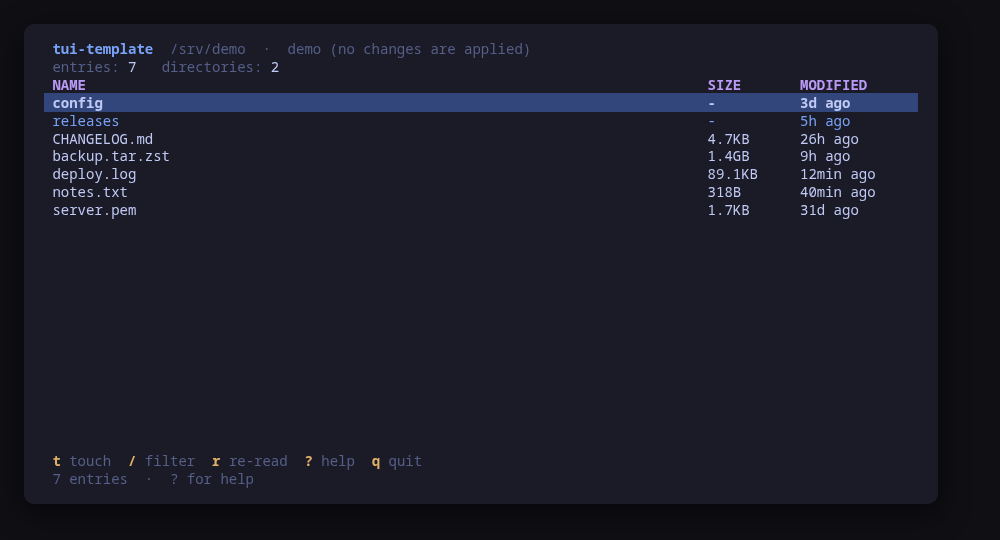
A terminal UI (TUI) for touch on Linux: the starting point for a new tool in the family.
unreleasedtemplateMIT
The list: the four bands every tool in the family draws
The starting point for a new tool in the family. Press Use this template, rename it, replace one package, and you have a tool that looks and behaves like the rest.
It is not a pile of TODOs: it is a working tool. It lists the files in a directory and can update a file's timestamp, which is deliberately trivial — what matters is the shape around it, and that shape is already correct: the action table that generates the key map, the help screen and the confirm dialog; the backend interface with a real and a fake implementation; --demo; CI; and GoReleaser.
This tool.json is itself the example. It is a valid manifest, validated against the schema on every CI run, and the values are the ones you replace.
Keys
Key
Action
t
Touch the selected file
/
Filter the list
r / ctrl+r
Re-read the directory
?
Help
q
Quit
Press ? inside the tool for the full help screen, which is generated from the same action table as the key map.
Compatibility
This tool is a face on the program below, so its version matters. Tested is not a claim: a version lands there only after the tool's own suite passed against it on a real machine in the lab, and the run is kept as evidence in the repository. At startup the tool probes the backend once and says what it found in its header — a version nobody has run against is shown as (untested) in the warning colour, one older than the minimum as (below minimum) in the error colour. Neither stops it: the backend still refuses what it cannot do, in its own words.
coreutils
touch ≥ 8.0
Binary
touch
Minimum
8.0
Probed with
touch --version
Tested
No recorded run yet. The tool still runs and reports the version it found as untested.
Needs a version this new
no-dereferencesince 8.1
What changes on older versions
coreutils <8.1
touch -h is missing, so the timestamp of a symlink is set on its target instead of on the link
Install
!
Not published yet. The command is what it will be once the package repository at pkgs.tui.tools is live. Until then, use the static binary or build from source.
Once per machine, then every tool in the family is one pacman away.
Add the repositorycoming soon
$ curl -fsSL https://pkgs.tui.tools/install.sh | sh
Or run the same thing yourself, one command at a time
A family whose whole promise is preview before you run is not going to insist you pipe a script into a shell. These are the commands that script runs.
The template is never packaged. Your tool's channel turns available once its first release lands in pkgs.tui.tools.
!
Not published yet. The command is what it will be once the package repository at pkgs.tui.tools is live. Until then, use the static binary or build from source.
Once per machine, then every tool in the family is one apt away.
Add the repositorycoming soon
$ curl -fsSL https://pkgs.tui.tools/install.sh | sh
Or run the same thing yourself, one command at a time
A family whose whole promise is preview before you run is not going to insist you pipe a script into a shell. These are the commands that script runs.
The template is never packaged. Your tool's channel turns available once its first release lands in pkgs.tui.tools.
!
Not published yet. The command is what it will be once the package repository at pkgs.tui.tools is live. Until then, use the static binary or build from source.
Once per machine, then every tool in the family is one dnf away.
Add the repositorycoming soon
$ curl -fsSL https://pkgs.tui.tools/install.sh | sh
Or run the same thing yourself, one command at a time
A family whose whole promise is preview before you run is not going to insist you pipe a script into a shell. These are the commands that script runs.
The template is never packaged. Your tool's channel turns available once its first release lands in pkgs.tui.tools.
!
Not published yet. The command is what it will be once the package repository at pkgs.tui.tools is live. Until then, use the static binary or build from source.
The template is never released. Your tool is, once you tag v0.1.0.
From source · tui-template
$ git clone https://github.com/tui-tools/tui-template
  cd tui-template && make demo
Or press "Use this template" on GitHub, which is the point of it.
What it can do to your machine
✓
Preview, then confirm
Every change is shown as an exact command line and confirmed before it runs. The dialog and the runner receive the same value, so the preview cannot drift from what executes.
•
Escalates for actions
Only the touch action escalates, and only when the configured prefix is non-empty. Listing a directory is an ordinary read. Replace this sentence with what your own tool escalates for.
✓
No daemon, no state of its own
Nothing keeps running after you quit, and nothing is installed to run later. The system is the source of truth; the tool re-reads it after every change.
✓
No network access
The tool opens no network connection of its own. No telemetry, no update check, no phone home.
✓
Static binary
Released statically linked, with no runtime dependencies to install.
•
No release yet
Nothing has shipped, so there is nothing to verify. Build from source in the meantime.
Reporting
Report a security issue privately, through GitHub's private vulnerability reporting on the repository's Security tab. The family-wide policy, and what counts as in scope, is on the security page.