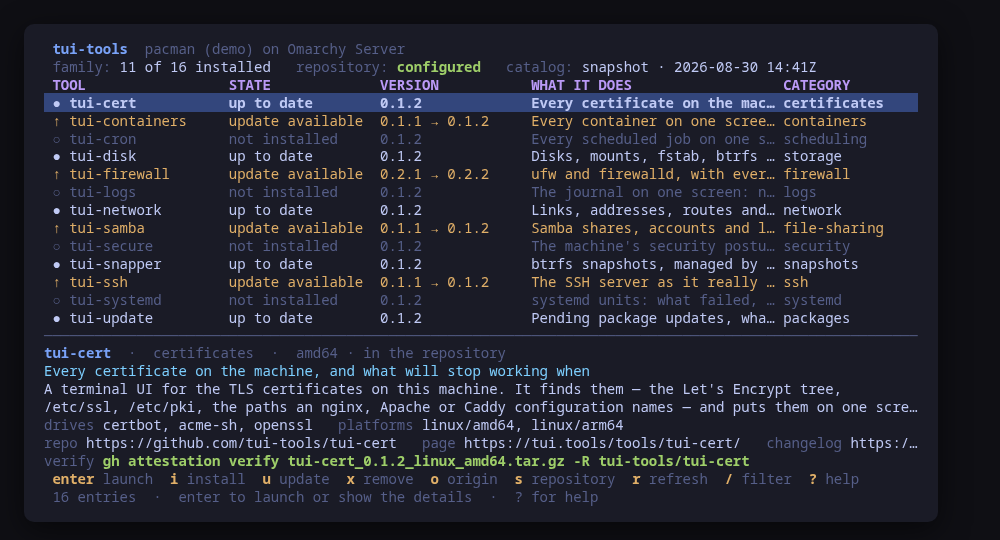
## tui-tools v0.3.2

tui-tools 0.3.2

The embedded catalog snapshot is refreshed: it now lists tui-dc, tui-router, tui-traffic, tui-tailscale and tui-wireguard (formerly tui-vpn), so the launcher shows the whole family even before it reaches the live catalog.

Built by this repository's CI on the tag itself. Each archive ships a
CycloneDX SBOM, `checksums.txt` carries a keyless cosign signature, and
every file has SLSA build provenance — see the README's "Verify a
download" for the two commands that check them.

The commits in this release:

## Changelog
* ab4c1827a8de917d6e83d027d00831306c7ff054 catalog: refresh the embedded snapshot (#25)
## tui-tools v0.3.1

tui-tools 0.3.1

Release notes (0.3.1): companion packages (headscale, tui-tools components) are now installed, upgraded and removed through tui-kit's companion builders instead of a copy kept in this launcher. Installs and upgrades still name the family repository on pacman (`tui-tools/headscale`), so Arch's own build of a mirror cannot win over the family's; apt and dnf get the bare name as before. apt steps, the switch to the family build included, now run with `DEBIAN_FRONTEND=noninteractive NEEDRESTART_MODE=a`, and every command runs without a controlling terminal, so a debconf, needrestart or password prompt fails fast instead of waiting invisibly behind the TUI.

Built by this repository's CI on the tag itself. Each archive ships a
CycloneDX SBOM, `checksums.txt` carries a keyless cosign signature, and
every file has SLSA build provenance — see the README's "Verify a
download" for the two commands that check them.

The commits in this release:

## Changelog
* 0fe5abe623eae4c60dd0ecb2545070fb5cd74e7a Take tui-kit v0.4.4: companions go through the kit's builders (#24)
## tui-tools v0.3.0

tui-tools 0.3.0: Omarchy installs, companions from the family repository, a running indicator

tui-tools 0.3.0 installs and updates on Omarchy. Omarchy's pacman hook refuses a direct `-Syu`, so there the launcher uses `pacman -S --needed` for tools and companions alike, and the confirm dialog explains why before anything runs. Plain Arch keeps `-Syu`. On pacman, companions such as headscale are now installed and updated as `tui-tools/<name>`, so the family's build is what arrives even when the distribution ships the same package, and `o` remains the one way to switch a copy that came from elsewhere. While an install, update or removal runs, the status line shows what is running and for how long, updated every second, so a slow download no longer looks like a frozen screen. Built on tui-kit v0.4.1, which no longer cuts a mutation off at the read timeout.

Built by this repository's CI on the tag itself. Each archive ships a
CycloneDX SBOM, `checksums.txt` carries a keyless cosign signature, and
every file has SLSA build provenance — see the README's "Verify a
download" for the two commands that check them.

The commits in this release:

## Changelog
* 2957f82984bab79e7c45fb8e42c239de333d4349 Record the lab run on Ubuntu 26.04: apt 3.2.0 tested (#22)
* f905bf0ce7605da914f94b936794342c4111a21d Release 0.3.0: Omarchy installs, running indicator; tui-kit v0.4.1 (#23)
## tui-tools v0.2.2

Ubuntu: the dashboard reads the machine again once dpkg knows a sibling tool's name without it being installed (tui-kit v0.3.2). The .deb path is now exercised in CI on Ubuntu LTS and devel, and apt 2.8.3 on Ubuntu 24.04 is recorded as tested.

Built by this repository's CI on the tag itself. Each archive ships a
CycloneDX SBOM, `checksums.txt` carries a keyless cosign signature, and
every file has SLSA build provenance — see the README's "Verify a
download" for the two commands that check them.

The commits in this release:

## Changelog
* 2e0d03092cb9061745562d82586f42356e403b55 Bump anchore/sbom-action/download-syft (#5)
* 32d6f879630994f8d46c78393d0280c6dfde5572 Bump anchore/sbom-action/download-syft in the github-actions group (#18)
* 1febed20aeb6744478e3ae6ca7ed247a9663fedb Bump the github-actions group with 4 updates (#19)
* 76628fe00fb573af772f75c4dc97f5b913135f12 README: link the tool's page on tui.tools (#17)
* fe6fc7992382b78a4fa7601b97919c6d21115876 README: point the install snippet at the current release (#16)
* 6a13c6c37097325e0a88d7f790338bde501fbaf1 Read the dpkg status for the family and the companions; guard the .deb path in CI (#21)
## tui-tools v0.2.1

tui-kit v0.3.0: the dialogs wrap and scroll instead of clipping the
command preview, and the picker filters as you type.

Built by this repository's CI on the tag itself. Each archive ships a
CycloneDX SBOM, `checksums.txt` carries a keyless cosign signature, and
every file has SLSA build provenance — see the README's "Verify a
download" for the two commands that check them.

The commits in this release:

## Changelog
* 5cffc85bf3773457fa40b6e4f7331e3e2c8d45b9 Bump tui-kit to v0.3.0 (#15)
* 541da53892282b130a36d7054a35bb443376c5e4 Re-render the README frames on the companions build (#14)
## tui-tools v0.2.0

v0.2.0

Built by this repository's CI on the tag itself. Each archive ships a
CycloneDX SBOM, `checksums.txt` carries a keyless cosign signature, and
every file has SLSA build provenance — see the README's "Verify a
download" for the two commands that check them.

The commits in this release:

## Changelog
* c25cd2e6a834404f6ae75e54d8a1c67fda22c9c2 A code of conduct that fits on one screen (#11)
* ed096cc3462b8ac4986bd8d172258b0870af400d Add --report, and a bug form that asks for it (#12)
* 65906d641b388bca2fadda50f23c65efea58ed45 Carry the OpenSSF Best Practices badge (#9)
* a5344ec3b5b5fad554ea98050ae8e558a3bde9fb Show the companions, and where each installed one came from (#13)
* bc4643d4471188e0c18a7f7180ac5ffa0eb2cb5a Take tui-kit v0.2.8: hashed pip install, provenance bundle on the release (#10)
## tui-tools v0.1.3

Release notes that say what changed

The release header now prints the whole tag message, so this paragraph is
the first release note a reader of the family sees on a release page.
Nothing in the launcher itself moved since v0.1.1: same dashboard, same
package, same epoch.

Built by this repository's CI on the tag itself. Each archive ships a
CycloneDX SBOM, `checksums.txt` carries a keyless cosign signature, and
every file has SLSA build provenance — see the README's "Verify a
download" for the two commands that check them.

The commits in this release:

## Changelog
* c10f83d71e7db96632ec951f8f8ab80638e9217d Print the whole tag message, not only its body (#8)
## tui-tools v0.1.2


Built by this repository's CI on the tag itself. Each archive ships a
CycloneDX SBOM, `checksums.txt` carries a keyless cosign signature, and
every file has SLSA build provenance — see the README's "Verify a
download" for the two commands that check them.

The commits in this release:

## Changelog
* bad69f56854ddf9a474cbc70528c11f22da96fb9 Fetch the tag annotation before releasing (#7)
* 5191fe142898ffde4020e838e47e2f59cae4920e Say beta once (#6)
## tui-tools v0.1.1


Built by this repository's CI on the tag itself. Each archive ships a
CycloneDX SBOM, `checksums.txt` carries a keyless cosign signature, and
every file has SLSA build provenance — see the README's "Verify a
download" for the two commands that check them.

The commits in this release:

## Changelog
* 9739acf69ba242bff964856368eb6ecf1e3fc07d Pin what CI runs, fuzz the parsers, and say the releases are signed (#4)
## Changelog
* 22ef3093debdf59d9e3be1f96ed0d5a40c812978 Initial commit
* c6fe870df208bf0145a417b5616b68269814b0dc Outrank the metapackage that used to carry this name (#3)
* 43ce7c9482beb181af6d0b7e3d48f1ad3c170587 Take tui-kit v0.2.7: an Arch install is one -Syu step (#2)
* e4955cd15ae8779c798e684202cf18791d923079 The launcher: every tool of the family in one dashboard (#1)