The SSH server as it really is, with every change previewed before it runs
A terminal UI (TUI) for ssh on Linux: the machine's SSH server.
v0.2.2betasshMIT
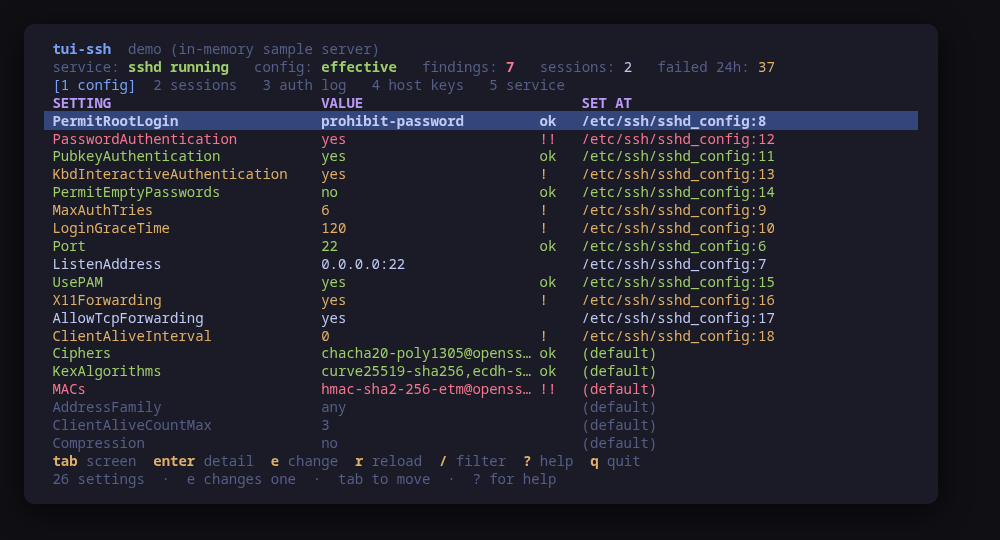
The effective configuration: the settings that decide who gets in, each with a verdict and the file that set it
A terminal UI for the machine's SSH server. It asks sshd what its configuration actually is — sshd -T, not what a file says — and shows the settings that decide who gets in first, each with a verdict and the file and line that set it.
Five more screens complete the picture: who is logged in right now and a way to end a session; what the authentication log says over the last day or week; the host keys and their fingerprints; the unit and its sockets; and the local accounts with the keys that log into them, where one is added or removed.
Changes go to a drop-in: tui-ssh never rewrites /etc/ssh/sshd_config. It writes 90-tui-ssh.conf, checks the staged file with sshd -t -f before asking anything, and shows the diff and both commands. sshd takes the first value it is given, so the include order is read too: if another file already sets the keyword earlier, the tool says so instead of writing a line that would be ignored. A keyword can also go inside a Match block, which the file keeps last: sshd reads what follows one as part of it.
Run tui-ssh --demo to drive a sample server: every key works, every command is built and previewed for real, and nothing touches your system.
Keys
Key
Action
tab / 1-6
Move between config, sessions, auth log, host keys, service and users
enter
Open the selected row in full
e
Change the selected setting, written to a drop-in with a diff to confirm
m
Change a setting inside a Match block, for some connections only
A
Add a public key to an account's authorized_keys
t
End the selected session
b
Block the selected address at the firewall
w
Switch the log window between the last 24 hours and 7 days
K
Regenerate the server's host keys, old ones moved aside
r
Reload the SSH service
/
Filter the rows of the current screen
R
On users, remove the selected key; on every other screen, re-read
ctrl+r
Re-read the server, from any screen
?
Help
q
Quit
Press ? inside the tool for the full help screen, which is generated from the same action table as the key map.
Compatibility
This tool is a face on the program below, so its version matters. Tested is not a claim: a version lands there only after the tool's own suite passed against it on a real machine in the lab, and the run is kept as evidence in the repository. At startup the tool probes the backend once and says what it found in its header — a version nobody has run against is shown as (untested) in the warning colour, one older than the minimum as (below minimum) in the error colour. Neither stops it: the backend still refuses what it cannot do, in its own words.
openssh
ssh ≥ 8.2
Binary
ssh
Minimum
8.2
Probed with
ssh -V
Tested
9.610.210.5
Needs a version this new
include-dropinssince 8.2
kbd-interactivesince 8.7
What changes on older versions
openssh >=10.5
sshd -T prints the canonical spelling of every keyword (PermitRootLogin no) where 10.2 and earlier lower-case it (permitrootlogin no); both forms are parsed to the canonical name, so the verdicts and the source lines are the same either way
openssh >=8.2
the version comes from ssh -V, which prints to standard error; sshd -V only exists from OpenSSH 9.6, so asking the server itself would report nothing over most of the supported range
openssh <8.2
Include does not exist, so /etc/ssh/sshd_config.d is never read; tui-ssh will not rewrite sshd_config itself, so the editor has nowhere to write and says so
openssh <8.7
KbdInteractiveAuthentication is still spelled ChallengeResponseAuthentication; both are read, and the old name is what gets written
Maintain openssh? You are welcome to help shape this tool. About → maintainers
Install
Once per machine, then every tool in the family is one pacman away.
Add the repository
$ curl -fsSL https://pkgs.tui.tools/install.sh | sh
Or run the same thing yourself, one command at a time
A family whose whole promise is preview before you run is not going to insist you pipe a script into a shell. These are the commands that script runs.
Upgrades then arrive with the rest of your system updates.
!
Not published yet. The command is what it will be once the package repository at pkgs.tui.tools is live. Until then, use the static binary or build from source.
Arch Linux (AUR) · tui-ssh-bincoming soon
$ paru -S tui-ssh-bin
The -bin package installs the released static binary.
Once per machine, then every tool in the family is one apt away.
Add the repository
$ curl -fsSL https://pkgs.tui.tools/install.sh | sh
Or run the same thing yourself, one command at a time
A family whose whole promise is preview before you run is not going to insist you pipe a script into a shell. These are the commands that script runs.
Upgrades then arrive with the rest of your system updates.
!
Not published yet. The command is what it will be once the package repository at pkgs.tui.tools is live. Until then, use the static binary or build from source.
Needs the tui-tools repository, a one-time setup you do once per machine.
openSUSE · tui-sshcoming soon
$ sudo zypper install tui-ssh
The rpm repository is shared with dnf; zypper support is not tested yet.
One static binary. Verify it against checksums.txt from the same release.
From source · tui-ssh
$ git clone https://github.com/tui-tools/tui-ssh
  cd tui-ssh && make build
  sudo install -m0755 bin/tui-ssh /usr/local/bin/tui-ssh
Needs Go 1.27 or newer.
What it can do to your machine
✓
Preview, then confirm
Every change is shown as an exact command line and confirmed before it runs. The dialog and the runner receive the same value, so the preview cannot drift from what executes.
•
Escalates for actions
Two reads escalate through sudo -n, which never prompts: sshd -T, and cat for a file the plain read cannot open — sshd_config on Fedora and Arch, or another account's authorized_keys. Both fall back rather than demand a password, and the screen says so. Every change escalates too.
✓
No daemon, no state of its own
Nothing keeps running after you quit, and nothing is installed to run later. The system is the source of truth; the tool re-reads it after every change.
✓
No network access
The tool opens no network connection of its own. No telemetry, no update check, no phone home.
✓
Static binary
Released statically linked, with no runtime dependencies to install.
✓
Signed release, with provenance
checksums.txt carries a keyless cosign signature from this repository's release workflow, every archive has a CycloneDX SBOM, and every archive, package and the checksum file carry SLSA build provenance. The security page shows the three commands that check it.
Reporting
Report a security issue privately, through GitHub's private vulnerability reporting on the repository's Security tab. The family-wide policy, and what counts as in scope, is on the security page.
## tui-ssh v0.2.2

tui-ssh 0.2.2: tui-kit v0.4.4

tui-ssh 0.2.2 moves to tui-kit v0.4.4: every sshd, ssh-keygen and systemctl step now runs in its own session without a controlling terminal, so a step that would prompt fails at once instead of hanging behind the UI, and a failed step reports its meaningful line, cleaned of escape codes. Command previews are POSIX shell-quoted, the README screenshots are re-rendered with continuous box borders, and the README banner now carries the kit's stability markers.

Built by this repository's CI on the tag itself. Each archive ships a
CycloneDX SBOM, `checksums.txt` carries a keyless cosign signature, and
every file has SLSA build provenance — see the README's "Verify a
download" for the two commands that check them.

The commits in this release:

## Changelog
* fdf7deb4c88b0fb3005d25a1cdfd0716ceb540fc 0.2.2: tui-kit v0.4.4 (#17)
* 2241f127d4112cc94e692d53908524e7833a0b7e Bump anchore/sbom-action/download-syft (#3)
* 3d8d12a6396c24ed7df53e8e46081f7893527401 Bump anchore/sbom-action/download-syft in the github-actions group (#15)
* 02a622e5d5947e254addf486042e7de52df6af88 Bump the github-actions group with 4 updates (#16)
* b18f5e7277d659cce53d48ed7cdba8b9d5e568fa README: link the tool's page on tui.tools (#14)
* 28931ddb400ac41443147ab3a945cc0c41d1fef8 README: point the install snippet at the current release (#13)
## tui-ssh v0.2.1

tui-kit v0.3.0: the dialogs wrap and scroll instead of clipping the
command preview, and the picker filters as you type.

Built by this repository's CI on the tag itself. Each archive ships a
CycloneDX SBOM, `checksums.txt` carries a keyless cosign signature, and
every file has SLSA build provenance — see the README's "Verify a
download" for the two commands that check them.

The commits in this release:

## Changelog
* 59f464bd9b76a11ce67056a275d49d1de88330d5 Bump tui-kit to v0.3.0 (#12)
## tui-ssh v0.2.0

Manage, not view (wave 3): create what does not exist, edit what does; lab-validated.

Built by this repository's CI on the tag itself. Each archive ships a
CycloneDX SBOM, `checksums.txt` carries a keyless cosign signature, and
every file has SLSA build provenance — see the README's "Verify a
download" for the two commands that check them.

The commits in this release:

## Changelog
* 7de9b8fad1e34aab24b355b302a584b055330939 A code of conduct that fits on one screen (#9)
* f411e9dbb9b58995adbadb207913773ad832dd30 Add --report, and a bug form that asks for it (#10)
* cee2339649efe65892abca497c56e98d9a72d3ec Authorized keys and Match blocks from the TUI (#11)
* 0b5657572829034d7a747fe2ea9d3f4edb4e7f4e Carry the OpenSSF Best Practices badge (#7)
* 9c967dfcb1214ae3ef70c89c9b06db31ce4be23b Fetch the tag annotation before releasing (#5)
* 1d9051197bcfdc953a0a15e3b439aee8fe76fe9c Pin what CI runs, fuzz the parsers, and say the releases are signed (#2)
* 8c8401431438edd3c4522951b8a14e02b4027176 Print the whole tag message, not only its body (#6)
* ff9d48bc4abb5d680d8d80900869b212b3417291 Say beta once (#4)
* b33b5fcb3eb76e6e5f4d46db0b4cd6d90776698d Take tui-kit v0.2.8: hashed pip install, provenance bundle on the release (#8)
## Changelog
* ffcdb96595e5c0c7d81efe483fbfe91a5b180151 Drop cross-repo dispatch; the package repo and the site poll releases
* 3a41d0f39fa195a04fb3324a8bc59510d436840b Gate the release on a security job, and sign what it publishes (#1)
* f0c68266be6668976ee83cf817cb805b971cdbac Stop telling readers the packages are unpublished
## Changelog
* 1ee39bd3044f0d5ff14b0c6b656ce9dba42ce962 Packages are available from pkgs.tui.tools
* 15c103805478584a468d95b47c5a8523b9c9c192 Re-pin the kit at v0.2.3
* 9848e306785c46b81e361743accd591fa3cdccb2 Ship the tool as a .deb, an .rpm and a pacman package
* cb788ef277f7ee9c67a287f194afb49a20ce215b Stop flagging two defaults, and parse the sshd -T of OpenSSH 10.5
## Changelog
* 9340594db1c9641ef051937f8907d89ef6786dae Initial commit
* 453e9ea9679c3cf1373ce8c90aba8566ae2ae0bd Stop the version probe test pinning the CI image's OpenSSH
* bb1845bbeb057c17442bfe93d5c483e8ace2b67a Turn the template into tui-ssh