## tui-secure v0.2.3

tui-secure 0.2.3: tui-kit v0.4.4; ufw enable confirmed by the tool

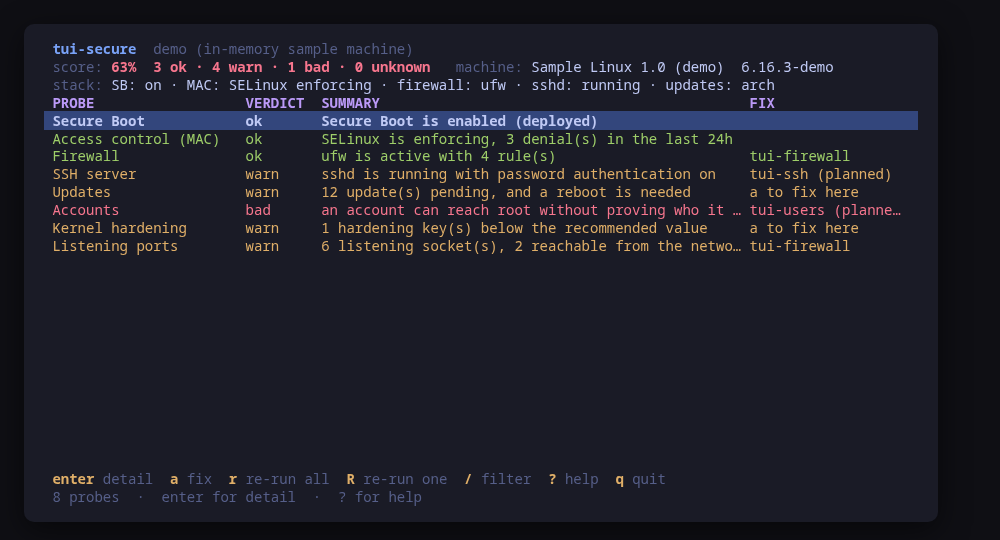
tui-secure 0.2.3 moves to tui-kit v0.4.4: every probe and fix now runs in its own session without a controlling terminal, so a step that would prompt fails at once instead of hanging behind the UI, and a failed step reports its meaningful line, cleaned of escape codes. Command previews are POSIX shell-quoted, the README screenshots are re-rendered with continuous box borders, and the README banner now carries the kit's stability markers.
Enabling ufw is now confirmed by the tool alone. Without a terminal, ufw's own "Command may disrupt existing ssh connections. Proceed (y|n)?" could no longer be answered over ssh, so the fix runs `ufw --force enable`, as tui-firewall does. The question ufw used to ask moved into the confirm dialog, with its answer read first: the plan reads `ufw show added` and the default incoming policy (read-only) and checks the ssh port this session came in on, or the one sshd listens on. The dialog says plainly whether that port is allowed and by which rule. When it is not, is allowed only from some sources, or the rules could not be read, the warning is in the dialog's red title before `y`.
Validated in an ubuntu:24.04 container with ufw 0.36.2, driven through tmux: with `ufw allow 22/tcp` the dialog says ssh stays reachable, names the rule, and `y` leaves ufw active; with only `ufw allow 80/tcp` the title reads "Enable ufw: ssh port 22 is NOT allowed", `n` cancels, and ufw stays inactive.

Built by this repository's CI on the tag itself. Each archive ships a
CycloneDX SBOM, `checksums.txt` carries a keyless cosign signature, and
every file has SLSA build provenance — see the README's "Verify a
download" for the two commands that check them.

The commits in this release:

## Changelog
* be29a96df1ce4d39255cea7622e4a51550bf0e99 0.2.3: tui-kit v0.4.4; ufw enable confirmed by the tool (#21)
* 010c5589760c596c5bcc28605cc37fd0b3f22547 Bump anchore/sbom-action/download-syft (#3)
* 8d879e949a0b8dc269f8f5fdb9b093d51f3525b5 Bump anchore/sbom-action/download-syft in the github-actions group (#19)
* 2031a51f55eb1e0700f979c5e01a45eb9bfc0748 Bump the github-actions group with 4 updates (#20)
* 9e576ce95f69ed643b178ff15964b597fcbda9ed README: link the tool's page on tui.tools (#18)
* 6e31ba3402a9516804a20a4d9cd3fbe5a7ad55ce README: point the install snippet at the current release (#17)
## tui-secure v0.2.2

Offer the sshd fix the row says is missing, and count the kernel fixes it has.

Also: tui-kit v0.3.0 — dialogs wrap and scroll instead of clipping the
command preview, and the picker filters as you type.

Built by this repository's CI on the tag itself. Each archive ships a
CycloneDX SBOM, `checksums.txt` carries a keyless cosign signature, and
every file has SLSA build provenance — see the README's "Verify a
download" for the two commands that check them.

The commits in this release:

## Changelog
* 7d750eb5603b43ea6e0a966a5cffb5b854161219 Bump tui-kit to v0.3.0 (#16)
* c05ce5371986bce81e7c59fd24a13fe9884a641b Offer the sshd fix the row says is missing, and count the kernel fixes it has (#15)
## tui-secure v0.2.1

v0.2.1

Built by this repository's CI on the tag itself. Each archive ships a
CycloneDX SBOM, `checksums.txt` carries a keyless cosign signature, and
every file has SLSA build provenance — see the README's "Verify a
download" for the two commands that check them.

The commits in this release:

## Changelog
* 9b637fb7afd8b7c18249de291c754140ce151aba Say which binary the smoke tests, and unmap loopback before judging reach (#14)
## tui-secure v0.2.0

Manage, not view (wave 2): apply what it diagnoses, author what it manages; lab-validated.

Built by this repository's CI on the tag itself. Each archive ships a
CycloneDX SBOM, `checksums.txt` carries a keyless cosign signature, and
every file has SLSA build provenance — see the README's "Verify a
download" for the two commands that check them.

The commits in this release:

## Changelog
* c5a191d091e4947e57b91fe844de39ed8e828376 A code of conduct that fits on one screen (#9)
* 4b57e20142a7fac45d875f55f8676bfe99a52209 Add --report, and a bug form that asks for it (#10)
* 2dac58457540acc789a7fc5376e4df7248cad741 Apply what it diagnoses: sshd enforce, firewall enable parity (#12)
* 3ef24068d59c29e9f3800d53859cd99923b2d671 Carry the OpenSSF Best Practices badge (#7)
* ffb5783b67e339861b058f6aebd57f78febca4b7 Do not search the distro line for the host name (#11)
* d63ad90fe05d8ce7dc193a7cf3eee7730ee39a50 Fetch the tag annotation before releasing (#5)
* 1fae5ffa4f0e31ab2b2eafdc6a467208c0cd2152 Pin what CI runs, fuzz the parsers, and say the releases are signed (#2)
* 0c4754496b6e6742db60fa0f64f9c78a34851758 Print the whole tag message, not only its body (#6)
* fd1832b11e5d72c47a601b490674111b73670940 Say beta once (#4)
* 3e2504de4d96d2245d929d3f6e94b8f9abc04bbb Take tui-kit v0.2.8: hashed pip install, provenance bundle on the release (#8)
## Changelog
* a6db62ae259503283f6003ae802d95d7ab84fda4 Drop cross-repo dispatch; the package repo and the site poll releases
* 18863b793ca7df03f4eef7d3da6642e51f4f877f Gate the release on a security job, and sign what it publishes (#1)
* 9b78d4e93303b38f0d081ea2bf1d14f41666331f Stop telling readers the packages are unpublished
## Changelog
* 23296ec4701a65c4cca4b00c3cb0ccfb57e7964d Packages are available from pkgs.tui.tools
* a9a974009f517847df38208adfee279cfbd4e2cb Re-pin the kit at v0.2.3
* 2002cc75b4a739eb15550fe7ddcf33076254a2ba Record the first real-machine compatibility run
* cc619794049ce563e93019913e448735ae35a015 Ship the tool as a .deb, an .rpm and a pacman package
## Changelog
* 5dc90ba63ada888548d488933f2a156290368403 Give it a face: the branding, six frames and the README
* c88b946d7742b36472d82684d08e29c36b8a4117 Initial commit
* ba9c696b4571b6f1d361b32ff47bb01fc10130ca Point the install line at v0.1.0
* aac2efff07610fc50ec9b580163f67e9dd524803 Prove it against a real machine, and record which one
* 95ec8cf975f35dff981e890546967345579d41a8 Read the machine's posture: the model, the backend and its probes
* 1e2288fb487f499f895d7e66a01c376cbecafb83 Start tui-secure from the family template
* 970ac953a060e0e4752f796b52322e06e0fa7f73 The screens: the posture, one probe in full, and one confirm dialog