## tui-router v0.4.0

tui-router 0.4.0

- **New Tailnet card**, between VPN and Updates, managed by tui-tailscale. ENTER hands the terminal to `tui-tailscale` (resolved absolute path, no arguments), like every other card.
- The card's summary comes from `tui-tailscale --check`, run unprivileged through the router's exec site and cached for a minute: whether this host's node is online and how many peers it sees, whether this host runs the headscale control plane, its node count, and the first step it still lacks (tui-tailscale's readiness `next`, with the step in words in the detail). Examples: `node online · headscale: unit`, `node online · 3 of 4 peers`, `headscale ready · 5 nodes`.
- Without the binary the card reads `tui-tailscale (not installed)` with the family hint that it comes from pkgs.tui.tools. A document of the wrong shape (not JSON, another tool's, missing halves, negative counts) is refused with a reason and the card reads unknown.
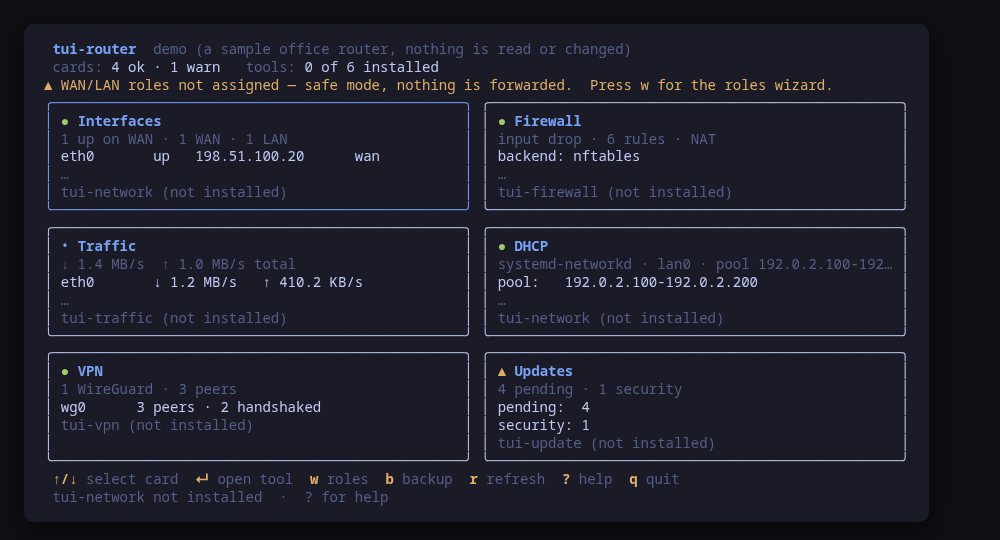
- **Grid for seven cards**: the column count no longer reserves a gap after the last column (104 columns now fit three cards), a short last row stretches across the grid, and a screen too short for every row at full height moves the tool foot onto the title row, so all seven cards fit 80x24 even with the roles banner up. A card with room for one body line now keeps its summary instead of showing only an ellipsis.
- `--check` gains the `tailnet` card and `snapshot.tailnet` (additive; no field removed or renamed).
- `--report` lists every card's managing tool, now including tui-tailscale and tui-update.
- `--demo` shows a node that also runs headscale one step short of ready, the same state `tui-tailscale --demo --check` reports.
- README (cards table, intro, demo paragraph, install snippet at 0.4.0), tool.json description, screenshots re-rendered (the selected-card frame now selects the Tailnet card), smoke test asserts the card.

Built by this repository's CI on the tag itself. Each archive ships a
CycloneDX SBOM, `checksums.txt` carries a keyless cosign signature, and
every file has SLSA build provenance — see the README's "Verify a
download" for the two commands that check them.

The commits in this release:

## Changelog
* 987ee27bc11942202eb79c3dab185d166d528088 0.4.0: a Tailnet card that hands off to tui-tailscale (#14) (#16)
## tui-router v0.3.4

tui-router 0.3.4

tui-router 0.3.4 follows the tui-vpn rename: ENTER on the VPN card now opens tui-wireguard (0.5.0 and later), where 0.3.3 looked for the old tui-vpn binary and reported the tool as not installed once the new package was in. A machine that still carries only the old `tui-vpn` binary keeps working: the card hands off to it and the status line says it was renamed and the package should be upgraded; `--check` carries the same hint as `toolHint`, and `--report` lists the old binary when it is present. The headscale control plane the card detects is now managed by tui-tailscale, which you run directly for now (a way into it from the cockpit is tracked in #14).

Built by this repository's CI on the tag itself. Each archive ships a
CycloneDX SBOM, `checksums.txt` carries a keyless cosign signature, and
every file has SLSA build provenance — see the README's "Verify a
download" for the two commands that check them.

The commits in this release:

## Changelog
* 41997329e2ccd30f75626ffcbdc38fa7be0fe182 0.3.4: the VPN card hands off to tui-wireguard (#15)
## tui-router v0.3.3

tui-router 0.3.3: tui-kit v0.4.4

tui-router 0.3.3 moves to tui-kit v0.4.4: every probe now runs in its own session without a controlling terminal, so nothing can wait on a prompt hidden behind the cockpit, while the hand-off to the managing tool keeps going through tea.Exec and keeps the terminal. The README screenshots are re-rendered with continuous box borders, and the beta banner now sits between the kit's stability markers and carries the family's standard wording.

Built by this repository's CI on the tag itself. Each archive ships a
CycloneDX SBOM, `checksums.txt` carries a keyless cosign signature, and
every file has SLSA build provenance — see the README's "Verify a
download" for the two commands that check them.

The commits in this release:

## Changelog
* 7ee100b4ecd9b14287cbecf3d3781d510b65ed20 0.3.3: tui-kit v0.4.4 (#13)
* 64103bd68da4e068db5a7284f83d2ee21d290fec Bump the github-actions group with 4 updates (#11)
* f2d072cd067fe963ee3e9e0fc5eda0ea4654b9e0 README: link the tool's page on tui.tools (#10)
* 5bd2df340cf40a73ef0fa70ba6379fa15cde5437 README: point the install snippet at the current release (#9)
## tui-router v0.3.2

DHCP card reads systemd-networkd's own server, and the wizard states its own verdict

Built by this repository's CI on the tag itself. Each archive ships a
CycloneDX SBOM, `checksums.txt` carries a keyless cosign signature, and
every file has SLSA build provenance — see the README's "Verify a
download" for the two commands that check them.

The commits in this release:

## Changelog
* 8f35ac18d8dbd18335d16a69eb0e704323911f0d DHCP card: read systemd-networkd's own server (#8)
## tui-router v0.3.1

Roles wizard: cancel the revert without reporting a false failure.

Also: tui-kit v0.3.0 — dialogs wrap and scroll instead of clipping the
command preview, and the picker filters as you type.

Built by this repository's CI on the tag itself. Each archive ships a
CycloneDX SBOM, `checksums.txt` carries a keyless cosign signature, and
every file has SLSA build provenance — see the README's "Verify a
download" for the two commands that check them.

The commits in this release:

## Changelog
* c0ecf66571db67f267345cf7383e974481bd58c1 Bump tui-kit to v0.3.0 (#7)
* b9cc8ab53514aad503b520c6bccaa3c5461cbad4 Roles wizard: cancel the revert without a false failure (#6)
## tui-router v0.3.0

Manage, not view (wave 2): apply what it diagnoses, author what it manages; lab-validated.

Built by this repository's CI on the tag itself. Each archive ships a
CycloneDX SBOM, `checksums.txt` carries a keyless cosign signature, and
every file has SLSA build provenance — see the README's "Verify a
download" for the two commands that check them.

The commits in this release:

## Changelog
* 9c4f5a04e0f11d0666e42c1ad3a8ddaa341964e2 Single-artifact backup/restore (item 15, complete) (#3)
* 691d94562e551636878bee8e5ba4c58a34b3aacc tool.json: released (#5)
## tui-router v0.2.0

Manage, not view: create and edit from the TUI (wave 1), lab-validated on the router image.

Built by this repository's CI on the tag itself. Each archive ships a
CycloneDX SBOM, `checksums.txt` carries a keyless cosign signature, and
every file has SLSA build provenance — see the README's "Verify a
download" for the two commands that check them.

The commits in this release:

## Changelog
* 0fe4b2d86b92763a7f068d0b04d05d677e2c6a50 Roles wizard, updates card, reboot — the cockpit learns to manage (#4)
## tui-router v0.1.0

First validated release: the router-1.0 lab ran this tool against real VMs (tui-lab router topology).

Built by this repository's CI on the tag itself. Each archive ships a
CycloneDX SBOM, `checksums.txt` carries a keyless cosign signature, and
every file has SLSA build provenance — see the README's "Verify a
download" for the two commands that check them.

The commits in this release:

## Changelog
* 2aa8ab1295eaca0915c657c2f8599e4f74bf38e5 Bump anchore/sbom-action/download-syft (#1)
* 79dfff77175a8c5909dcdc00ce87036e1536a7af Initial commit
* 23a230435e1388b2d9a8755bf51a672d3065e067 tui-router phase 1: the read-only router cockpit (#2)