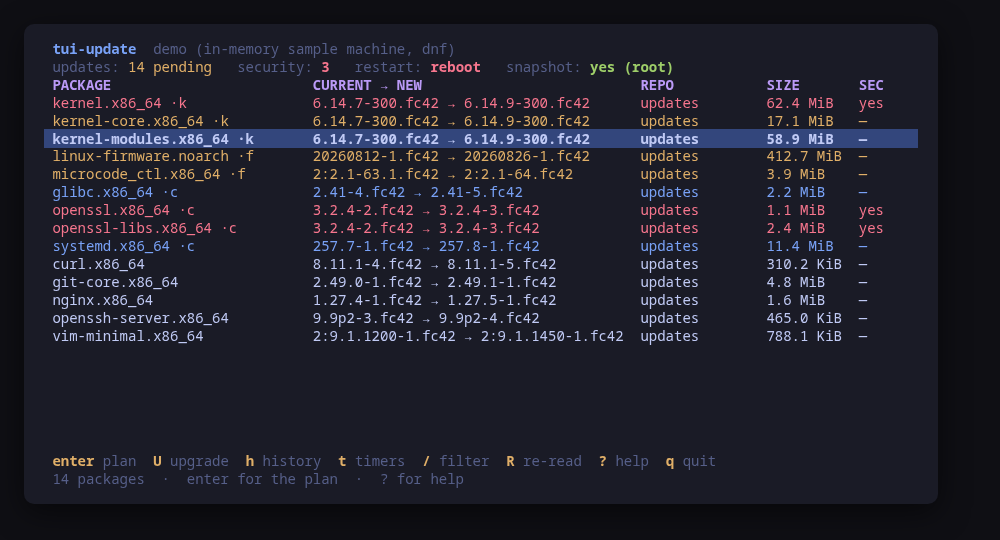
## tui-update v0.3.1

tui-update 0.3.1

- The pre/post snapshot pair around an upgrade now completes: the post snapshot is created with the number the pre snapshot printed, and the preview shows where it goes. If the pre snapshot fails, the upgrade does not run; if a later step fails, the pre snapshot's number and the command that removes it are shown.
- The snapshot commands now select the snapper configuration correctly (`snapper -c root create ...`). Before, `root` was taken as the snapshot's cleanup algorithm.
- apt and dpkg progress lines that redraw in place show only their final state in the apply pane instead of every state glued together.

Built by this repository's CI on the tag itself. Each archive ships a
CycloneDX SBOM, `checksums.txt` carries a keyless cosign signature, and
every file has SLSA build provenance — see the README's "Verify a
download" for the two commands that check them.

The commits in this release:

## Changelog
* c27859348a1efe08c5036adbb7f359edd5405ede 0.3.1: pair the snapper post snapshot by number; clean apt progress in the apply pane (#25)
## tui-update v0.3.0

tui-update 0.3.0

tui-kit v0.4.4 runs every command in a session with no terminal, so a program that asks a question fails at once instead of hanging behind the screen. The two upgrades that could ask are now handled.
- **apt upgrades ask nothing.** The upgrade runs as `sudo -n env DEBIAN_FRONTEND=noninteractive NEEDRESTART_MODE=a apt-get -y -o Dpkg::Options::=--force-confdef -o Dpkg::Options::=--force-confold upgrade` (or `dist-upgrade`). debconf takes its defaults, needrestart restarts the services left on replaced libraries, and a config file changed on the machine keeps the local version (the package's version is left beside it as `.dpkg-dist`). The confirm dialog shows the full command line and explains all three parts.
- **Omarchy Server's updater gets the terminal.** `omarchy-server-update run --no-reboot` is interactive by design, so it no longer runs as a background step. After the same preview and confirm, tui-update hands the terminal over to it (`tea.Exec`). When it exits, the screen comes back, the sequence continues and the machine is read again. It is previewed and run with `sudo` rather than `sudo -n`, because it has a terminal where sudo can ask for a password.
- **`--demo-machine ubuntu|omarchy`** runs both paths on a sample machine (the default is `fedora`). On the Omarchy sample machine, the hand-off shows on the real terminal what would run there and waits for Enter.
- README: new section "Nothing asks behind the screen", two new screenshots (`confirm-apt`, `confirm-omarchy`), and the install snippet now points at 0.3.0.

Built by this repository's CI on the tag itself. Each archive ships a
CycloneDX SBOM, `checksums.txt` carries a keyless cosign signature, and
every file has SLSA build provenance — see the README's "Verify a
download" for the two commands that check them.

The commits in this release:

## Changelog
* 9e2a37ec30b4eecc8f96444b6c29af9643e555e9 Non-interactive apt upgrades; Omarchy's updater as a hand-off (#21) (#22)
## tui-update v0.2.2

tui-update 0.2.2: tui-kit v0.4.4

tui-update 0.2.2 moves to tui-kit v0.4.4: every package manager step now runs in its own session without a controlling terminal, so a step that would prompt fails at once instead of hanging behind the UI, and a failed step reports its meaningful line, cleaned of escape codes. Command previews are POSIX shell-quoted (the dnf and rpm query formats now read quoted), `--check` keeps emitting no null now that kit commands carry an Env list, the README screenshots are re-rendered with continuous box borders, and the README banner now carries the kit's stability markers.

Built by this repository's CI on the tag itself. Each archive ships a
CycloneDX SBOM, `checksums.txt` carries a keyless cosign signature, and
every file has SLSA build provenance — see the README's "Verify a
download" for the two commands that check them.

The commits in this release:

## Changelog
* 614c88d83365a3521ffb75afcb889789bdeef220 0.2.2: tui-kit v0.4.4 (#20)
* e9ffe64b4c134bb633323be77e10ecd6464c3ad8 Bump anchore/sbom-action/download-syft in the github-actions group (#18)
* 33a9dda56d8e18f83c25cc73e0a30e46f65600b1 Bump the github-actions group with 4 updates (#19)
* a2d8ca13eebccd647c7eac80d4ac9d37a90a352e README: link the tool's page on tui.tools (#17)
* eac0a70d16983a6e91c0f62606858f42c53aebb7 README: point the install snippet at the current release (#16)
## tui-update v0.2.1

tui-kit v0.3.0: the dialogs wrap and scroll instead of clipping the
command preview, and the picker filters as you type.

Built by this repository's CI on the tag itself. Each archive ships a
CycloneDX SBOM, `checksums.txt` carries a keyless cosign signature, and
every file has SLSA build provenance — see the README's "Verify a
download" for the two commands that check them.

The commits in this release:

## Changelog
* a449f959cfb784dd3aa0290f0bab1c2a273e1cef Bump tui-kit to v0.3.0 (#15)
## tui-update v0.2.0

Manage, not view (wave 3): create what does not exist, edit what does; lab-validated.

Built by this repository's CI on the tag itself. Each archive ships a
CycloneDX SBOM, `checksums.txt` carries a keyless cosign signature, and
every file has SLSA build provenance — see the README's "Verify a
download" for the two commands that check them.

The commits in this release:

## Changelog
* 1c308b158e3d10bc1e4dfcb821f91130df704870 A code of conduct that fits on one screen (#11)
* dd66fddfa54f0222baf514944ecd759af3701c68 Add --report, and a bug form that asks for it (#12)
* 4b4f68d46a38946fb4c5fe0c95b597f65666c865 Carry the OpenSSF Best Practices badge (#9)
* a3c836b10a8dd8acb40a9ed98234a490811efd39 Fixtures from nobody's machine (#3)
* a7d445d803d6ae94f4e278527f706c5816b79e67 Let the kit detect the manager, and keep only the update-specific half (#2)
* 470268612261b2a989e17d20f8587d0a7dc1f2f7 Pin what CI runs, fuzz the parsers, and say the releases are signed (#4)
* e0b3c069cc2deb9aabc5b80a41750c1f9507c1e3 Point the screenshot manifest at the frame that exists (#13)
* b6676160318032cd8b5aaec6713fb6b18dfeb170 Print the whole tag message, not only its body (#8)
* 3571ba88332b9258f0a7b91c33f98b4e04f7c79f Say beta once, and fetch the tag annotation before releasing (#7)
* 1b57822d674deb74764e2fa170f0340eba93a8ab Security-only upgrades, snapshot toggle, package holds (#14)
* e2d1e8b5b3e023b617ef9a39b7f252c0d7b761ad Take the govulncheck note back out of ci.yml (#6)
* d618c77fb260215b1c9f390c8f4b76596939d5b0 Take tui-kit v0.2.8: hashed pip install, provenance bundle on the release (#10)
## Changelog
* f0b4702892daafa88d6d04d97bbee1aadb610123 Drop cross-repo dispatch; the package repo and the site poll releases
* 37bfa305e336457c3ac889a0512071c264dec23f Gate the release on a security job, and sign what it publishes (#1)
* 636a0a24903b2519b205a8549fcd6214bfc68d65 Stop telling readers the packages are unpublished
## Changelog
* 6e872cc9b7abad19ddb1c868899e70d58f3b81df Packages are available from pkgs.tui.tools
* 250cde4e769a6120d4907b5aa6ef944267140bf5 Re-pin the kit at v0.2.3
* d9c3ed1e2a9654203aa7fe29a022bf9f4782066d Read the pending list on a machine checkupdates cannot run on
* 043fce7b7933b4c59931515c9c0fc8becc780d07 Read the version banners from the captured fixtures
* 43d2b76c3bc5d3e0d8a1fe004e9763af1eeebee4 Ship the tool as a .deb, an .rpm and a pacman package
* 4f49f0f222f37e2be5cd8f81e29e35f60449ea96 Show the apply screen the README was missing
## Changelog
* 7429a1b25376a82aae1d0d75ffa9410d7c0e3682 Initial commit
* 30753be833bd60f2b7d1085c988d38d5c089b865 Make tui-update the machine's update screen