

Links, addresses, routes and DNS, with every change previewed before it runs
v0.1.1networkMIT
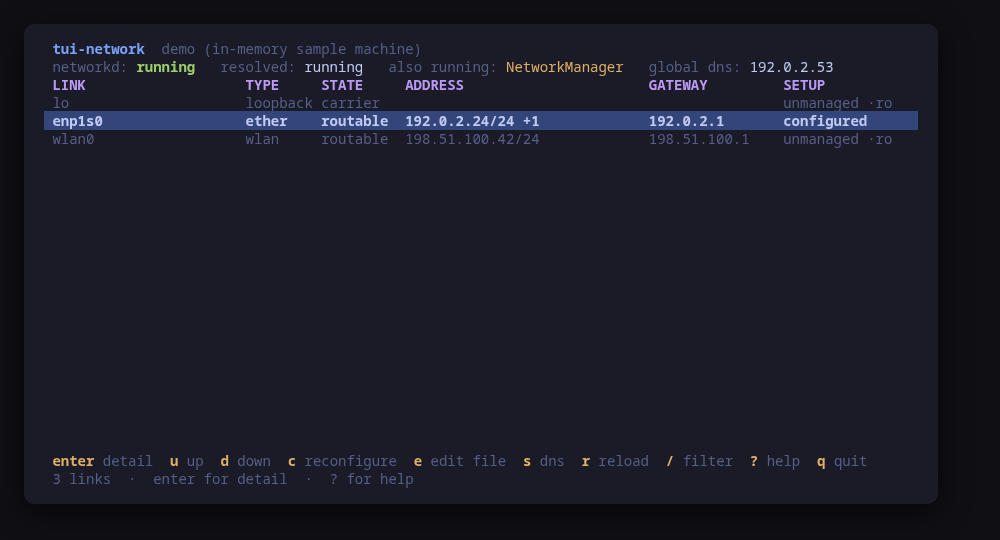
The links table: state, type, address, gateway and who manages each link
A terminal UI for the machine's network. It shows the links you actually have — state, type, addresses, gateway, MAC, MTU and driver — with the routing table, what systemd-resolved is using for DNS, and the .network file behind each link.
Open a link and you get the whole picture in one screen: its addresses and where each came from, its routes, its DNS servers and search domains, its DHCP lease, the .network file that configures it, and what systemd-networkd has been saying about it in the journal.
Changes are previewed. Bringing a link up or down, reconfiguring it, renewing a lease, setting DNS at runtime, and editing a .network file — which shows a unified diff and then installs the file and reloads networkd — all go through a confirm dialog carrying the exact command line. A link systemd-networkd does not manage, because NetworkManager owns it, is shown read-only with the reason.
Run tui-network --demo to drive a sample machine: every key works, every command is built and previewed for real, and nothing touches your system.
Keys
Key
Action
enter
Open the selected link
u / d
Bring the link up or take it down
c
Reconfigure the link from its .network file
n
Renew the link's dynamic lease
e
Edit the link's .network file, with a diff to confirm
s / S
Set the link's DNS servers or search domains
f
Flush the resolver cache
r
Reload the networkd configuration files
/
Filter links across every column
R
Re-read the network
?
Help
q
Quit
Press ? inside the tool for the full help screen, which is generated from the same action table as the key map.
Compatibility
This tool is a face on the program below, so its version matters.Tested is not a claim: a version lands there only after the tool's own suite passed against it on a real machine in the lab, and the run is kept as evidence in the repository. At startup the tool probes the backend once and says what it found in its header — a version nobody has run against is shown as(untested) in the warning colour, one older than the minimum as (below minimum) in the error colour. Neither stops it: the backend still refuses what it cannot do, in its own words.
systemd-networkd
networkctl ≥ 245
Binary
networkctl
Minimum
245
Probed with
networkctl --version
Tested
255257259261
Needs a version this new
json-statussince 249
link-up-downsince 249
What changes on older versions
systemd-networkd <249
networkctl --json does not exist, so the columns of networkctl list and the Key: value block of networkctl status are parsed instead; addresses carry no prefix length there, and the DHCP lease clock is not reported at all
systemd-networkd <249
networkctl up and down do not exist; the keys are dropped from the hint bar and reconfigure is offered in their place
systemd-networkd >=245
no released systemd emits JSON from resolvectl status, so DNS servers and search domains are read from the text output of resolvectl dns and resolvectl domain
Install
Once per machine, then every tool in the family is one pacman away.
Add the repository
$ curl -fsSL https://pkgs.tui.tools/install.sh | sh
Or run the same thing yourself, one command at a time
A family whose whole promise is preview before you run is not going to insist you pipe a script into a shell. These are the commands that script runs.
Upgrades then arrive with the rest of your system updates.
!
Not published yet. The command is what it will be once the package repository at pkgs.tui.tools is live. Until then, use the static binary or build from source.
Arch Linux (AUR) · tui-network-bincoming soon
$ paru -S tui-network-bin
The -bin package installs the released static binary.
Once per machine, then every tool in the family is one apt away.
Add the repository
$ curl -fsSL https://pkgs.tui.tools/install.sh | sh
Or run the same thing yourself, one command at a time
A family whose whole promise is preview before you run is not going to insist you pipe a script into a shell. These are the commands that script runs.
Upgrades then arrive with the rest of your system updates.
!
Not published yet. The command is what it will be once the package repository at pkgs.tui.tools is live. Until then, use the static binary or build from source.
Needs the tui-tools repository, a one-time setup you do once per machine.
openSUSE · tui-networkcoming soon
$ sudo zypper install tui-network
The rpm repository is shared with dnf; zypper support is not tested yet.
One static binary. Verify it against checksums.txt from the same release.
From source · tui-network
$ git clone https://github.com/tui-tools/tui-network
cd tui-network && make build
sudo install -m0755 bin/tui-network /usr/local/bin/tui-network
Needs Go 1.27 or newer.
What it can do to your machine
✓
Preview, then confirm
Every change is shown as an exact command line and confirmed before it runs. The dialog and the runner receive the same value, so the preview cannot drift from what executes.
•
Escalates for actions
Reads are unprivileged: networkctl list, resolvectl dns and ip route answer to any user. Escalation is sudo -n, which never prompts: the 0640 .network file netplan renders, and every change — up/down, reconfigure, renew, DNS, install, reload.
✓
No daemon, no state of its own
Nothing keeps running after you quit, and nothing is installed to run later. The system is the source of truth; the tool re-reads it after every change.
✓
No network access
The tool opens no network connection of its own. No telemetry, no update check, no phone home.
✓
Static binary
Released statically linked, with no runtime dependencies to install.
✕
Releases are not signed yet
Releases carry SHA-256 checksums but no signature. Verify the checksum, and read this as the open item it is.
Reporting
Report a security issue privately, through GitHub's private vulnerability reporting on the repository's Security tab. The family-wide policy, and what counts as in scope, is on the security page.
## Changelog
* ccdb2902d759995b7ee43ce29d09bcffe1804a97 Bump the github-actions group with 5 updates (#1)
* a2f49b8122405212975e1d32dbc85d9f212779d9 Packages are available from pkgs.tui.tools
* 9a04b3e925fa33db0f32006d011c699603784bb7 Point the install line at v0.1.0
* a1816df47018de2a0ffabae96d8605de3b0fe15e Re-pin the kit at v0.2.3
* 7c36585f99c3fc9f347113c05d3da44fda406715 Read the .network file netplan hides, and prove it on three machines
* 8d5b3ddc0937100dba0afc4a4cae62416f21cc50 Ship the tool as a .deb, an .rpm and a pacman package
* 0e1fca0d9294a83ab72a2b75d2e6dc0ba130db3b Trim needs_sudo back under the manifest's 300-character cap
## Changelog
* 11031373f2496eaf83ff162a27d9d549a04e88bd Give it a face: the branding, six frames and the README
* 8d28b3cd0fcbba62e61c0405d6f6c81f4c5f52c1 Initial commit
* 85ba4845f42a4dd8d438a32a2ded0e7d044ee81b Keep the sudo note inside what the schema allows
* dab17731572c36decbcd75e39d506c94a5bcba66 Prove it against a real machine, and record which one
* 234f591f987db4673aa800d4a991d95d855b8b7f Read the network: the model, the backend and its parsers
* 82dcc79151c850bd5501e5799144e8528eded661 Start tui-network from the family template
* e146699e26eef235870a2a662e6b490064006efb The screens: a link list, a link in full, and one confirm dialog