
A security posture check with tui-secure
Eight questions about a server, each answered with the command that answered it, and the fixes that belong to this tool applied one at a time. One walk through tui-secure on a Fedora server over SSH, from the first score to the kernel hardening keys surviving a reboot.
Everything below was run on 2026-11-18 on a Fedora 44 Cloud Edition virtual
machine (systemd 259, SELinux enforcing, firewalld 2.4.4, OpenSSH 10.2), with a
build of tui-secure from its main branch ahead of 1.0.0, including
tui-secure#32. The tool ran
as an ordinary user, lab, in a terminal reached over SSH, and escalated with
sudo -n. The screens and dialogs are copied from the terminal, without the
dialog borders and with the runs of spaces in wide tables shortened; nothing in
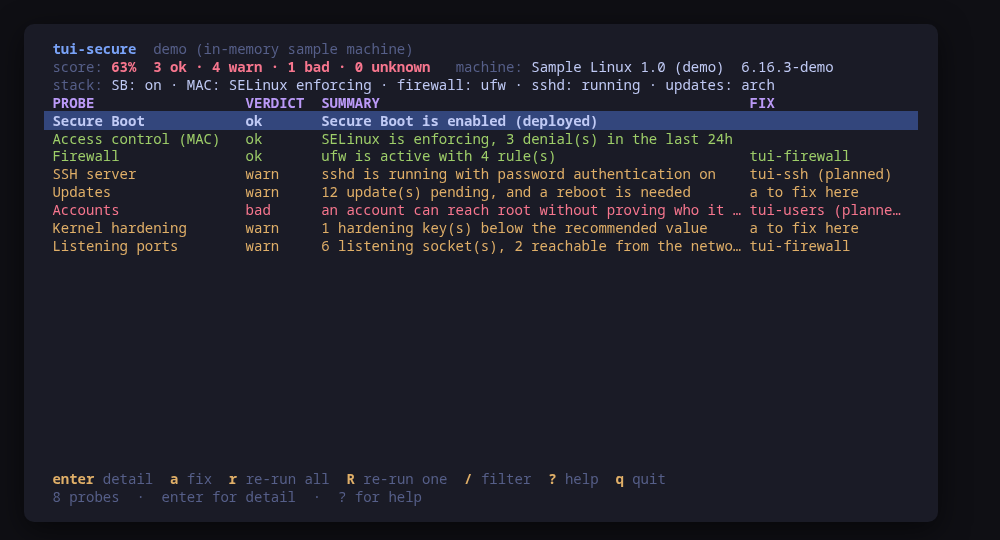
them was retyped. The screenshot is the tool’s own, from --demo.
tui-secure does not try to fix everything it finds. Most findings belong to another tool in the family, and the fix column says which one. What it fixes itself is small and is shown as the file it will leave behind.
Install and open it
$ sudo dnf install tui-secureThe repository setup is on the install page.
$ tui-secureThe eight probes
 score: 63%  2 ok · 6 warn · 0 bad · 0 unknown   machine: Fedora Linux 44 (Cloud Edition)  6.19.10-300.fc44.x86_64
stack: SB: off · MAC: SELinux enforcing · firewall: firewalld · sshd: running · updates: fedora   backend: systemd 259   backend: openssh 10.2
backend: firewalld 2.4.4
PROBE                  VERDICT  SUMMARY                                                         FIX
Secure Boot            warn     Secure Boot is off, so the firmware boots anything
Access control (MAC)   ok       SELinux is enforcing
Firewall               ok       firewalld is running, default zone public                       tui-firewall
SSH server             warn     sshd is running, with 3 keyword(s) this tool would change       a to fix here
Updates                warn     210 update(s) pending                                           tui-update (plann…
Accounts               warn     sudo runs without a password for this user                      tui-users (planne…
Kernel hardening       warn     3 hardening key(s) below the recommended value                  a to fix here
Listening ports        warn     12 listening socket(s), 6 reachable from the network            a to fix here
The build here still called tui-update and tui-users “(planned)” in the fix
column, from before they shipped; 1.0.0 names them plainly, in --check’s
fix.tool too.
The score weighs an ok as one, a warn as half and a bad as nothing.
enter on a row shows the evidence: each command the probe ran and the line
of its output that decided the verdict. tui-secure --check prints the same
probes as JSON, for a script or a monitoring job.
The firewall row is worth a sentence. Over SSH, polkit refuses firewall-cmd
to an ordinary user, and before tui-secure#32 the probe read that refusal as
“firewalld is installed but not running” and scored a running firewall as
bad. It now asks again through sudo -n, and when that is refused too, it
reads the unit’s state from systemd and says the zone could not be read.
The kernel keys (a)
On the Kernel hardening row, a lists one fix per key below the recommended
value:
Fix Kernel hardening
> Set kernel.kptr_restrict=1, now and on every boot
 Set fs.protected_regular=2, now and on every boot
 Set fs.suid_dumpable=0, now and on every boot
Each one is shown as the whole file it leaves, then the two commands:
Set kernel.kptr_restrict to 1
hides kernel pointers from unprivileged readers.
/etc/sysctl.d/90-tui-secure.conf will read:
# Written by tui-secure. Each line was previewed and confirmed.
# Remove a line and run `sudo sysctl --system` to undo it.

kernel.kptr_restrict = 1
Command to run:
$ /usr/bin/sudo -n /usr/bin/setsid -w install -m 644 /tmp/tui-secure-3760325437/90-tui-secure.conf /etc/sysctl.d/90-tui-secure.conf
$ /usr/bin/sudo -n /usr/bin/setsid -w sysctl -w kernel.kptr_restrict=1
After y, the probe ran again and the row said 2 hardening key(s) below the recommended value. The other two went the same way, one dialog each, and the
row ended at:
Kernel hardening ok the hardening basics are set
The file holds the three lines and nothing else:
$ cat /etc/sysctl.d/90-tui-secure.conf | grep -v ^#kernel.kptr_restrict = 1 fs.protected_regular = 2 fs.suid_dumpable = 0
After a reboot
sysctl -w changes the running kernel; the file is what makes it last. After
sudo -n systemctl reboot:
$ sysctl kernel.kptr_restrict fs.protected_regular fs.suid_dumpablekernel.kptr_restrict = 1 fs.protected_regular = 2 fs.suid_dumpable = 0
tui-secure --check then put the score at 69, with the kernel probe ok.
Undo
The file is the only thing the kernel fixes write, and its own first lines say
how to take a line back: remove it and run sudo sysctl --system. That was not
done on this machine.
What this does not show
- The SSH and listening ports fixes (
aon those rows), and the firewall fixes on a machine whose firewall is off. - Debian, Ubuntu and Omarchy Server, where the firewall is ufw and the MAC layer AppArmor or none.
- The findings it hands to other tools: tui-update, tui-users and tui-ssh are where those are fixed.
More on every probe is on the tui-secure page and in the README.