
wireguard-tools
wg ≥ 1.0.20200513- Binary
wg- Minimum
1.0.20200513- Probed with
wg --version- Tested
- 1.0.202109141.0.202505211.0.20260223

A terminal UI (TUI) for wg on Linux: WireGuard interfaces and their peers from the terminal, and the host around them.
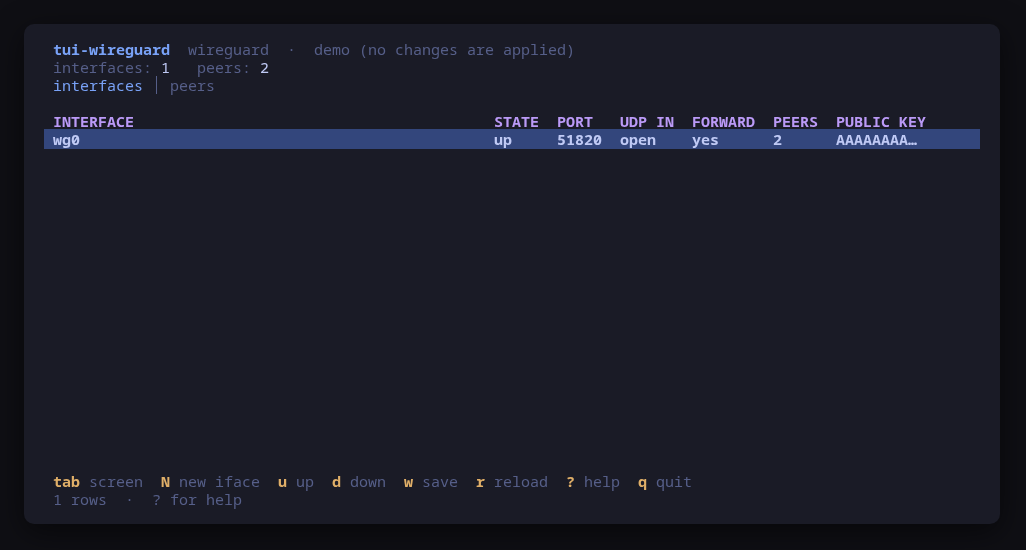
WireGuard interfaces and their peers from the terminal, and the host around them.
The interfaces screen reads wg show all dump: each interface's state, listen port and peer count, plus whether the host firewall lets a handshake reach the port (read from tui-firewall, nftables or iptables, so firewalld and ufw are seen as they are) and whether the host forwards for it. The peers screen shows endpoints, handshakes, transfer, allowed IPs and keepalive.
Every change is previewed as the exact command line and applied only after you confirm it: creating an interface from zero (an endpoint, or a forwarding server with its ip_forward, FORWARD and MASQUERADE rules and its listen port opened in INPUT, or a firewalld policy on firewalld), bringing one up or down, adding or removing a peer (optionally with its endpoint, a persistent keepalive and a generated pre-shared key) and saving the runtime config. A private key is never shown, typed, or put on a command line.
This tool was called tui-vpn up to 0.4.x. The Headscale control plane it used to manage moved to tui-tailscale.
Run it with --demo to see every screen with nothing installed.
| Key | Action |
|---|---|
| tab / 1 / 2 | Switch screen (interfaces, peers) |
| N | Create an interface: endpoint or forwarding server (keygen, conf, port, up) |
| u / d | Bring the selected interface up / down |
| w | Save the interface's runtime config (wg-quick save) |
| a / x | Add / remove a peer (add: optional endpoint, keepalive, pre-shared key file) |
| r / ctrl+r | Reload |
| ? | Help |
| q | Quit |
Press ? inside the tool for the full help screen, which is generated from the same action table as the key map.
This tool is a face on the program below, so its version matters. Tested is not a claim: a version lands there only after the tool's own suite passed against it on a real machine in the lab, and the run is kept as evidence in the repository. At startup the tool probes the backend once and says what it found in its header — a version nobody has run against is shown as (untested) in the warning colour, one older than the minimum as (below minimum) in the error colour. Neither stops it: the backend still refuses what it cannot do, in its own words.
wg1.0.20200513wg --versionMaintain wireguard-tools? You are welcome to help shape this tool. About → maintainers
Once per machine, then every tool in the family is one pacman away.
$ curl -fsSL https://pkgs.tui.tools/install.sh | shA family whose whole promise is preview before you run is not going to insist you pipe a script into a shell. These are the commands that script runs.
$ curl -fsSL -o /tmp/tui-tools.asc https://pkgs.tui.tools/pubkey.asc
  sudo pacman-key --add /tmp/tui-tools.asc
  sudo pacman-key --lsign-key \
    "$(gpg --show-keys --with-colons /tmp/tui-tools.asc | awk -F: '/^fpr:/{print $10; exit}')"
  printf '[tui-tools]\nServer = https://pkgs.tui.tools/arch/$arch\n' \
    | sudo tee -a /etc/pacman.conf
sudo pacman -Sy$ sudo pacman -S tui-wireguardAvailable once the first release lands in pkgs.tui.tools.
Once per machine, then every tool in the family is one apt away.
$ curl -fsSL https://pkgs.tui.tools/install.sh | shA family whose whole promise is preview before you run is not going to insist you pipe a script into a shell. These are the commands that script runs.
$ sudo install -d -m 0755 /etc/apt/keyrings
  curl -fsSL https://pkgs.tui.tools/pubkey.asc \
    | sudo gpg --dearmor -o /etc/apt/keyrings/tui-tools.gpg
  echo "deb [signed-by=/etc/apt/keyrings/tui-tools.gpg] https://pkgs.tui.tools/deb stable main" \
    | sudo tee /etc/apt/sources.list.d/tui-tools.list
sudo apt update$ sudo apt install tui-wireguardAvailable once the first release lands in pkgs.tui.tools.
Once per machine, then every tool in the family is one dnf away.
$ curl -fsSL https://pkgs.tui.tools/install.sh | shA family whose whole promise is preview before you run is not going to insist you pipe a script into a shell. These are the commands that script runs.
$ sudo rpm --import https://pkgs.tui.tools/pubkey.asc
  sudo curl -fsSL -o /etc/yum.repos.d/tui-tools.repo https://pkgs.tui.tools/rpm/tui-tools.repo
sudo dnf makecache$ sudo dnf install tui-wireguardAvailable once the first release lands in pkgs.tui.tools.
$ curl -fsSL https://github.com/tui-tools/tui-wireguard/releases/download/v0.5.2/tui-wireguard_0.5.2_linux_amd64.tar.gz | tar -xz tui-wireguard
sudo install -m0755 tui-wireguard /usr/local/bin/tui-wireguard$ curl -fsSL https://github.com/tui-tools/tui-wireguard/releases/download/v0.5.2/tui-wireguard_0.5.2_linux_arm64.tar.gz | tar -xz tui-wireguard
sudo install -m0755 tui-wireguard /usr/local/bin/tui-wireguardAvailable once the first release is tagged.
$ git clone https://github.com/tui-tools/tui-wireguard
cd tui-wireguard && make demoEvery change is shown as an exact command line and confirmed before it runs. The dialog and the runner receive the same value, so the preview cannot drift from what executes.
Reading WireGuard needs CAP_NET_ADMIN and the iptables ruleset is root-only, so those reads escalate; ip does not. Every mutation escalates, previewed and confirmed first.
Nothing keeps running after you quit, and nothing is installed to run later. The system is the source of truth; the tool re-reads it after every change.
The tool opens no network connection of its own. No telemetry, no update check, no phone home.
Released statically linked, with no runtime dependencies to install.
checksums.txt carries a keyless cosign signature from this repository's release workflow, every archive has a CycloneDX SBOM, and every archive, package and the checksum file carry SLSA build provenance. The security page shows the three commands that check it.
Report a security issue privately, through GitHub's private vulnerability reporting on the repository's Security tab. The family-wide policy, and what counts as in scope, is on the security page.
| File | Size | SHA-256 |
|---|---|---|
| checksums.txt | 1 KB | — |
| checksums.txt.sigstore.json | 10 KB | — |
| provenance.intoto.jsonl | 12 KB | — |
| tui-wireguard-0.5.2-1-aarch64.pkg.tar.zst | 1.8 MB | c2cd5cebef7d31eb6bc510b1dfe1800a2945c9ba4615fb51bd10e3559f7f316e |
| tui-wireguard-0.5.2-1-x86_64.pkg.tar.zst | 1.9 MB | ab273977602d37dea29c35141328141e2960df013b670d718f93fa61372096da |
| tui-wireguard-0.5.2-1.aarch64.rpm | 1.7 MB | c3b617334aa492560d9e01dbc93a608d96848fc0a90c628fc211757684f9e0bf |
| tui-wireguard-0.5.2-1.x86_64.rpm | 1.9 MB | 89ade278a104a10673e0eb8908b3912a853c3d331cb16859b027e4c2e3500987 |
| tui-wireguard_0.5.2_amd64.deb | 1.9 MB | 74e245b2a991086b3df25f7d249b4cecbb8a47927cc330f447de497c26c1ad78 |
| tui-wireguard_0.5.2_arm64.deb | 1.7 MB | 846b6fde3574bfcf3b5d865b4d173c4242ebc42aa70a53ef278f600f3df02ef1 |
| tui-wireguard_0.5.2_linux_amd64.tar.gz | 1.9 MB | 98d3e4427c66ead65bb67f111bb8bff61bcec9851cc68a32291feed4e55e7285 |
| tui-wireguard_0.5.2_linux_amd64.tar.gz.cyclonedx.json | 24 KB | cbc8c9887bc736478b771d5be733f646d9f306fe230fcda332eea143200eb912 |
| tui-wireguard_0.5.2_linux_arm64.tar.gz | 1.7 MB | a9aba78595384f1dde2f4cbfd052133ddde6db747cf948369aa0285289354bf6 |
| tui-wireguard_0.5.2_linux_arm64.tar.gz.cyclonedx.json | 24 KB | 7d43d28a4d413b64856f154c1efa9e098c1cf07f4143972674f46b5fd357a16c |
Every release ships a checksums.txt. Download it next to the archive and run sha256sum -c checksums.txt --ignore-missing. See verifying a download.
## tui-wireguard v0.5.2

tui-wireguard 0.5.2

- **Forwarding server on firewalld (#30).** When firewalld is running, `N` as a forwarding server writes a firewalld policy into the conf instead of iptables FORWARD and MASQUERADE rules, which firewalld's own forward chain overruled. PostUp creates the policy `<interface>-fwd` (ingress ANY, egress the egress NIC's zone, accept and masquerade scoped to the peers' network and each destination) with `firewall-cmd --permanent` and reloads; PostDown deletes it and reloads, so `down` puts firewalld back as it was. The dialog says that each reload drops runtime-only firewalld changes.
- **The WireGuard interface is bound to the zone it falls into** (and unbound at `down`) only when the egress NIC is not bound to a zone either: firewalld dispatches no policy between two interfaces that are both only in the default zone's catch-all. With a NIC NetworkManager manages, nothing is bound.
- **Known limitation, Ubuntu 26.04:** its AppArmor `wg-quick` profile denies the hooks' `sysctl -w net.ipv4.ip_forward=1`, so a forwarding server there needs `ip_forward` turned on by hand (documented in the README). Not new in this release.
- **Port step on a firewalld forwarding server** is `firewall-cmd --permanent --add-port=<port>/udp`, since the interface's reload at `up` would drop a runtime-only port.
- **FORWARD column and `--check` read firewalld** (`firewall-cmd --list-all-policies` and `--list-all-zones`) when it is running. `--check` adds `forwardingChecked`, `forwardingSource` (`firewalld` or `iptables`) and `forwardingManager` (`firewalld` or `ufw`).
- ufw hosts and hosts with a plain nftables or iptables ruleset keep the iptables rules and read.

Built by this repository's CI on the tag itself. Each archive ships a
CycloneDX SBOM, `checksums.txt` carries a keyless cosign signature, and
every file has SLSA build provenance — see the README's "Verify a
download" for the two commands that check them.

The commits in this release:

## Changelog
* be4edba429b5c6bb01bd8714c3f04f08124cbc74 0.5.2: forwarding server on firewalld builds a firewalld policy and reads it back (#30) (#31)
## tui-wireguard v0.5.1

tui-wireguard 0.5.1

- **Add peer: endpoint and persistent keepalive (#27).** After the key line, `a` asks for the peer's endpoint (`host:port` or `[v6]:port`, validated) and a persistent keepalive (0-65535 seconds, empty or 0 is off, prefilled with 25 once an endpoint is given). Both are optional and land on the one previewed `wg set … endpoint … persistent-keepalive …`, so `wg-quick save` persists them and the peers screen shows them (ENDPOINT, KEEP). A bad value reopens its step with the value as typed and the reason; a bad key line is reported before the optional steps open.
- **UDP IN reads the firewall in charge (#28).** The interfaces screen's UDP IN column and `--check`'s `listenPortInput` now read `tui-firewall --check` when tui-firewall is installed, else `nft -j list ruleset` (following jumps and gotos into user chains), else `iptables -S`. firewalld's rules, in its own nftables table, are seen at last. Undetermined (a jump that cannot be followed, a firewalld service whose ports are unknown) reads `?` / `unknown`, never closed. `--check` adds `firewallSource` and `firewallManager`.
- **Port step on firewalld.** The create wizard opens the listen port with `firewall-cmd --add-port=<port>/udp` on a firewalld host (an iptables INPUT rule sits in a table firewalld's reject never consults), and each firewall gets its own "to keep it" hint (`firewall-cmd --permanent`, `ufw allow`, `netfilter-persistent save`).
- **tui-kit v0.4.4**: runner children get no controlling terminal (a prompt fails fast instead of hanging behind the TUI); a failed step's status line goes through `runner.StatusLine`. `go get -u` on the rest.

Built by this repository's CI on the tag itself. Each archive ships a
CycloneDX SBOM, `checksums.txt` carries a keyless cosign signature, and
every file has SLSA build provenance — see the README's "Verify a
download" for the two commands that check them.

The commits in this release:

## Changelog
* fd9c9b77063f82c06637adc92ab70eaf1c7b7d31 0.5.1: endpoint and keepalive on add-peer; firewall-aware UDP IN; tui-kit v0.4.4 (#27 #28) (#29)
## tui-wireguard v0.5.0

tui-wireguard 0.5.0: tui-vpn is now tui-wireguard

WireGuard interfaces and peers from the terminal: status, peers, a new interface as an endpoint or as a forwarding server (IP forwarding, FORWARD rules, NAT and the listen port previewed together), persistence with wg-quick, and a down interface kept on screen so it can be brought back up. The Headscale control plane moved to tui-tailscale. The package replaces tui-vpn on apt, dnf and pacman; configuration under the old tui-vpn paths is still read. Built with tui-kit v0.4.3.

Built by this repository's CI on the tag itself. Each archive ships a
CycloneDX SBOM, `checksums.txt` carries a keyless cosign signature, and
every file has SLSA build provenance — see the README's "Verify a
download" for the two commands that check them.

The commits in this release:

## Changelog
* 4ed006336bde3be37a7e5a4ac77fd952b0ad5188 Become tui-wireguard: WireGuard only; Headscale moved to tui-tailscale (#26)
* cb69e9ce337e0a9cc97b777434d2ac7cc65ac0c0 Host validation, stopped-unit screens, OIDC presets, forwarding server, routes approval (#25)
## tui-vpn v0.4.0

Control plane from the tool: transport choice (plain http, Let's Encrypt, own certificate, reverse proxy) and MagicDNS base domain in S, enable at boot, state ownership check and fix. Validated on a real Ubuntu 24.04 host: Let's Encrypt on 443, OIDC against Google, first node registered through the browser.

Built by this repository's CI on the tag itself. Each archive ships a
CycloneDX SBOM, `checksums.txt` carries a keyless cosign signature, and
every file has SLSA build provenance — see the README's "Verify a
download" for the two commands that check them.

The commits in this release:

## Changelog
* 08b566642c8e15acca99b3cfdac9f0d5f359aedb Bump anchore/sbom-action/download-syft in the github-actions group (#11)
* 2951e47b9677936c9a9f7313c071347d453d5e40 Bump the github-actions group with 4 updates (#12)
* ca09f2086ae9a48fe699d246e2f04c791b38b5c4 Control plane: transport choice, unit enable, state ownership (#20)
* a7f73deaa89f1b8157266641473dd807ee828b90 README: link the tool's page on tui.tools (#10)
* e4d32534fe6c9d40ef018044aee4bb1a9cb99992 README: point the install snippet at the current release (#9)
## tui-vpn v0.3.0

v0.3.0: headscale server settings and OIDC identity provider setup from the users screen

Built by this repository's CI on the tag itself. Each archive ships a
CycloneDX SBOM, `checksums.txt` carries a keyless cosign signature, and
every file has SLSA build provenance — see the README's "Verify a
download" for the two commands that check them.

The commits in this release:

## Changelog
* e305fd9bb243a155c5f7c6c362e30987fb13692a Manage the control plane's identity, not just report on it (#8)
## tui-vpn v0.2.1

tui-kit v0.3.0: the dialogs wrap and scroll instead of clipping the
command preview, and the picker filters as you type.

Built by this repository's CI on the tag itself. Each archive ships a
CycloneDX SBOM, `checksums.txt` carries a keyless cosign signature, and
every file has SLSA build provenance — see the README's "Verify a
download" for the two commands that check them.

The commits in this release:

## Changelog
* acb05fbcbb276183df33e515d6050cf3c615e520 Bump tui-kit to v0.3.0 (#7)
* 35cc8c9bdf18225d1372b40982fcce3b97fc1271 tool.json: released (#6)
## tui-vpn v0.2.0

Manage, not view: create and edit from the TUI (wave 1), lab-validated on the router image.

Built by this repository's CI on the tag itself. Each archive ships a
CycloneDX SBOM, `checksums.txt` carries a keyless cosign signature, and
every file has SLSA build provenance — see the README's "Verify a
download" for the two commands that check them.

The commits in this release:

## Changelog
* b40ba2f90774e40ed7a58ca7c5168f78e5dc5e55 Manage, not view: interface bootstrap, persistence, preauth create, node ops (#5)
## tui-vpn v0.1.0

First validated release: the router-1.0 lab ran this tool against real VMs (tui-lab router topology).

Built by this repository's CI on the tag itself. Each archive ships a
CycloneDX SBOM, `checksums.txt` carries a keyless cosign signature, and
every file has SLSA build provenance — see the README's "Verify a
download" for the two commands that check them.

The commits in this release:

## Changelog
* 237b88f9ebabbd872cd7bb1a79bf54642ee2816a Bump anchore/sbom-action/download-syft in the github-actions group (#1)
* 99ad5cf18e22469b643e1484677e8ea30400367a Initial commit
* 25578d404a7274369384ba7bdbfc64b5dbe02a2b Phase 1: WireGuard + Headscale (read-mostly, previewed mutations) (#2)
* e546638c2dc3256e2bbfe71931a52ce573c895c8 Render the screenshots from the demo, and name them for the real screens (#3)
* 9bf282e20ba44ac03ccb28d62ba4ef8cac86c62b headscale: read the gRPC-gateway build's protobuf-json (0.2x), not just ogen (#4)