
An account from creation to removal, with tui-users
A new colleague needs a login on a Fedora server, then a key instead of a password, then less access, then none. One walk through tui-users over SSH, from useradd to userdel, with every command shown before it runs and each step checked from outside.
Everything below was run on 2026-11-18 on a Fedora 44 Cloud Edition virtual
machine (systemd 259, SELinux enforcing, OpenSSH 10.2), with a build of
tui-users from its main branch ahead of 1.0.0, including
tui-users#32. The tool ran as
an ordinary user, lab, in a terminal reached over SSH, and escalated each
change with sudo -n. The second machine that logs in as the new account is
the VM’s host, through the VM’s SSH port forwarded to port 2342. The screens
and dialogs are copied from the terminal, without the dialog borders and with
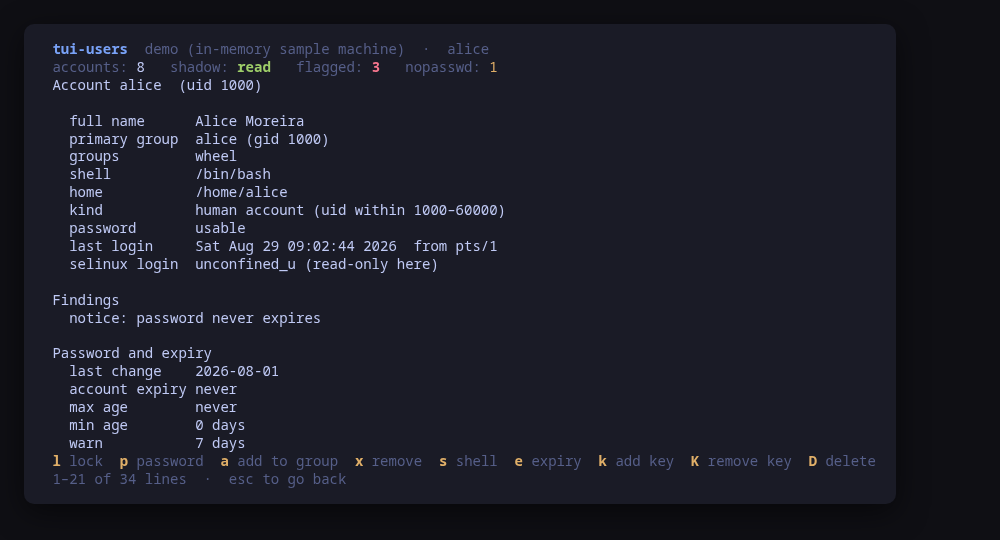
the runs of spaces in wide tables shortened; nothing in them was retyped. The screenshot is the tool’s own, from --demo.
The host keys of a throwaway virtual machine change on every rebuild, which is
why the ssh commands below skip the host key check; on a real server, keep
it. The account is ana. The order is the one a real account goes through: it is
created, gets a password, gets a key, loses its password, loses sudo, and is
removed.
Install and open it
$ sudo dnf install tui-usersThe repository setup is on the install page. Run it as yourself:
$ tui-usersReading /etc/shadow needs root, so the tool asks for it through sudo -n,
which never prompts. The header says whether that worked:
 tui-users  shadow-utils via /usr/bin/sudo -n
accounts: 26   shadow: read   nopasswd: 1   backend: openssh 10.2
shadow: read means the lock state and the expiry of every account are known.
Without it the list still opens, and says it could not read them.
Create it (n)
n opens the form. The name, a full name, and wheel as the one extra group,
which is what gives sudo on Fedora:
New account
  Name            ana
  Full name       Ana, operations
  Shell             (the machine's default)
> Groups          wheel
  Create home       yes
  System account    no
enter shows what will run:
Create ana
Create the account ana.
The account is created with no usable password: set one, or add an authorized key, before it can be logged into.
Command to run:
$ /usr/bin/sudo -n /usr/bin/setsid -w useradd -m -c 'Ana, operations' -G wheel ana
After y, from a shell:
$ getent passwd ana; id ana; sudo -n grep ^ana: /etc/shadow | cut -d: -f2 | cut -c1-3ana:x:1001:1002:Ana, operations:/home/ana:/bin/bash uid=1001(ana) gid=1002(ana) groups=1002(ana),10(wheel) !
The ! is the start of the stored hash: no usable password yet.
A password that never reaches a command line (p)
With ana selected, p opens a field that echoes nothing. An empty one is
refused (shadow: the password is empty). With a password typed:
Set the password of ana
The password is written to chpasswd's standard input as
ana:••••••••
so it never appears in the command line, and never in `ps`.
Command to run:
$ /usr/bin/sudo -n /usr/bin/setsid -w chpasswd
After y the account moved to the top of the list, because the list puts
findings first:
 USER   UID    GROUP   PASSWORD       SHELL   LAST LOGIN   FINDING
ana    1001   ana     usable +sudo   bash    never        password never expires
password never expires is Fedora’s own default (PASS_MAX_DAYS 99999 in
/etc/login.defs); e on the detail screen sets a lifetime if you want one.
A key, written as the account (K)
Keys are read on the detail screen, so enter first, then K and add a key. The key was made on the second machine:
$ ssh-keygen -q -t ed25519 -N "" -C ana@laptop -f tuistable-ana_ed25519; ssh-keygen -lf tuistable-ana_ed25519.pub256 SHA256:eMMHSM4XIj1eWbyiBufya6l9C7JdOTmtRpGB7bOOuI8 ana@laptop (ED25519)
With the .pub line pasted and enter:
Add an authorized key to ana
--- /dev/null
+++ /home/ana/.ssh/authorized_keys
@@ -1,0 +1,1 @@
+ssh-ed25519 AAAAC3NzaC1lZDI1NTE5AAAAINF3nbmnyE6DYhLMF6G+5YGSKtnJQ6XgTcCV8vprzHvs ana@laptop
Command to run:
$ /usr/bin/sudo -n /usr/bin/setsid -w runuser -u ana -- /usr/bin/install -d -m 700 /home/ana/.ssh
$ /usr/bin/sudo -n /usr/bin/setsid -w runuser -u ana -- /usr/bin/install -m 600 /dev/null /home/ana/.ssh/authorized_keys
$ /usr/bin/sudo -n /usr/bin/setsid -w runuser -u ana -- /usr/bin/tee -a /home/ana/.ssh/authorized_keys
All three run as ana through runuser, not as root: the account owns its
~/.ssh, so a symbolic link planted there cannot carry a root write somewhere
else. After y, the detail screen listed the key with the fingerprint the
second machine printed:
 Authorized keys
 /home/ana/.ssh/authorized_keys
 1: ssh-ed25519 256 SHA256:eMMHSM4XIj1eWbyiBufya6l9C7JdOTmtRpGB7bOOuI8  ana@laptop
From the second machine:
$ ssh -p 2342 -i tuistable-ana_ed25519 -o IdentitiesOnly=yes -o StrictHostKeyChecking=no -o UserKnownHostsFile=/dev/null -o LogLevel=ERROR -o BatchMode=yes ana@localhost "id; ls -la ~/.ssh"uid=1001(ana) gid=1002(ana) groups=1002(ana),10(wheel) context=unconfined_u:unconfined_r:unconfined_t:s0-s0:c0.c1023 total 4 drwx------. 1 ana ana 30 Nov 18 17:35 . drwx------. 1 ana ana 72 Nov 18 17:35 .. -rw-------. 1 ana ana 92 Nov 18 17:35 authorized_keys
Lock the password (l)
With a key in place, the password can go. The dialog says what a lock does and what it does not:
Lock the password of ana
Lock the password of ana.
`usermod -L` puts a "!" in front of the stored hash, exactly as `passwd -l` does: the password stops working and unlocking brings it back.
It stops password logins only — an authorized key still lets this account in over SSH.
This account has 1 authorized key(s).
Command to run:
$ /usr/bin/sudo -n /usr/bin/setsid -w usermod -L ana
After y the detail screen said password locked ("!" before the hash; keys still work), and the second machine still got in with the key:
$ ssh -p 2342 -i tuistable-ana_ed25519 -o IdentitiesOnly=yes -o StrictHostKeyChecking=no -o UserKnownHostsFile=/dev/null -o LogLevel=ERROR -o BatchMode=yes ana@localhost "echo key-login-after-lock-ok"key-login-after-lock-ok
Take sudo away (S)
On Fedora, sudo comes from the wheel group, so revoking it is leaving the
group:
Revoke sudo from ana by removing them from the group wheel
Revoke sudo from ana by removing them from the group wheel.
1 other account(s) keep sudo through wheel.
A rule naming ana directly in a sudoers file would survive this — the sudo rules screen is where to look.
Command to run:
$ /usr/bin/sudo -n /usr/bin/setsid -w gpasswd -d ana wheel
After y, id ana printed uid=1001(ana) gid=1002(ana) groups=1002(ana).
Remove it (D)
D refuses an account that is logged in, because userdel would refuse it
too. Once the second machine had logged out, R re-read the machine and the
detail screen said (not logged in). Then D asked whether the home
directory goes as well:
Delete ana
> delete the account and keep its home directory
 delete the account and remove its home directory
Delete ana
Delete the account ana and remove its home directory and mail spool.
Everything in the home directory goes with it. Files the account owns elsewhere stay, owned by a UID nobody has.
Command to run:
$ /usr/bin/sudo -n /usr/bin/setsid -w userdel -r ana
After y:
$ getent passwd ana || echo no-ana; ls -d /home/ana 2>&1; getent group ana || echo no-ana-groupno-ana ls: cannot access '/home/ana': No such file or directory no-ana-group
What this does not show
- Groups (
tab, thennandDthere) and the sudo rules screen. - The expiry and password lifetime form (
e) and the shell form (s). - Debian and Ubuntu, where the sudo group is
sudorather thanwheel; the tool reads which one the machine uses.
More on every screen is on the tui-users page and in the README.