
Setting up a WireGuard server and its first peer with tui-wireguard
A WireGuard server built from nothing with tui-wireguard, as a forwarding server with its NAT rules, then a peer with an endpoint, a keepalive and a pre-shared key, saved to the conf with no secret in it and checked against a real handshake.
Everything below was run on 2026-10-23 with
tui-wireguard v0.6.2,
installed from the apt repository in an Ubuntu 24.04 container (wireguard-tools
1.0.20210914, the kernel’s own WireGuard module). A second Ubuntu 24.04
container played the client, with plain wg-quick. The two shared one network,
198.51.100.0/24: the server was 198.51.100.10 and the client 198.51.100.20. The
screens and dialogs are copied from the terminal, without the dialog borders;
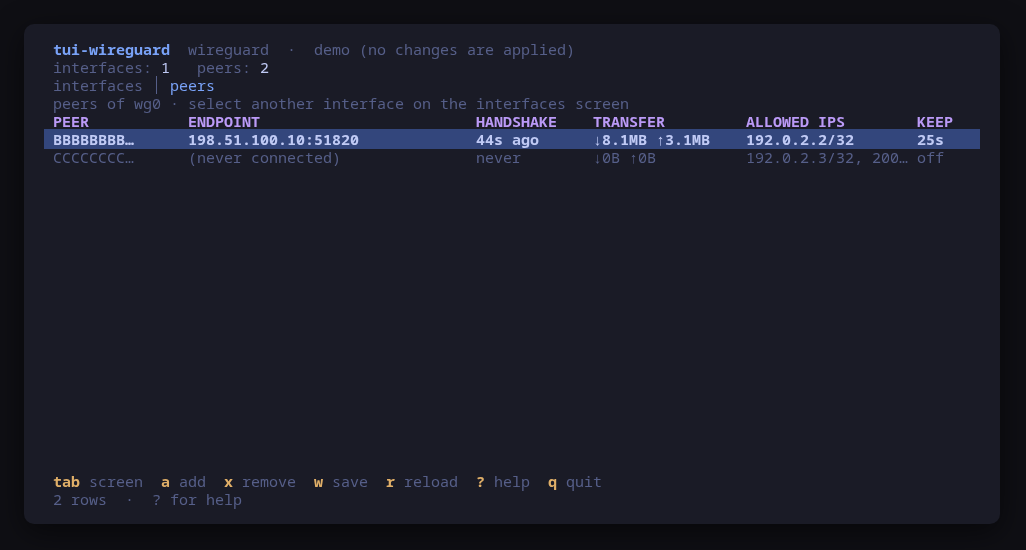
nothing in them was retyped. The screenshot is the tool’s own, from --demo.
The tunnel itself uses 192.0.2.0/24: 192.0.2.1 for the server, 192.0.2.2 for the client.
Install and open it
$ sudo apt install tui-wireguardThe repository setup is on the install page. The tool also needs
wg and wg-quick (the wireguard-tools package) and, for a forwarding
server, iptables. Reading WireGuard state needs root, and every change
escalates through sudo -n, which never prompts: run sudo -v in another
terminal first, or start the tool with sudo. Here it ran as root, so the
dialogs below show each command without a prefix.
On a host with no WireGuard yet, the first screen is empty:
interfaces: 0   peers: 0   backend: wireguard-tools 1.0.20210914
interfaces │ peers

                              no WireGuard interfaces are up

tab screen  N new iface  u up  d down  w save  F forwarding  r reload  ? help  q quit
Create the interface (N)
N asks four questions, each a one-line input: the interface name, its address
in CIDR form, the listen port (51820 is filled in) and its role. Here the
answers were wg0, 192.0.2.1/24 and the default port. The role is a pick
from a list:
New interface — role

> endpoint — peers reach this host only
 forwarding server — peers reach networks behind this host (forwarding + NAT)
An endpoint is reached by its peers and nothing else. A forwarding server lets the peers reach the networks behind the host, and it asks two more questions. The first proposes the networks this host reaches directly, read from its routing table; here that was the one network the container was on:
New interface — forwards traffic for

> 198.51.100.0/24

The networks peers reach through this interface, in CIDR form
(IPv4), separated by commas. Proposed: this host's own networks
from its routing table. Empty forwards to any destination (a
full tunnel).
The second proposes the NIC the traffic leaves by, the device of the default
route (eth0 here). Both proposals were accepted with enter.
Then come the confirms, one per step. The first generates the key pair:
Generate key pair for wg0

Step 1 of 4 — generate the key pair for wg0. The private key is written to /etc/wireguard/wg0.key (root, mode 600) inside this one shell and never
leaves it; only the public key is printed.

Command to run:
$ sh -c 'umask 077 && wg genkey | tee /etc/wireguard/wg0.key | wg pubkey'
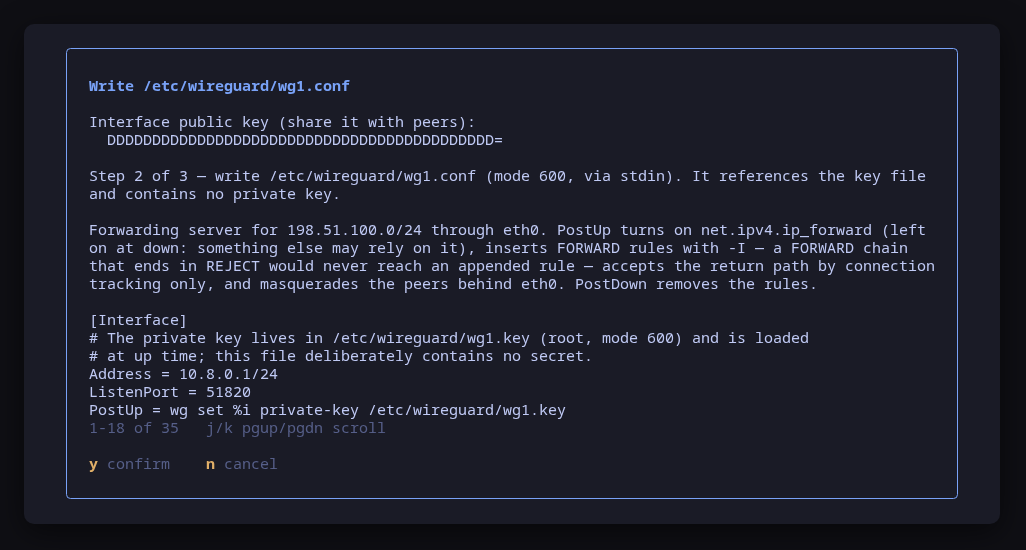
The second shows the public key you hand to peers, and the whole conf before it
is written. It can show the whole file because the file holds no private key:
a PostUp line loads it from wg0.key at up time. For a forwarding server the
NAT and FORWARD rules are in the same file, so they come and go with the
interface:
Write /etc/wireguard/wg0.conf

Interface public key (share it with peers):
5zvoE+QC7t6dXYndSofjP43VyTxZeH7ULhF6RyUsp1Y=

Step 2 of 4 — write /etc/wireguard/wg0.conf (mode 600, via stdin). It references the key file and contains no private key.

Forwarding server for 198.51.100.0/24 through eth0. PostUp inserts FORWARD rules with -I — a FORWARD chain that ends in REJECT would never reach an
appended rule — accepts the return path by connection tracking only, and masquerades the peers behind eth0. PostDown removes the rules. The kernel's
forwarding switch is the next step, not a hook.

[Interface]
# The private key lives in /etc/wireguard/wg0.key (root, mode 600) and is loaded
# at up time; this file deliberately contains no secret.
Address = 192.0.2.1/24
ListenPort = 51820
PostUp = wg set %i private-key /etc/wireguard/wg0.key
# Forwarding server: peers reach the networks behind this host through eth0.
# net.ipv4.ip_forward is set by /etc/sysctl.d/90-tui-wireguard-wg0-forward.conf, not by a hook here.
PostUp = iptables -I FORWARD -i %i -o eth0 -d 198.51.100.0/24 -j ACCEPT
PostUp = iptables -I FORWARD -i eth0 -o %i -m conntrack --ctstate RELATED,ESTABLISHED -j ACCEPT
PostUp = iptables -t nat -I POSTROUTING -s 192.0.2.0/24 -o eth0 -d 198.51.100.0/24 -j MASQUERADE
PostDown = iptables -D FORWARD -i %i -o eth0 -d 198.51.100.0/24 -j ACCEPT
PostDown = iptables -D FORWARD -i eth0 -o %i -m conntrack --ctstate RELATED,ESTABLISHED -j ACCEPT
PostDown = iptables -t nat -D POSTROUTING -s 192.0.2.0/24 -o eth0 -d 198.51.100.0/24 -j MASQUERADE

Command to run:
$ install -m 600 /dev/stdin /etc/wireguard/wg0.conf
The third step, for a forwarding server only, turns on the kernel’s forwarding switch with a sysctl.d drop-in of its own, outside wg-quick:
Turn on forwarding for wg0 (/etc/sysctl.d/90-tui-wireguard-wg0-forward.conf)

Now: on. At boot: off (no sysctl.d file sets it; the kernel's default is 0).

/etc/sysctl.d/90-tui-wireguard-wg0-forward.conf (mode 644, via stdin):
# Written by tui-wireguard for the forwarding server wg0.
# Peers reach the networks behind this host through it, which needs the
# kernel to forward. tui-wireguard removes this file when asked (F);
# other drop-ins that set the same switch are left alone.
net.ipv4.ip_forward = 1


Esc skips it and leaves wg0 down; F on the interfaces screen offers it again.

Command to run:
$ sh -c 'install -D -m 644 /dev/stdin /etc/sysctl.d/90-tui-wireguard-wg0-forward.conf && sysctl -w net.ipv4.ip_forward=1'
There were four steps and not five because this container had no firewall
rules, so UDP 51820 was already accepted. On a host whose INPUT chain rejects
the port, the wizard adds a step that opens it, and says that the rule does not
survive a reboot. The last step, wg-quick up wg0, is optional; esc leaves the
interface created but down. After y:
interfaces: 1   peers: 0   backend: wireguard-tools 1.0.20210914
interfaces │ peers
INTERFACE                                                                                                STATE  PORT   UDP IN  FORWARD  PEERS  PUBLIC KEY
wg0                                                                                                      up     51820  open    yes      0      5zvoE+QC…
UDP IN is what the host firewall does with a handshake to the listen port, and FORWARD whether the host forwards traffic coming in on the interface.
Add the peer (a)
The client makes its own key pair; the server only ever needs the public half. On the client:
$ cd /etc/wireguard && umask 077 && wg genkey | tee client.key | wg pubkey | tee client.pubIt printed xzsy3WH7SADnFUi5iO8OlZR21ACCIX4V1boXnoC4hyE=. Back on the server,
tab to the peers screen of wg0, then a. The first line is the public key
and the allowed IPs; ending it with psk asks for a pre-shared key as well:
Add peer

> xzsy3WH7SADnFUi5iO8OlZR21ACCIX4V1boXnoC4hyE= 192.0.2.2/32 psk
Two optional questions follow. The endpoint is where to reach the peer; leave
it empty when the peer always dials in. This client has a fixed address and
listens on 51820 too, so the endpoint was 198.51.100.20:51820, which lets
either side start the handshake. Once an endpoint is given, the keepalive step
is filled in with 25 seconds, which was kept (empty or 0 turns it off).
Because of psk, the add is two confirms. Step 1 of 2 generates the key into a
root-only file named after the peer, with
sh -c 'umask 077 && wg genpsk > /etc/wireguard/wg0-xzsy3WH7.psk', and step 2
hands wg only the path:
Add peer to wg0

Step 2 of 2 — add the peer. wg opens the pre-shared key file itself; the key is never an argument.

Command to run:
$ wg set wg0 peer xzsy3WH7SADnFUi5iO8OlZR21ACCIX4V1boXnoC4hyE= allowed-ips 192.0.2.2/32 endpoint 198.51.100.20:51820 persistent-keepalive 25
preshared-key /etc/wireguard/wg0-xzsy3WH7.psk
Save it to the conf (w)
wg set changes only the running interface. Right after the add, the tool
offers to save; it was cancelled here with n to show that w on the peers
screen opens the same dialog on demand:
Save wg0 runtime config to /etc/wireguard/wg0.conf

This REWRITES /etc/wireguard/wg0.conf from the runtime state with wg-quick save: hand-written comments and layout are lost, and wg-quick writes the
private key and every pre-shared key into the file. The awk program below, in the same root step, takes them back out wherever the conf can load them
from a file:
• PrivateKey is removed when the conf loads it with PostUp = wg set %i private-key /etc/wireguard/wg0.key (the line N writes) and that file holds the
same key. A conf written by hand keeps it inline, root-only (mode 600), as wg-quick leaves it.
• a PresharedKey is replaced with a PostUp line that loads it from its file, when the file a … psk generated for that peer holds the same key. Any
other stays inline.
The status line says what stayed inline, if anything. Esc keeps the change runtime-only.

Command to run:
$ sh -c 'set -e
wg-quick save wg0
umask 077
The command continues with the awk program in full (80 lines, scrolled with
j/k). After y the status line said, cut at the terminal’s width:
Save wg0 runtime config to /etc/wireguard/wg0.conf: /etc/wireguard/wg0.conf saved: the private key is loaded from /etc/wireguard/wg0.key, 1 pre-shared key(s)…
The file it left. The comments N wrote are gone, as the dialog warned, and
neither key is in it:
[Interface]
Address = 192.0.2.1/24
PostUp = wg set %i private-key /etc/wireguard/wg0.key
PostUp = wg set %i peer xzsy3WH7SADnFUi5iO8OlZR21ACCIX4V1boXnoC4hyE= preshared-key /etc/wireguard/wg0-xzsy3WH7.psk
PostUp = iptables -I FORWARD -i %i -o eth0 -d 198.51.100.0/24 -j ACCEPT
PostUp = iptables -I FORWARD -i eth0 -o %i -m conntrack --ctstate RELATED,ESTABLISHED -j ACCEPT
PostUp = iptables -t nat -I POSTROUTING -s 192.0.2.0/24 -o eth0 -d 198.51.100.0/24 -j MASQUERADE
PostDown = iptables -D FORWARD -i %i -o eth0 -d 198.51.100.0/24 -j ACCEPT
PostDown = iptables -D FORWARD -i eth0 -o %i -m conntrack --ctstate RELATED,ESTABLISHED -j ACCEPT
PostDown = iptables -t nat -D POSTROUTING -s 192.0.2.0/24 -o eth0 -d 198.51.100.0/24 -j MASQUERADE
ListenPort = 51820

[Peer]
PublicKey = xzsy3WH7SADnFUi5iO8OlZR21ACCIX4V1boXnoC4hyE=
AllowedIPs = 192.0.2.2/32
Endpoint = 198.51.100.20:51820
PersistentKeepalive = 25
The client side
tui-wireguard does not write a config for the other end: it manages the
interfaces of the host it runs on. The client needs three things from the
server, and the tool showed two of them: the server’s public key (step 2 of the
wizard) and its address and port. The third is the pre-shared key, which never
appears on screen; it is in /etc/wireguard/wg0-xzsy3WH7.psk on the server,
readable by root only. It was copied to the client as
/etc/wireguard/server.psk (mode 600) between the two containers; between two
machines that is a root scp or any other channel you trust with a secret.
The client’s conf was written by hand, in the same style as the server’s, so that neither key sits in it. On the client:
$ cat > /etc/wireguard/wg0.conf <<'CONF'
  [Interface]
  Address = 192.0.2.2/24
  ListenPort = 51820
  PostUp = wg set %i private-key /etc/wireguard/client.key
  PostUp = wg set %i peer 5zvoE+QC7t6dXYndSofjP43VyTxZeH7ULhF6RyUsp1Y= preshared-key /etc/wireguard/server.psk

  [Peer]
  PublicKey = 5zvoE+QC7t6dXYndSofjP43VyTxZeH7ULhF6RyUsp1Y=
  AllowedIPs = 192.0.2.0/24
  Endpoint = 198.51.100.10:51820
  PersistentKeepalive = 25
  CONF
  chmod 600 /etc/wireguard/wg0.conf
  wg-quick up wg0
ping -c 3 192.0.2.164 bytes from 192.0.2.1: icmp_seq=1 ttl=64 time=2041 ms 64 bytes from 192.0.2.1: icmp_seq=2 ttl=64 time=1024 ms 64 bytes from 192.0.2.1: icmp_seq=3 ttl=64 time=0.779 ms --- 192.0.2.1 ping statistics --- 3 packets transmitted, 3 received, 0% packet loss, time 2040ms
The first two replies waited for the handshake. A pre-shared key that did not match on both sides would have left the handshake failing and the ping unanswered.
The handshake, on the server (r)
r reads the state again. The peers screen shows when the last handshake
happened and what crossed the tunnel:
peers of wg0 · select another interface on the interfaces screen
PEER           ENDPOINT                                                                                HANDSHAKE    TRANSFER         ALLOWED IPS        KEEP
xzsy3WH7…      198.51.100.20:51820                                                                     4s ago       ↓712B ↑1.6KB     192.0.2.2/32       25s
Before the client came up, the same row said never in HANDSHAKE, with bytes
sent and none received: the server was trying its endpoint and nobody answered.
To check that the save is what the interface now comes up from, d on the
interfaces screen (wg-quick down wg0) and then u brought it down and up
again from the file. Thirty seconds later the peer’s row said 29s ago in
HANDSHAKE, with the pre-shared key loaded from its file by the saved PostUp
line.
For a script, tui-wireguard --check prints the same reading as JSON, without
keys or addresses (trimmed to the peer and the interface’s verdicts):
        "peers": [
        {
          "lastHandshakeAgeSeconds": 33,
          "allowedIpCount": 1,
          "hasPresharedKey": true,
          "keepaliveSeconds": 25
        }
      ],
      "listenPortInput": "accept",
      "forwarding": true,
      "forwardingDropIn": true
Above them, kernelForwardingAtBoot said on, because of the drop-in from
step 3.
What this does not show
- A client config generated by the tool: there is none in 0.6.2. The client
side above is hand-written
wg-quick. - The listen-port step, and firewalld: this container had no firewall rules. On a firewalld host the forwarding rules are written as a firewalld policy instead of iptables lines; the README shows both.
- Traffic forwarded to a network behind the server. The rules were written and brought up with the interface, but in this setup the client could reach 198.51.100.0/24 directly, so nothing here proves that they forward.
- Removing a peer (
x) and removing the forwarding drop-in (F).
The tool page is /tools/tui-wireguard/.