
A local CA with tui-cert
Certificates for an IP address or a name no public DNS carries, from a small certificate authority of your own. Create it, issue with DNS and IP names, copy it to another machine, trust it or stop trusting it, and read what each finding means.
Every command on this page is the one
tui-cert v0.3.0
shows in its preview dialog, taken from its
README and its source
rather than written from memory. The screenshots are the tool’s own, rendered
from --demo, so the names in them are the demo’s.
The names are examples: homelab-ca for the authority, nas.example.internal
and 192.0.2.20 for a server it certifies.
When Let’s Encrypt cannot help
A public certificate authority issues for public DNS names, and only after
proving you control them. A NAS reached as 192.0.2.20, a control plane known
only to the office resolver as nas.example.internal, a service on a lab
network with no route to the internet: none of them can get one. The usual
workaround is a self-signed certificate per server, which every client then has
to trust one by one, and which nothing ever checks again.
A local certificate authority is the better shape. You trust one certificate,
the CA’s, on each client once. Every server certificate it signs is then
trusted everywhere the CA is, and a new server costs no client any work.
tui-cert screen 5 is that authority, and the rest of the
tool reads the certificates it issues like any other.
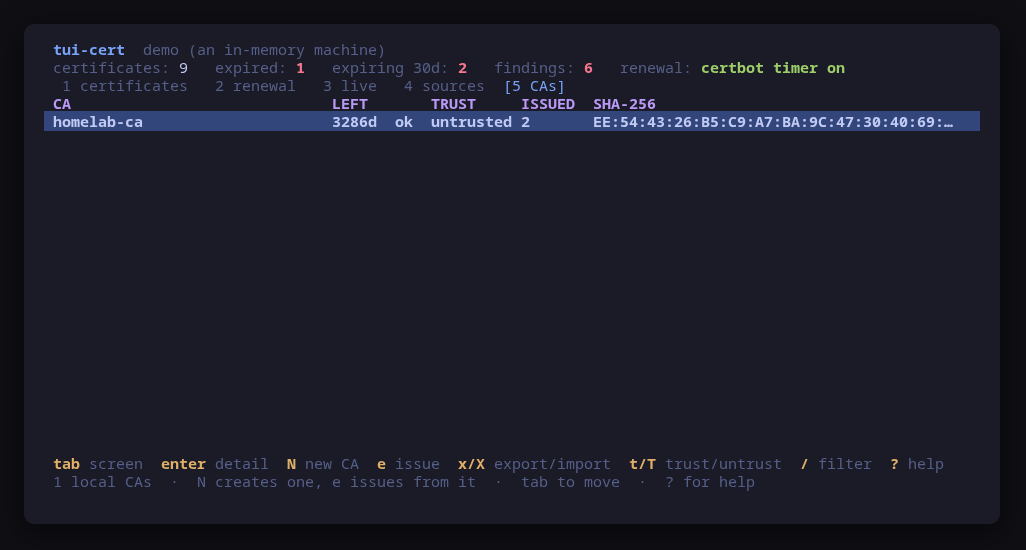
$ sudo apt install tui-certThe repository setup is on the install page. Run sudo tui-cert,
or run it as yourself with a warm sudo -v: every change, and every read of a
root-only file, escalates through sudo -n, which never prompts.
Create the CA (5, then N)
N asks for three things: a name (homelab-ca), a key type (ECDSA P-256, or
RSA 3072 for a client too old for elliptic curves) and a validity, ten years by
default. Everything lives in one directory, and the preview is the whole plan:
install -d -m 755 /etc/tui-cert/ca/homelab-ca
openssl req -x509 -newkey ec -pkeyopt ec_paramgen_curve:prime256v1 -nodes \
  -keyout /etc/tui-cert/ca/homelab-ca/ca.key \
  -out /etc/tui-cert/ca/homelab-ca/ca.crt -days 3650 -set_serial <random> \
  -subj /CN=homelab-ca -addext basicConstraints=critical,CA:TRUE,pathlen:0 \
  -addext keyUsage=critical,keyCertSign,cRLSign
chmod 600 /etc/tui-cert/ca/homelab-ca/ca.key
chmod 644 /etc/tui-cert/ca/homelab-ca/ca.crt
Three details carry the design:
pathlen:0means the CA can sign server certificates and nothing that could sign in turn. If a server key leaks, it cannot mint more certificates.- The key gets mode 600 in its own
chmod, becauseopensslleaves it at whatever the umask allows, often 0644. - An existing CA of the same name is refused, not overwritten. A new
ca.keywould orphan every certificate the old one signed and every client that trusts it.
Issue a server certificate (e)
Select the CA and press e. The form asks for:
- a common name:
nas.example.internal. It is always the first subject alternative name too, because clients have ignored the common name for years and check only the SANs; - other names: DNS names and IP addresses, each checked.
192.0.2.20goes in asIP:192.0.2.20. A client that connects by address compares the address with these, so leave it out and a connection by IP fails even with the CA trusted; - a validity: 397 days by default, inside the 398-day limit browsers set for a public server certificate, and never past the CA’s own expiry;
- a directory:
/etc/tui-cert/issued/<name>by default, which tui-cert already scans; - an owner: the account of the service that reads the pair. Empty leaves it with
root, which suits a server such as nginx that reads its key as root before
dropping privileges. A service that runs as its own user, such as Headscale’s
headscale, needsheadscale:headscalehere, or it cannot open its own key.
openssl req -x509 -CA /etc/tui-cert/ca/homelab-ca/ca.crt \
  -CAkey /etc/tui-cert/ca/homelab-ca/ca.key \
  -newkey ec -pkeyopt ec_paramgen_curve:prime256v1 -nodes \
  -keyout /etc/tui-cert/issued/nas.example.internal/privkey.pem \
  -out /etc/tui-cert/issued/nas.example.internal/fullchain.pem \
  -days 397 -set_serial <random> -subj /CN=nas.example.internal \
  -addext subjectAltName=DNS:nas.example.internal,IP:192.0.2.20 \
  -addext basicConstraints=critical,CA:FALSE \
  -addext keyUsage=critical,digitalSignature -addext extendedKeyUsage=serverAuth
tee -a /etc/tui-cert/issued/nas.example.internal/fullchain.pem
chmod 600 /etc/tui-cert/issued/nas.example.internal/privkey.pem
chmod 644 /etc/tui-cert/issued/nas.example.internal/fullchain.pem
When the directory does not exist yet, an install -d -m 755 comes first; an
existing one is left alone, because install -d -m would change its mode. With
an owner, a chown of both files comes last.
The result is fullchain.pem, the server certificate followed by the CA’s, and
privkey.pem: the two names every server configuration example uses. tee -a
appends the CA’s certificate, which is public, fed on standard input with its
fingerprint in the dialog. Point the server at the two files, and the
certificate list on screen 1 shows the new row with the CA that signed it.
Copy the CA to another machine (x)
A client has to hold the CA’s certificate before it can trust it. x on the CA
shows its path, its SHA-256 fingerprint, its expiry, and the one line to run on
the other machine. That line copies the certificate only, never the key, to the
same place there:
$ ssh nas.example.internal cat /etc/tui-cert/ca/homelab-ca/ca.crt \
| sudo install -D -m 644 /dev/stdin /etc/tui-cert/ca/homelab-ca/ca.crtThe host in it is the machine the CA lives on; use whatever name or address reaches it over ssh. Before trusting what arrived, compare its fingerprint with the one the export panel showed:
$ openssl x509 -noout -fingerprint -sha256 -in /etc/tui-cert/ca/homelab-ca/ca.crttui-cert on that machine then lists homelab-ca as certificate-only: it can be
trusted there, and nothing can be issued from it.
Trust it, and stop trusting it (t, T)
t adds the selected CA to this machine’s trust store, each distribution its
own way. T takes it out again.
| Trust | Untrust | |
|---|---|---|
| Debian, Ubuntu | install -m 644 ca.crt /usr/local/share/ca-certificates/tui-cert-homelab-ca.crt, then update-ca-certificates |
rm -f -- that file, then update-ca-certificates |
| Fedora, RHEL | install -m 644 ca.crt /etc/pki/ca-trust/source/anchors/tui-cert-homelab-ca.crt, then update-ca-trust extract |
rm -f -- that file, then update-ca-trust extract |
| Arch | trust anchor --store ca.crt |
trust anchor --remove ca.crt |
The anchor’s file name starts with tui-cert-, and an untrust removes only that
file. A CA the distribution ships, or one somebody added by hand, is never
touched. Whether a CA is trusted is read from the system bundle every time the
screen loads, so the column changes the moment the store does.
Two things the dialog says, and both are worth knowing before you press y:
- Trusting a CA means every program on the machine that uses the system trust store will accept whatever it signs, for any name. That is the reason the key stays on one machine, root-only.
- A program that is already running keeps the store it loaded at start.
Restart it after a trust or an untrust; tui-tailscale’s join does exactly that
for
tailscaled.
If the machine joining a tailnet runs tui-tailscale,
you do not need t at all: its join notices the untrusted CA and offers the
ones tui-cert keeps. A private tailnet with your own CA
shows that path.
What the findings mean
tui-cert sorts every list by what needs you today, not by path. On screen 5,
a CA row can carry:
- its key is readable by an account other than root: treat the CA as disclosed. Anyone who read that file can issue certificates every client of yours trusts. Make a new CA, reissue, and untrust the old one everywhere;
- the CA is expiring: a warning once a default 397-day certificate issued today would outlive it, and a risk inside 30 days. Everything it signed stops verifying on the day it expires;
- it signed certificates that outlive it: those certificates are valid on paper and fail in practice on the CA’s expiry date.
On the certificate list, a certificate the CA issued can carry:
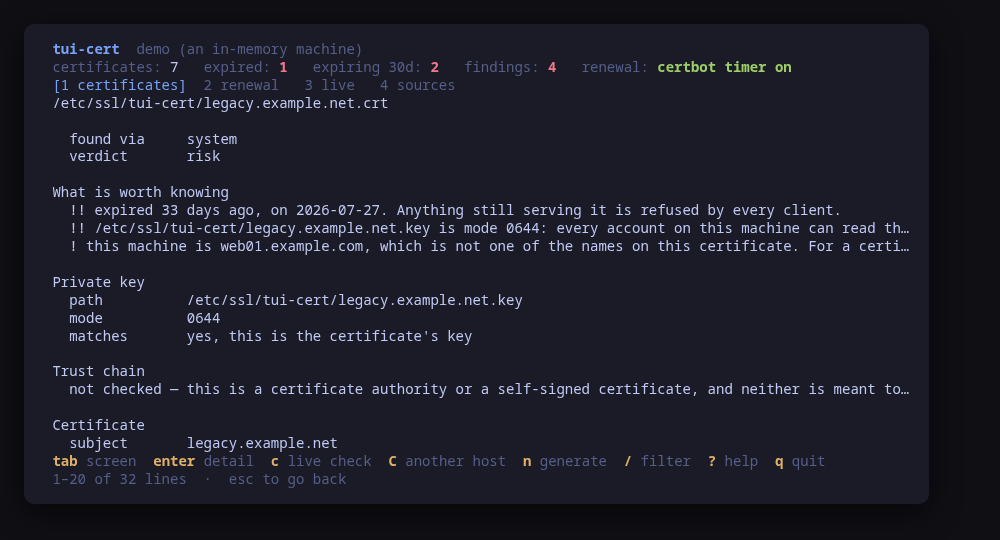
!issued by a local CA this machine does not trust: expected on the machine that runs the CA, until you trust it there too. Everywhere else it is the client that has not runtyet;!valid past the expiry of the local CA that signed it: the date it will really stop working is the CA’s;!the chain does not verify against the system trust store, with the exact error: for a private authority this is the same untrusted-CA fact, and tui-cert tells a private authority apart from a missing intermediate;- a wrong name. On a certificate from a public authority, a name that is not this machine’s is normal (a reverse proxy serves other names) and is not flagged. On a certificate made privately for this machine it is flagged, because there a wrong name is a mistake.
The expiry findings are the same as for any certificate: !! inside 7 days or
expired, ! inside 30.
enter on any row opens it in full: the chain with each certificate’s subject,
issuer, validity and fingerprint, the key beside it with its mode and whether it
matches, and the configuration lines that reference the file.
For scripts
--check lists the local CAs, and every certificate row names the CA that
signed it. It changes nothing and opens no connection:
$ tui-cert --check | jq '.cas[0], (.certs[] | select(.localCA) | .path)'Each CA carries its name, path, subject, fingerprint, expiry, key type, whether it can issue here, whether it is trusted, how many certificates it issued, and its verdict. All of it also runs against a sample machine with a local CA and two certificates it signed, one for an IP address:
$ tui-cert --demoRelated guides
- A private tailnet with your own CA: this CA serving a Headscale control plane, trusted by each client as it joins.
- Self-hosted Tailscale with Headscale and Google login: when the host does have a public name, and Let’s Encrypt can do the job.