
Opening ports on a cloud image's iptables firewall
Many cloud images ship no ufw and no firewalld, just an iptables ruleset whose INPUT chain ends in a REJECT. A rule appended after it never matches. tui-firewall inserts in front of it, persists with a diff, and says when the running rules and the saved ones disagree.
Every command on this page is the one
tui-firewall v0.5.0
shows in its preview dialog, taken from its
README and its source
rather than written from memory. The screenshots are the tool’s own, rendered
from --demo=iptables, a sample cloud image.
The symptom
You start a service on a fresh cloud instance. ss -tlnp shows it listening on
0.0.0.0:443. The provider’s console says the port is open in the security
list or security group. And from outside, the connection fails at once with
No route to host.
That error is the giveaway. Nothing is wrong with the route: the host itself
answered with an ICMP host-prohibited message, which is what a
--reject-with icmp-host-prohibited rule sends. The instance has a firewall of
its own, and nothing told you.
Why the image does this
Many cloud images, Oracle’s Ubuntu images among them, ship without ufw or
firewalld. Their firewall is a plain iptables ruleset, restored at boot by
iptables-persistent from /etc/iptables/rules.v4 and rules.v6, and its
INPUT chain allows established traffic, loopback, ICMP and ssh, and then ends
in a catch-all:
-A INPUT -p tcp -m state --state NEW -m tcp --dport 22 -j ACCEPT
-A INPUT -j REJECT --reject-with icmp-host-prohibited
Fedora and RHEL with iptables-services have the same shape: the default
/etc/sysconfig/iptables also ends INPUT with a REJECT.
This is a reasonable default. The trouble is how people usually add a rule.
iptables -A INPUT appends, and an appended rule lands after the REJECT, where
no packet ever reaches it. The command succeeds, the rule shows up in
iptables -S, and the port stays closed. Then the next reboot restores the
saved file, and even that rule is gone.
There are two firewalls on such an instance, and both have to allow the port: the provider’s network firewall in front of the host, which only the provider’s console or API changes, and this ruleset on the host. The rest of this page is about the second one.
tui-firewall picks iptables on its own
$ sudo apt install tui-firewallThe repository setup is on the install page. Run sudo tui-firewall, or run it as yourself with a warm sudo -v; changes escalate
through sudo -n, which never prompts.
tui-firewall drives ufw, firewalld, iptables and
nftables, and with backend = "auto" it decides which one this machine really
runs. A running ufw or firewalld always wins, since both drive the kernel’s
tables underneath. After those, it picks iptables when:
- the loader that restores the saved rules is active or enabled:
netfilter-persistent, or theiptablesunit of iptables-services; - or the nft ruleset shows iptables-nft filter tables carrying rules of the operator’s own;
- or the legacy iptables tables do.
Docker’s plumbing alone does not count: a pure nftables host running docker
stays on nftables. The selection line in the header says which of these reasons
applied, and so do --check and --report. If you know better,
--backend iptables skips the detection.
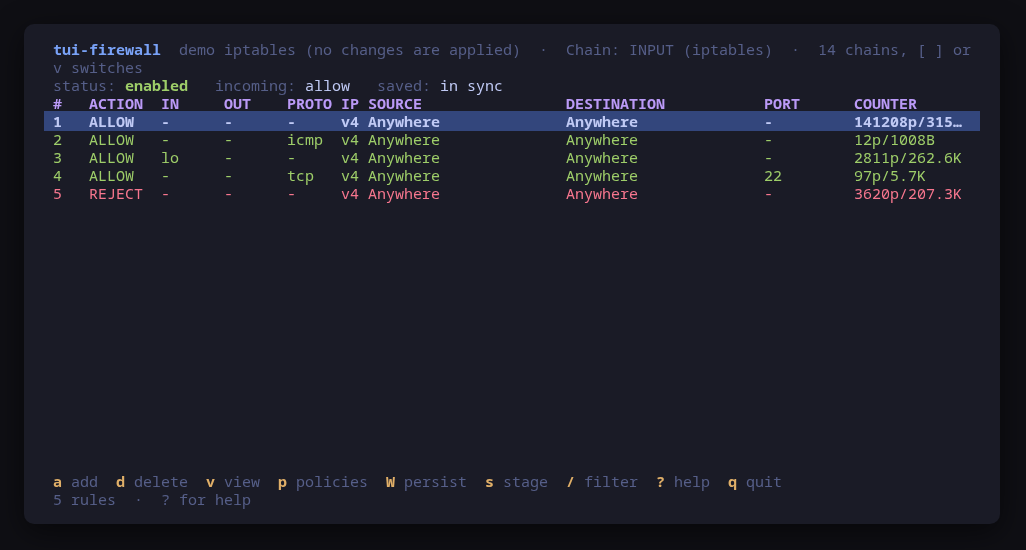
The screen shows one view per chain and family, INPUT (iptables) beside
INPUT (ip6tables), read with iptables-save -c and ip6tables-save -c so each
rule carries its counters. v picks a view, ] and [ step through them. The
tool writes only to the built-in INPUT, FORWARD and OUTPUT chains of the
filter table. Chains that docker, tailscaled, kube-proxy or fail2ban create are
shown and left alone, because those daemons rebuild them every time they start,
and so is any chain the image itself added.
Add the rule in front of the REJECT (a)
a opens the add form: action, protocol, port, source, destination, interface,
comment. For a web service or a Headscale control plane, that is accept,
tcp, 443. The tool does not append. A new rule goes in front of the
catch-all REJECT or DROP, and the preview says where and why:
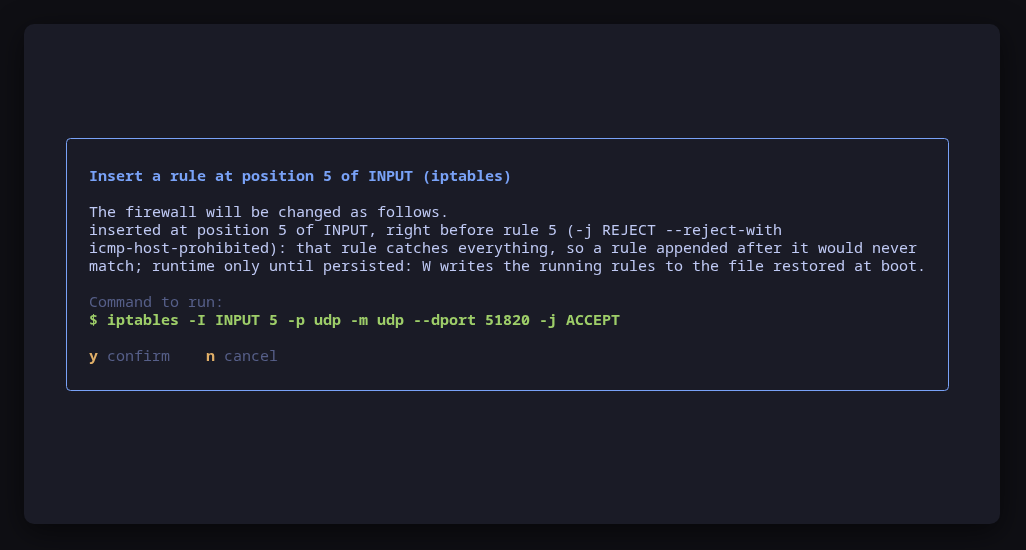
The README’s example is a WireGuard port on a chain whose REJECT is rule 5:
Insert a rule at position 5 of INPUT (iptables)
inserted at position 5 of INPUT, right before rule 5 (-j REJECT --reject-with
icmp-host-prohibited): that rule catches everything, so a rule appended after
it would never match

$ sudo -n iptables -I INPUT 5 -p udp -m udp --dport 51820 -j ACCEPT
For 443/tcp the command has the same shape, with the position of the REJECT on
your chain:
iptables -I INPUT <position of the REJECT> -p tcp -m tcp --dport 443 -j ACCEPTA chain with no catch-all gets the rule at its end, where the chain’s policy
decides what nothing matched. You can give a position in the form, and it is
honoured, unless it lands after the catch-all: that is refused with the reason,
because it would be the same dead rule iptables -A makes.
Two practical notes:
- IPv6 is a separate chain. If the service is reached over IPv6, switch to
INPUT (ip6tables)and add the rule there too; the preview then runsip6tables. - For a tailnet, add
41641/udpthe same way. It is the port Tailscale nodes use to reach each other directly; without it they still connect, relayed.
d deletes the selected rule by its specification,
iptables -D INPUT -p tcp -m tcp --dport 443 -j ACCEPT, not by its number, so a
rule another daemon inserted in the meantime cannot shift the delete onto a
neighbour.
Save it, or lose it at the next boot (W)
The insert changes the running kernel. The next boot restores the saved file,
and the saved file does not have your rule. The header says which state you
are in, saved: in sync or saved: differs: 1 line not saved (W), and the
status line repeats it after every change.
W persists, and its preview is the diff between the saved file and the
running rules, so you see exactly what the next boot will load:
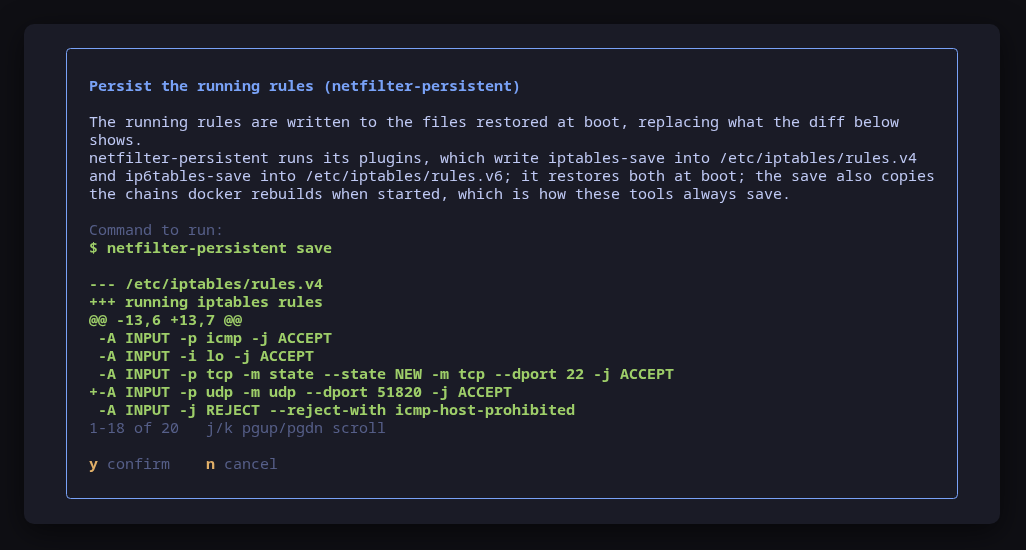
The command is the persistence layer’s own:
- Debian and Ubuntu:
netfilter-persistent save, which writes/etc/iptables/rules.v4andrules.v6; - Fedora and RHEL with iptables-services:
/usr/libexec/iptables/iptables.init saveandip6tables.init save, which write/etc/sysconfig/iptablesandip6tables. It is whatservice iptables saveruns, without needing theservicewrapper installed.
The comparison covers the filter table and leaves out the chains other daemons
rebuild. A host where tailscaled added its ts-input chain after the last save
still reads as in sync, because that chain is tailscaled’s to recreate, not
yours to save.
Drift, before it bites
The saved state is read on every load, not only after a change of your own. On
a machine where somebody ran iptables -I by hand last week and never saved,
the header says saved: differs the moment you open the tool, and W shows
you exactly which lines the next reboot would drop. That is the day to decide
whether they should be saved or removed, rather than the morning after a
kernel update, when the service is down and nobody remembers the rule.
Several changes at once, with a way back
Changing a firewall over the ssh session that the firewall protects is how a
remote host gets locked out. s turns staging on: changes are collected instead
of applied, and S reviews the pending set. The apply runs through
iptables-restore --noflush, all or nothing per address family, and a snapshot
of the filter table is taken right before it.
After the apply a timer starts. Press k to say you still have access, and the
batch stays. If you do not, because the change just cut off the session you
would press it from, the filter table is restored from the snapshot when the
timer runs out, and you are back on the ruleset that worked. It is the
iptables-apply idea, built into the same preview and confirm as everything
else. Staged changes are running changes like any other: W still saves them.
For scripts
$ sudo tui-firewall --check | jq '.selection, .iptables'The iptables block carries the variant (nf_tables or legacy), the writable
chains and where a new rule would land in each, the ports INPUT accepts ahead of
its catch-all, any accept that sits after it and never matches, and the
persistence layer with the drift between running and saved rules. An accept
after the catch-all is worth a script’s attention: it is the iptables -A
mistake, found on a machine you did not set up.
All of it runs against a sample cloud image, with nothing touched:
$ tui-firewall --demo=iptablesRelated guides
- Self-hosted Tailscale with Headscale and Google login:
a control plane on a cloud instance, where
fin tui-tailscale opens this tool for443/tcpand41641/udp. - A private tailnet with your own CA: the same ports on a control plane with no public name.
- Verify a release before you run it: checking the tui-firewall binary itself before you give it root.